Freedom251 › Legal Intellectual Property Management Software
TIP Tool
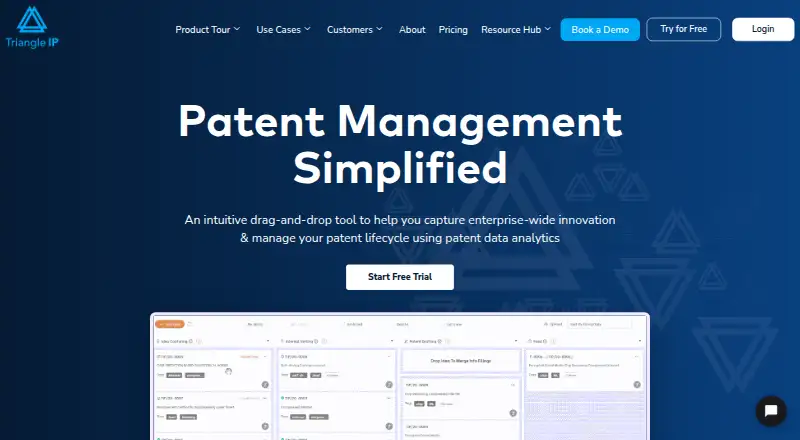
What TIP Tool is
TIP Tool is a web platform for gathering organization-wide innovation ideas and managing patent workflows with patent data analytics. Teams can customize invention disclosure forms, attach supporting documents, and sort or filter submissions. Members can edit and discuss ideas, comment in real time, and track changes and contributors. The workflow follows ideas through patent stages, sends status notifications, and offers dashboards for delays, innovators, and role-based access. Analytics include patent success and cost predictions, plus counsel and examiner statistics. Automatic USPTO status updates cover published and unpublished applications; Private PAIR access is listed with Premium. Docketing System Sync imports Excel or CSV patent application data from systems such as AppColl, Foundation IP, and Patricia, with automatic or manual field mapping. Patent Lookup can show available application data, documents, transactions, and continuity details. Search allowances are two patent searches per portfolio on the free plan and up to ten on Premium. The free plan is billed forever and includes up to 10 users, 5 GB storage, files up to 10 MB, and one portfolio. Premium costs $50 a month and includes up to 100 users, 20 GB storage, files up to 50 MB, three portfolios, and additional features.
Who it suits
TIP Tool is intended for startups, individual inventors, enterprise innovation managers, and patent practitioners. It suits teams that need to collect ideas and track patent portfolios or workflows in a web platform.
What it does well
- Free plan is billed forever.
- Free plan supports up to 10 users and one portfolio.
- Imports Excel or CSV patent application data.
- Tracks ideas through patent stages with status notifications.
- Displays U.S. and international applications together.
What to know first
- Free plan allows only two patent searches per portfolio.
- Premium costs $50 a month.
- Premium file size limit is 50 MB.
- Trademark portfolio tracking is not supported.
Limits
The Free plan supports up to 10 users, 5 GB of storage, files up to 10 MB, and one portfolio. Patent Lookup is limited to two searches per portfolio on Free; Premium allows up to 10 per portfolio and adds Private PAIR access.
Plans
| Plan | Billed and limits | Price |
|---|---|---|
| Free | forever · up to 10 users · 5 GB storage · 10 MB files · 1 portfolio | Free |
| Patent Family Tree | free with any personal-level tool · personal-level purchase required | Free |
| Patent Family Tree (personal-level add-on) | Free with the purchase of any personal-level tool · Works in every organization or portfolio the user is part of | Free |
| Premium | per year; page says save 17.5% with yearly plan · Up to 100 users · 20 GB storage · Up to 50 MB file size · Three separate portfolios · Private PAIR access · Case analytics · Domestic family trees · Customizable idea form · Real-time collaboration · Enhanced nurturing | $495 a year |
| Premium yearly | per year · up to 100 users · 20 GB storage · 50 MB files · 3 portfolios · Private PAIR · case analytics · domestic family trees · customizable idea form · real-time collaboration · enhanced nurturing | $495 a year |
| Art Unit Predictor (organization-level add-on) | / user / month · Price multiplied by number of users · Admins purchase and assign licenses · Licenses valid only within that organization | $5 a month |
| Examiner Analysis (personal-level add-on) | / user / month · Works in every organization or portfolio the user is part of | $5 a month |
| Art Unit Predictor (personal-level add-on) | / user / month · Works in every organization or portfolio the user is part of | $5 a month |
The first 8 of 16 plans, as triangleip.com lists them, read 15 Oct 2026. The maker's own page has the final word. Every plan
Getting started
- Visit https://triangleip.com/
- Use the web platform to create an account and choose the Free plan or a paid option.
- Create a portfolio and configure an invention disclosure form.
- Invite team members and add ideas or import patent application data.
Overview
TIP Tool brings invention intake, patent-stage management, and portfolio analytics into a web platform for inventors and patent teams. It is best suited to organizations that want ideas and prosecution activity in the same workflow; the free tier offers a practical entry point, but portfolio, storage, and search caps make it a limited home for expanding programs.
Key features
Teams can tailor invention disclosure forms, attach supporting documents, and sort or filter submissions. That gives innovation managers a structured intake process, while real-time editing, discussion, comments, and change tracking help collaborators follow decisions and see who made changes. The free plan includes idea management, but Premium explicitly adds a customizable idea form, real-time collaboration, and enhanced nurturing.
Patent workflow tracking follows ideas through patent stages, sends status notifications, and uses dashboards to surface delays and innovators, with role-based access. Those tools are useful for monitoring progress across a portfolio; the single-portfolio Free plan is less suitable for organizations that need distinct workspaces. Portfolio Manager can show U.S. and international applications together, and docketing sync can import foreign records as well as domestic ones.
Analytics include patent success and cost predictions and counsel and examiner statistics. Patent Lookup can show application data, documents, transactions, continuity details, and other available records, but searches are capped at two per portfolio on Free and up to 10 per portfolio on Premium. Automatic USPTO status updates cover published and unpublished applications; Private PAIR access is a Premium feature. Docketing System Sync imports Excel or CSV application data from systems such as AppColl, Foundation IP, and Patricia, with automatic or manual field mapping.
Triangle IP says portfolio data is encrypted on AWS servers in the U.S., developers cannot access it, passwords are not stored, and Stripe handles payments without storing card details. It reports completing a SOC 2 Type 2 audit covering August 1, 2025 to July 31, 2026, with the certificate issued September 16, 2026. A help center covers administration, analytics, idea and portfolio management, and Private PAIR, with a contact-support option.
Pricing
Free costs nothing, billed forever, and allows up to 10 users, 5 GB of storage, files up to 10 MB, and one portfolio. It is a useful starting tier for a small team, but limited search capacity and the single-portfolio cap can become restrictive as patent work grows.
Premium costs $50 a month, billed per month, for up to 100 users, 20 GB of storage, files up to 50 MB, and three portfolios. It adds Private PAIR access, case analytics, domestic family trees, customizable idea forms, real-time collaboration, and enhanced nurturing. The larger limits and portfolio allowance suit teams running a broader program, though the price is a step up from Free and Premium still caps both portfolio count and storage.
Personal-level Patent Family Tree is free with the purchase of any personal-level tool and works across every organization or portfolio the user belongs to. Personal-level Examiner Analysis and Art Unit Predictor each cost $5 a month, billed per user per month, and likewise work across organizations or portfolios. Organization-level Examiner Analysis and Art Unit Predictor also cost $5 a month, billed per user per month; the price is multiplied by the number of users, admins assign the licenses, and each license is limited to that organization. Prosecutor Analysis is $500 a year, billed per user per year, for personal use across organizations or portfolios. These separate add-ons let users buy specific analysis capabilities, but costs can accumulate beyond the headline paid-from price.
Custom has custom user, storage, portfolio, and file-size limits with custom pricing. It is the route for requirements beyond Premium's stated caps. A free trial is available.
Platforms
TIP Tool is available on the web and is cloud deployed. That makes it a browser-based option for distributed teams; no other platform is identified.
Who it's for
Startups and individual inventors can use Free to organize early idea intake and patent work, while its 10-user limit leaves room for a small group. Enterprise innovation managers and patent practitioners are better served when they need shared review, portfolio oversight, docketing imports, or analytics; teams with multiple portfolios or heavier lookup needs should weigh Premium or custom pricing. TIP Tool tracks patent portfolios, prosecution deadlines, and filings, but it does not track trademark portfolios.
Pros and cons
- Pros: Free supports up to 10 users and includes a lasting way to begin organizing patent ideas and workflow.
- Pros: Idea collaboration, patent-stage tracking, analytics, USPTO updates, and docketing imports bring several parts of patent operations into one platform.
- Pros: U.S. and international applications can appear together in Portfolio Manager, and sync can import foreign records.
- Cons: Free is restricted to one portfolio, 5 GB of storage, 10 MB files, and two Patent Lookup searches per portfolio.
- Cons: Premium remains capped at three portfolios and 20 GB, while Private PAIR and several analytics capabilities may require Premium or paid add-ons.
- Cons: Trademark portfolio tracking is not supported.
Alternatives
For a broader set of legal IP software options, browse the Legal Intellectual Property Management Software directory. Consider Lightbringer instead if you want a freemium platform spanning API and web access, with innovation insights, patent strategy building, and pre-filing consultation in its free Platform plan and competitor monitoring available as an add-on. Tradespace may suit readers focused on patent drafting: its Patent drafting plan includes two applications free, then charges $149 per application, with no long-term commitments or minimums.
Patricia is another option for readers seeking a service that spans Android, iOS, self-hosted, web, and Windows. AcclaimIP may fit readers who want API and web access with an annual, prepaid, per-seat license and free trial. DIAMS iQ is a paid web and Windows alternative. CPI IP Management Systems is a paid API and web alternative with pricing on request. JSK IP Suite offers a broad platform range including mobile, desktop, web, and self-hosted deployment. Minuet is another paid web option.
Verdict
TIP Tool is a strong fit for startups, inventors, innovation managers, and patent practitioners who want idea capture tied directly to patent workflows and analytics. Its free tier makes it possible to start without a subscription, and Premium adds useful collaboration and portfolio capacity. Look elsewhere if trademark tracking is central, or if your program needs more portfolios, storage, or lookup searches than its stated caps allow.
Verdict
TIP Tool brings idea intake, patent workflow tracking, and analytics together, with a perpetual free plan and paid Premium tier. Compare the free search and storage limits with the portfolio and collaboration features your team needs.
Questions
Does TIP Tool have a free plan?
Yes. The Free plan is billed forever and supports up to 10 users, 5 GB of storage, files up to 10 MB, and one portfolio.
How much does Premium cost?
Premium costs $50.00 per month. It includes up to 100 users, 20 GB of storage, files up to 50 MB, and three portfolios.
Which platforms does TIP Tool support?
The listed platform is web.
Can TIP Tool track international applications?
Yes. Portfolio Manager can show U.S. and international applications together, and docketing sync supports foreign application records.
Which docketing data can it import?
Docketing System Sync imports Excel or CSV patent application data and supports automatic or manual field mapping.
What security and compliance measures does Triangle IP describe?
Triangle IP says portfolio data is encrypted on U.S. AWS servers, developers cannot access it, passwords are not stored, and Stripe handles payments without storing card details. It reports completing a SOC 2 Type 2 audit covering August 1, 2025 to July 31, 2026.
Facts from TIP Tool's own pages
- AI summaries
- An editable AI summary can be generated from the latest claims of a U.S. application when its filed PDF is uploaded. · help.triangleip.com, 15 Oct 2026
- Analytics
- The product offers patent success and cost predictions, plus counsel and examiner statistics. · triangleip.com, 5 Oct 2026
- API and SDK
- The official website and help center pages reviewed provide no public API or SDK documentation. · help.triangleip.com, 15 Oct 2026
- Collaboration
- The platform supports simultaneous editing, comments, discussion, and change attribution across teams. · triangleip.com, 15 Oct 2026
- Company founded
- LinkedIn lists Triangle IP as founded in 2016. · linkedin.com, 15 Oct 2026
- Company headquarters and size
- LinkedIn lists headquarters in Englewood, Colorado and company size of 11–50 employees. · linkedin.com, 15 Oct 2026
- Company legal name
- The maker identifies itself as Triangle IP, Inc. · triangleip.com, 15 Oct 2026
- Compliance
- Triangle IP reports completing a SOC 2 Type 2 audit covering August 1, 2025 to July 31, 2026, with the certificate issued September 16, 2026. · triangleip.com, 5 Oct 2026
- Cost and success prediction
- Analytics estimate patent-success odds and future expenses to support filing-budget decisions. · triangleip.com, 15 Oct 2026
- Docketing integrations
- Docketing sync imports Excel or CSV exports from systems such as AppColl, Foundation IP, and Patricia with automatic or manual field mapping. · triangleip.com, 15 Oct 2026
- Documentation and support
- The help center provides sections for the control panel, administration, analytics, idea management, portfolio management, and USPTO Private PAIR, plus support contact. · help.triangleip.com, 15 Oct 2026
- Examiner and counsel analytics
- The product reports examiner tendencies, Art Unit information, and law-firm or prosecutor performance. · triangleip.com, 15 Oct 2026
- Free-case limit
- The FAQ says free accounts are limited to 25 active cases and premium accounts to 100 active cases. · triangleip.com, 15 Oct 2026
- Funding
- Founder Thomas Franklin said in an interview that Triangle IP is bootstrapped and declined venture capital funding. · ideamensch.com, 15 Oct 2026
- Idea capture
- Users can submit invention disclosures through configurable forms, attach documents, and filter or sort ideas. · triangleip.com, 15 Oct 2026
- International-data limit
- Reviewers report that foreign applications are not live-synced with offices such as EPO, JPO, or CNIPA and may require docketing uploads. · g2.com, 15 Oct 2026
- International portfolios
- The Portfolio Manager can display U.S. and international applications together in one Applications tab, and docketing sync supports foreign application records. · triangleip.com, 5 Oct 2026
- License and hosting
- The reviewed official pages do not identify an open-source license or offer self-hosted deployment. · triangleip.com, 15 Oct 2026
- Limit: Capterra analytics
- A Capterra reviewer said patent analytics were missing in an earlier version and hoped they would be added. · capterra.com, 15 Oct 2026
- Limit: customization
- G2 reviewers request more customizable dashboards, reports, exports, permissions, and workflows. · g2.com, 15 Oct 2026
- Limit: mobile availability
- SoftwareFinder reports that TIP Tool has no mobile app and lists mobile support as a requested capability. · softwarefinder.com, 15 Oct 2026
- Limit: onboarding
- G2 reviewers describe a learning curve and request more interactive tutorials or guided onboarding. · g2.com, 15 Oct 2026
- Limit: performance
- One G2 reviewer reports occasional slow loading when many items are open. · g2.com, 15 Oct 2026
- Notable news
- Triangle IP announced its SOC 2 Type 2 certification on September 25, 2026. · triangleip.com, 15 Oct 2026