Freedom251 › Time tracking apps
Time Sink
by Time Sink
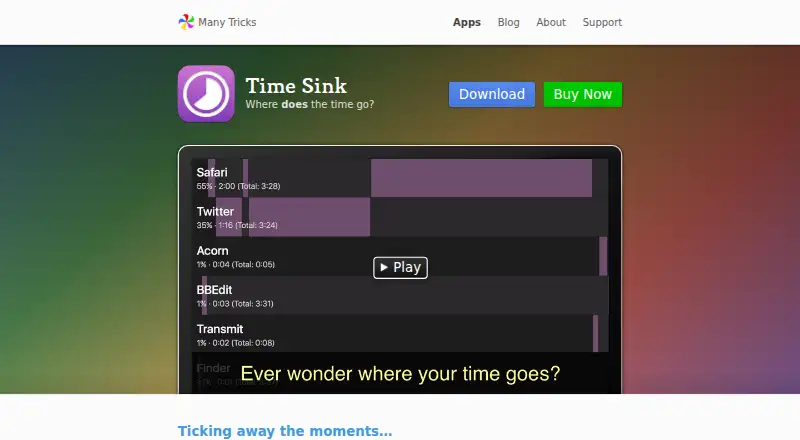
What Time Sink is
Time Sink is a paid macOS application that tracks activity in Mac apps and their associated windows, then reports what you worked on during the day. Related apps and windows can be grouped into Pools by dragging them into the Pools section. Ad hoc timers cover activities outside the Mac, and timers can start automatically when you become idle and resume work. The Activity Report offers selectable periods and three visual themes. Activity data can be exported to text files for analysis in other applications. Optional screenshots can be saved at an interval you choose, with the feature disabled by default. Browser detail relies on window titles; the maker points to Chrome and Firefox extensions for adding site-specific information and says it is unaware of a similar Safari plugin. Time Sink is sandboxed and stores records in its Mac app container. Version 2.2.4 requires macOS 10.9 Mavericks or newer, while version 2.2 runs natively on Apple silicon and Intel processors. Plans list $5 a month or $5, paid once.
Who it suits
It suits Mac users who want automatic application-level time tracking, reports, exports, and optional screenshots. People needing browser site detail should note the stated extension support.
What it does well
- Automatically tracks macOS apps and windows
- Pools group related activity
- Includes selectable-period activity reports
- Exports data to text files
- Runs natively on Apple silicon and Intel
What to know first
- macOS only
- Polling can use CPU
- No similar Safari plugin is known
- Requires macOS 10.9 or newer
Plans
| Plan | Billed and limits | Price |
|---|---|---|
| Time Sink license | At least 1 year of updates · License valid forever | $5 a month |
| Time Sink | Includes at least 1 year of updates · license valid forever | $5, paid once |
As manytricks.com lists them, read 22 Sept 2026. The maker's own page has the final word.
Verdict
Time Sink focuses on local Mac activity tracking with grouping, timers, reports, exports, and optional screenshots. Its browser detail and polling behavior are practical limitations to consider before choosing it.
Facts from Time Sink's own pages
- Ad hoc timers
- Users can start timers for non-Mac activities, and Time Sink can create timers automatically when the user becomes idle and starts working again. · manytricks.com, 11 Oct 2026
- Automatic tracking
- It automatically tracks time spent in macOS apps and their associated windows. · manytricks.com, 11 Oct 2026
- Browser tracking
- Time Sink relies on window titles, and the maker's FAQ describes Chrome and Firefox extensions as a way to add site-specific information to titles; it says it is unaware of a similar Safari plugin. · manytricks.com, 11 Oct 2026
- Data export
- Yes · manytricks.com, 22 Sept 2026
- Desktop app
- Yes · manytricks.com, 22 Sept 2026
- Export
- Users can export activity data to text files for analysis in other apps. · manytricks.com, 11 Oct 2026
- Free plan
- No · manytricks.com, 22 Sept 2026
- Headquarters
- Beaverton, Oregon, USA · manytricks.com, 28 Sept 2026
- Notable limitation
- The maker says Time Sink polls apps and windows twice a second, which can use CPU; lowering the sampling rate may cause missed tracking when switching apps rapidly. · manytricks.com, 11 Oct 2026
- Pools
- Pools group related windows and apps, and can be created by dragging an app or window into the Pools section. · manytricks.com, 11 Oct 2026
- Privacy
- The maker says Time Sink is sandboxed and stores usage-tracking records in its app container on the user's Mac. · manytricks.com, 11 Oct 2026
- Processor support
- The maker says Time Sink 2.2 is a universal app that runs natively on Apple silicon and Intel processors. · manytricks.com, 11 Oct 2026
- Project tracking
- Yes · manytricks.com, 22 Sept 2026
- Purpose
- Time Sink tracks activity on a Mac and reports what the user worked on during the day. · manytricks.com, 11 Oct 2026
- Reports
- Time Sink provides an Activity Report with selectable time periods and three visual themes. · manytricks.com, 11 Oct 2026
- Screenshots
- The app can optionally save screenshots at a chosen interval, and the screenshot feature is disabled by default. · manytricks.com, 11 Oct 2026
- Support
- Users can request support by opening a ticket, using Discord, or emailing the maker. · manytricks.com, 11 Oct 2026
- System requirement
- Time Sink 2.2.4 requires macOS 10.9 Mavericks or newer. · manytricks.com, 11 Oct 2026
Where Time Sink stands on Freedom251
- Time tracking apps#70 of 78
- Time Tracking Software#72 of 77