Freedom251 › AI Thumbnail Generators

Thumbsmith
What Thumbsmith is
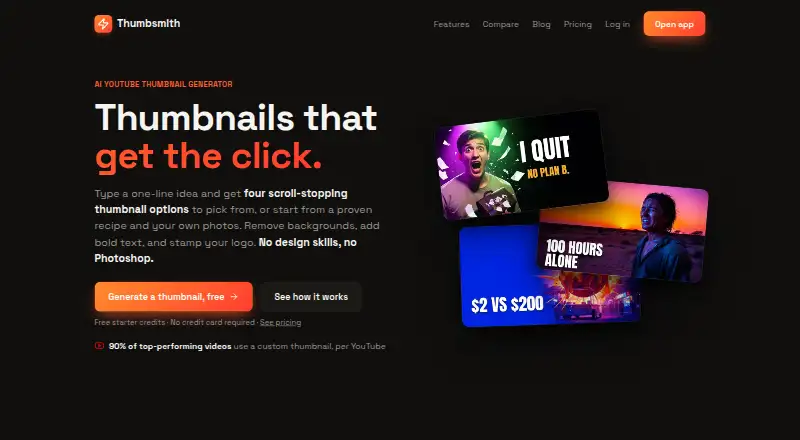
Thumbsmith is a web-based tool for making YouTube thumbnails, with AI generation and manual editing options. Enter a one-line idea to get four thumbnail options, or start with a recipe or your own background image and build a design by hand. Recipes supply a background, a subject slot, and styled text. The editor supports bold text, background removal, logo layers, and a 1280×720 canvas; finished thumbnails can be rendered in high quality and exported at 1280×720. Any plan can add a logo layer, while Studio can apply a saved brand logo automatically and generate batches for up to 10 video titles. The Free plan includes 3 starter HQ credits, daily watermarked four-option previews, and 10 background removals per day. Pro is $5 a month and lists 80 HQ generations per month; Studio is $19 a month with 400 per month. A one-time 15.00 USD credit top-up provides 200 credits. YouTube-ready exports are described, but no direct YouTube integration is listed.
Who it suits
Thumbsmith suits video creators who want to generate or assemble YouTube thumbnails in a web editor. It may also fit teams that need batch generation or automatic logo placement on every render.
What it does well
- Four thumbnail options from a one-line idea
- Manual creation with recipes or personal backgrounds
- Editor includes background removal and logo layers
- Studio batches up to 10 video titles
What to know first
- Free previews are watermarked
- Free accounts get 3 starter HQ credits
- Studio costs $19 a month
Limits
The Free plan includes three starter high-quality credits, watermarked daily four-option previews, and 10 background removals per day. Pro lists 80 high-quality generations per month; Studio lists 400 per month.
Plans
| Plan | Billed and limits | Price |
|---|---|---|
| Free | 3 starter HQ credits · Daily 4-up previews (watermarked) · Full editor, templates & saved projects | Free |
| Credit top-up | 200 credits for $15 · 200 credits | $15, paid once |
| Studio | $19/mo · 400 HQ generations/mo · Batch generation (10 titles at once) · Brand kit with logo on every render | $19 a month |
| Pro | $5/mo · 80 HQ generations/mo · No watermark · Face/logo in thumbnails · Unlimited background removal | $5 a month |
As thumbsmith.app lists them, read 30 Sept 2026. The maker's own page has the final word.
Getting started
- Visit the Thumbsmith website.
- Create a Free account to use the editor, templates, and saved projects.
- Enter a one-line idea for four options, or choose a recipe or your own background image.
- Edit with text, photos, background removal, and logo layers.
- Choose Pro or Studio for a paid monthly generation allowance.
- Render the thumbnail in high quality and export it at 1280×720.
Verdict
Thumbsmith combines AI-generated options with manual design tools and exports at 1280×720. Check the free limits and plan generation allowances against your publishing needs.
Questions
Does Thumbsmith have a free plan?
Yes. Free costs nothing and includes three starter high-quality credits, daily watermarked previews, the full editor, templates, and saved projects.
How much do the paid plans cost?
Pro costs $5 a month. Studio costs $19 a month, and a 200-credit top-up costs $15, paid once.
Which platforms does Thumbsmith support?
Thumbsmith is web-based. Its thumbnails are designed for YouTube, and exports are YouTube-ready.
Does Thumbsmith connect directly to YouTube?
The site describes YouTube-ready exports but does not list a direct YouTube integration.
How many monthly generations do the paid plans include?
Pro lists 80 high-quality generations per month, and Studio lists 400 per month.
What does Studio add?
Studio includes batch generation for up to 10 video titles at once and a brand kit that places a saved logo on every render.
Facts from Thumbsmith's own pages
- Batch generation
- Studio includes batch generation for up to 10 video titles at once. · thumbsmith.app, 30 Sept 2026
- Branding
- Any plan can add a logo as a layer, while Studio can automatically place a saved brand logo on every render. · thumbsmith.app, 30 Sept 2026
- Editing
- The editor supports bold text, background removal, logo layers, and 1280×720 composition. · thumbsmith.app, 30 Sept 2026
- Export
- Users can render a thumbnail in high quality and export it at 1280×720. · thumbsmith.app, 30 Sept 2026
- Free limits
- Free accounts get 3 starter HQ credits, daily watermarked four-option previews, and 10 background removals per day. · thumbsmith.app, 30 Sept 2026
- Generation
- A one-line idea generates four thumbnail options to choose from. · thumbsmith.app, 30 Sept 2026
- Integrations
- The site describes YouTube-ready thumbnail exports but does not list a direct YouTube integration. · thumbsmith.app, 30 Sept 2026
- Manual creation
- AI is optional; users can start with a recipe or their own background image and add text and photos by hand. · thumbsmith.app, 30 Sept 2026
- Paid limits
- The pricing page lists 80 HQ generations per month for Pro and 400 per month for Studio. · thumbsmith.app, 30 Sept 2026
- Purpose
- Thumbsmith is an AI YouTube thumbnail generator designed to create thumbnails for click-through rate. · thumbsmith.app, 30 Sept 2026
- Security
- The opened maker pages do not state security certifications or compliance details. · thumbsmith.app, 30 Sept 2026
- Support
- The site offers an email newsletter for thumbnail and click-through-rate guides, but the opened pages do not state a support channel. · thumbsmith.app, 30 Sept 2026
- Templates
- Users can start from ready-made recipes that provide a background, subject slot, and styled text. · thumbsmith.app, 30 Sept 2026
Where Thumbsmith stands on Freedom251
- AI Thumbnail Generators#19 of 29