Freedom251 › AI Thumbnail Generators
Thumbpilot
What Thumbpilot is
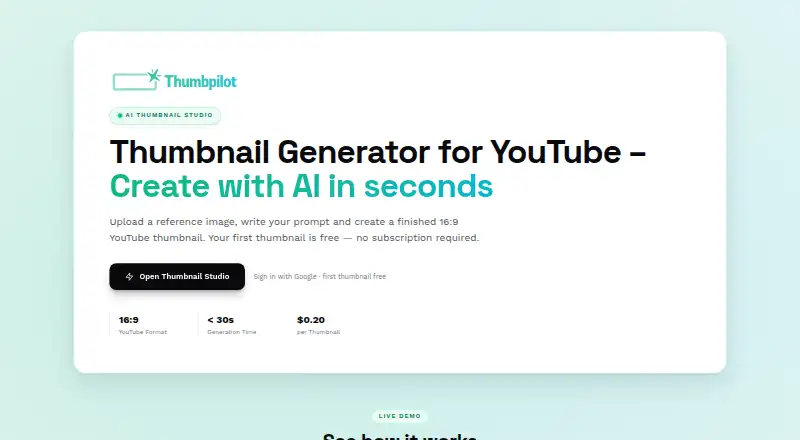
Thumbpilot is a browser-based AI tool for making YouTube thumbnails from a reference image and a text prompt. It says a thumbnail takes under 30 seconds to generate. Reference images can be PNG, JPG, or WebP; the demo sets a maximum file size of 10 MB. A built-in canvas editor supports text overlays, AI-generated object insertion, and composition adjustments. Exports are JPEG images at 1280 × 720 pixels in a 16:9 aspect ratio. Thumbpilot runs in a modern browser on desktop, tablet, or smartphone without desktop software installation. It supports English and German, and the interface switches according to browser language. The credit-based pay-per-use model has no monthly subscription, and unused credits do not expire. Text overlays and the first AI thumbnail are 0.00 USD; an AI object generation costs $0.02 per use, and an AI thumbnail generation costs $0.20 per use. Paid features require an account. The service is headquartered in Kaiserslautern, Germany.
Who it suits
Thumbpilot suits people making YouTube thumbnails who want to start from an image and prompt, then adjust the composition in a browser editor. It works across desktop, tablet, and smartphone browsers.
What it does well
- Generates thumbnails in under 30 seconds.
- Editor supports text, AI objects, and composition adjustments.
- Exports 1280 × 720 JPEGs in 16:9.
- Unused credits never expire.
- No monthly subscription.
What to know first
- Reference images are limited to 10 MB in the demo.
- Paid features require an account.
- AI thumbnail generation costs $0.20 per use.
Limits
The listed 0.00 USD offers cover text overlays and the first AI thumbnail. Further AI thumbnail generations cost $0.20, paid once, and AI object generations cost $0.02, paid once; paid features require an account.
Plans
| Plan | Billed and limits | Price |
|---|---|---|
| Text overlay | Text overlays | Free |
| First thumbnail | first thumbnail · First AI thumbnail | Free |
| AI object generation | per AI Object · One AI object generation | $0.02, paid once |
| AI thumbnail generation | per Thumbnail · One AI thumbnail generation | $0.20, paid once |
As thumbpilot.app lists them, read 11 Oct 2026. The maker's own page has the final word.
Getting started
- Open the Thumbpilot website in a modern browser.
- Upload a PNG, JPG, or WebP reference image, up to the demo's 10 MB limit.
- Enter a text prompt to generate a thumbnail.
- Use the canvas editor to add text, insert AI-generated objects, or adjust composition.
- Export the result as a JPEG image at 1280 × 720 pixels.
- Create an account to use paid features.
Verdict
Thumbpilot combines prompt-based thumbnail generation with a canvas editor and pay-per-use credits. Its listed generation and object costs are clear, and unused credits do not expire.
Questions
Is Thumbpilot free to use?
Text overlays and the first AI thumbnail are listed at 0.00 USD. Further AI thumbnail generations cost $0.20, paid once, and AI object generations cost $0.02, paid once.
Does Thumbpilot have a monthly subscription?
No. Thumbpilot says it uses pay-per-use credits and has no monthly subscription. Unused credits never expire.
Which platforms does it support?
Thumbpilot is a web service that runs in a modern browser on desktop, tablet, and smartphone. YouTube is the listed supported platform.
What image formats can I export?
Generated thumbnails export as JPEG images at 1280 × 720 pixels in a 16:9 aspect ratio.
What languages does it support?
Thumbpilot supports English and German, and says its interface switches according to browser language.
Who makes Thumbpilot?
Thumbpilot is headquartered in Kaiserslautern, Germany.
Facts from Thumbpilot's own pages
- Account requirement
- A user account is required for paid features. · thumbpilot.app, 11 Oct 2026
- Availability
- The terms say continuous, uninterrupted service availability is not guaranteed and third-party provider failures may cause temporary restrictions. · thumbpilot.app, 11 Oct 2026
- Browser access
- Thumbpilot runs in a modern browser and works on desktop, tablet, and smartphone without desktop software installation. · thumbpilot.app, 11 Oct 2026
- Credits
- The site says unused credits never expire. · thumbpilot.app, 11 Oct 2026
- Editing
- The built-in canvas editor supports text overlays, AI-generated object insertion, and composition adjustments. · thumbpilot.app, 11 Oct 2026
- Export
- Generated thumbnails are exported as JPEG images at 1280 × 720 pixels in a 16:9 aspect ratio. · thumbpilot.app, 11 Oct 2026
- Generation time
- The site says it generates a thumbnail in under 30 seconds. · thumbpilot.app, 11 Oct 2026
- Headquarters
- Kaiserslautern, Germany · thumbpilot.app, 28 Sept 2026
- Languages
- The service supports English and German, and says its interface switches based on browser language. · thumbpilot.app, 11 Oct 2026
- Payments and tax
- The terms say payments are processed via Stripe and no VAT is charged or shown on invoices because the provider uses German small-business status. · thumbpilot.app, 11 Oct 2026
- Purpose
- Thumbpilot is an AI-powered YouTube thumbnail generator that creates thumbnails from a reference image and text prompt. · thumbpilot.app, 11 Oct 2026
- Reference images
- It accepts PNG, JPG, and WebP reference images, with the demo specifying a maximum file size of 10 MB. · thumbpilot.app, 11 Oct 2026
- Subscription
- Thumbpilot says it has no monthly subscription and uses a credit-based pay-per-use model. · thumbpilot.app, 11 Oct 2026
- Support
- The contact page says the service usually replies to email inquiries within 24 hours. · thumbpilot.app, 11 Oct 2026
- Usage rights
- Subject to conflicting third-party rights, users receive a simple usage right in generated results that is unlimited in time and territory. · thumbpilot.app, 11 Oct 2026
Where Thumbpilot stands on Freedom251
- AI Thumbnail Generators#16 of 29
- Video Thumbnail Makers#33 of 46