Freedom251 › Photo Backup Software
ThePhotoStick
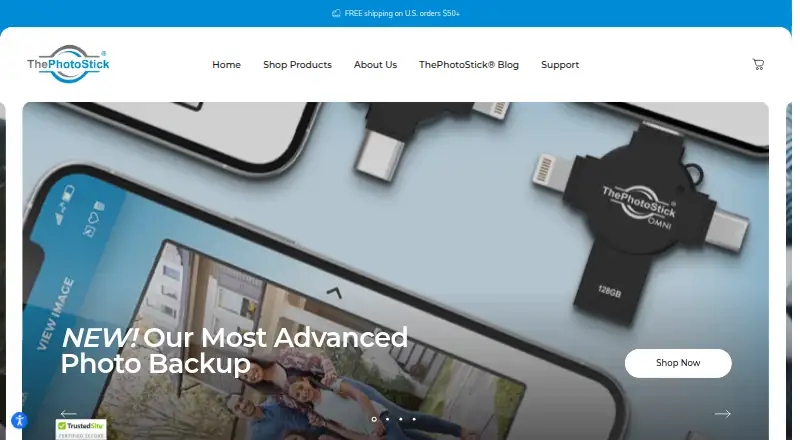
What ThePhotoStick is
ThePhotoStick pairs a physical backup drive with an app that finds, organizes and saves photos and videos. With the Omni X, users plug in the drive and tap “Back Up Files Now” in the companion app to start a backup. The maker says the 256GB model can hold over 102,000 photos and videos, though the number varies with file size and camera resolution. Listed photo formats include JPEG, HEIC, GIF, PNG, TIFF and camera raw; video formats include MOV, MPEG4, AVI and WMV. Requirements are Windows 7 SP1 or later, macOS 10.13 or later, iOS and iPadOS 13.0 or later, or Android 8.0 or later. The app is free to download from the Apple App Store or Google Play Store, with no monthly charges or download costs. The maker says backed-up files remain on the original phone or computer and describes the drive as a one-time purchase without subscriptions or monthly fees. Capacities range from 16GB to 256GB, with listed one-time prices from 44.99 USD to 163.99 USD. Support includes live chat Monday through Saturday, 8am–8pm PST, and a 30-day money-back guarantee.
Who it suits
It suits people who want a physical drive and companion app to preserve photos and videos across phones, tablets and computers. The listed system requirements cover Windows, macOS, iOS, iPadOS and Android devices.
What it does well
- Supports camera raw and several common photo formats.
- App downloads have no monthly charge or download cost.
- Backed-up media remains on the original device.
- One-time purchase with no subscription or monthly fees.
- Live chat and a 30-day money-back guarantee are listed.
What to know first
- No free plan or free trial is listed.
- File capacity varies with file size and camera resolution.
Limits
The number of photos and videos a drive can hold varies with file size and camera resolution. The listed Omni X capacities range from 16GB to 256GB; the maker says the 256GB model can back up over 102,000 photos and videos.
Plans
| Plan | Billed and limits | Price |
|---|---|---|
| ThePhotoStick Omni X 128GB | Sale price; regular price $154.99 · 128GB storage | $109.99, paid once |
| ThePhotoStick Omni X 256GB | Sale price; regular price $205.99 · 256GB storage | $163.99, paid once |
| ThePhotoStick Omni X 16GB | Sale price; regular price $104.99 · 16GB storage | $44.99, paid once |
| ThePhotoStick Omni X 32GB | Sale price; regular price $119.99 · 32GB storage | $64.99, paid once |
| ThePhotoStick Omni X 64GB | Sale price; regular price $134.99 · 64GB storage | $84.99, paid once |
As thephotostick.com lists them, read 8 Oct 2026. The maker's own page has the final word.
Getting started
- Choose an Omni X capacity from 16GB to 256GB.
- Purchase the drive; listed sale prices range from $44.99 to $163.99.
- Download the Omni companion app from the Apple App Store or Google Play Store.
- Connect the drive to a compatible device and tap “Back Up Files Now.”
Verdict
ThePhotoStick combines bundled storage with an app-based backup flow across desktop and mobile systems. Buyers can choose among listed capacities, but should account for file-size variation when considering how much media a drive can hold.
Questions
How much does ThePhotoStick Omni X cost?
Listed sale prices are $44.99 for 16GB, $64.99 for 32GB, $84.99 for 64GB, $109.99 for 128GB, and $163.99 for 256GB. The listed regular prices range from $104.99 to $205.99, respectively.
Is there a free plan or trial?
No free plan or free trial is listed. The companion app is free to download, and the maker describes the drive as a one-time purchase without subscriptions or monthly fees.
Which devices and operating systems are supported?
The listed requirements are Windows 7 SP1 or later, macOS 10.13 or later, iOS and iPadOS 13.0 or later, and Android 8.0 or later.
What file formats can it back up?
Listed photo formats include JPEG, HEIC, GIF, PNG, TIFF, and camera raw. Listed video formats include MOV, MPEG4, AVI, and WMV.
Does a backup delete the original media?
The maker says backed-up images and videos remain on the computer or phone, and the Omni software and app do not delete them.
What support and guarantee are listed?
The Support Center lists live chat Monday through Saturday, 8am–8pm PST, and a 30-day money-back guarantee.
Facts from ThePhotoStick's own pages
- Automatic backup
- The Omni X companion app lets users start a backup by plugging in the drive and tapping “Back Up Files Now.” · thephotostick.com, 8 Oct 2026
- Company origin
- The maker says founder Mark Oman and the PrairieIT team built ThePhotoStick after Oman lost photos and videos from a family trip. · thephotostick.com, 8 Oct 2026
- Compatible systems
- The listed requirements are Windows 7 SP1 or later, macOS 10.13 or later, iOS and iPadOS 13.0 or later, and Android 8.0 or later. · thephotostick.com, 8 Oct 2026
- File formats
- The Omni X support page lists photo formats including JPEG, HEIC, GIF, PNG, TIFF, and camera raw, and video formats including MOV, MPEG4, AVI, and WMV. · thephotostick.com, 8 Oct 2026
- Intended users
- The maker describes the product as a simple backup solution for people who want to preserve photos and videos across phones, tablets, and computers. · thephotostick.com, 8 Oct 2026
- Local backup
- The maker says backed-up images and videos remain on the computer or phone and the Omni software and app do not delete them. · thephotostick.com, 8 Oct 2026
- Mobile app
- The maker says its Omni companion app is free to download from the Apple App Store or Google Play Store and has no monthly charges or download costs. · thephotostick.com, 8 Oct 2026
- No subscription
- The maker describes the drive as a one-time purchase with no subscriptions or monthly fees. · thephotostick.com, 8 Oct 2026
- Notable limit
- The maker says the number of files a drive can hold can vary with file size and camera resolution. · thephotostick.com, 8 Oct 2026
- Product
- ThePhotoStick is a physical backup drive and companion app that finds, organizes, and saves photos and videos. · thephotostick.com, 8 Oct 2026
- Storage capacity
- The maker says the Omni X can back up over 102,000 photos and videos with up to 256GB of storage. · thephotostick.com, 8 Oct 2026
- Support
- The Support Center lists live chat Monday through Saturday, 8am–8pm PST, and a 30-day money-back guarantee. · thephotostick.com, 8 Oct 2026
Where ThePhotoStick stands on Freedom251
- Photo Backup Software#23 of 25