Freedom251 › Outlining Software
The Visual Outliner
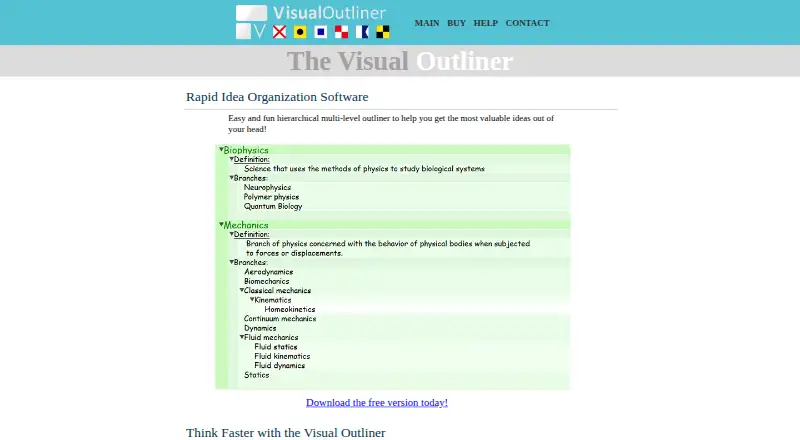
What The Visual Outliner is
The Visual Outliner is a Windows application for organizing ideas into a hierarchical outline. Its Bucket lets users collect ideas, keep multiple buckets and move items between a bucket and an outline. Within an outline, entries can be indented or outdented with keyboard shortcuts, or rearranged by dragging, move commands, or copy and paste. Tags filter the view to entries containing a selected tag; while filtering is active, lines and their properties can be edited, but lines cannot be moved. The Utility Pane supports local formatting, links to files, folders or websites, progress tracking and notes. Theme Composer lets users create, import and export themes and adjust colors. Outlines are stored in OPML for sharing or migration, and can also be exported as text, HTML or Markdown. The maker lists Windows 10, 8, 7, Vista and XP, though the full-version plan names Windows 10, 8, 7 and XP. A free plan is listed, but there is no free trial. The full version costs $59.95, paid once and includes minor upgrades, one major upgrade and a 60 day money back guarantee.
Who it suits
It suits Windows users who want to collect and structure ideas, add notes and links, or export outlines in several formats. Its tag filtering and progress tracking may also suit users who organize work within outlines.
What it does well
- Bucket supports multiple collections of ideas.
- Keyboard shortcuts and drag-and-drop rearrange outline entries.
- Utility Pane supports links, notes and progress tracking.
- Exports to text, HTML and Markdown.
- Full version includes a 60 day money back guarantee.
What to know first
- Filtered lines cannot be moved.
- No free trial is listed.
- No mobile apps are listed.
Limits
When tag filtering is active, lines and their properties can be edited but lines cannot be moved. The full-version plan is a one-time 59.95 USD purchase, and no free trial is included.
Plans
| Plan | Billed and limits | Price |
|---|---|---|
| Visual Outliner for Windows FULL VERSION | Windows 10, 8, 7, XP · includes free minor upgrades and one major upgrade · 60 day money back guarantee | $59.95, paid once |
As visualoutliner.com lists them, read 8 Oct 2026. The maker's own page has the final word.
Getting started
- Open https://www.visualoutliner.com/
- Use the free plan or purchase the full version
- Install it on a listed Windows system
- Capture ideas in the Bucket
- Move ideas into an outline and arrange entries
- Create tags, themes or Utility Pane details
- Export or store outlines using the available formats
Verdict
The Visual Outliner combines idea capture, outline editing and export options in a Windows application. Check the version-specific platform list and the filtered-line movement limit before choosing it.
Questions
How much is the full version?
The Visual Outliner for Windows FULL VERSION costs $59.95, paid once. It includes free minor upgrades, one major upgrade and a 60 day money back guarantee.
Is there a free plan or trial?
A free plan is available. There is no free trial.
Which platforms are supported?
The maker lists Windows 10, 8, 7, Vista and XP. No mobile apps are listed.
What import and export formats are supported?
Outlines are stored in OPML and can be imported in that format. Export options are TXT, HTML and Markdown.
Can filtered lines be moved?
No. With tag filtering active, users can edit lines and change their properties, but cannot move lines.
How can users contact support?
The maker lists [email protected] as its support email.
Facts from The Visual Outliner's own pages
- Export
- The product can export outlines as text, HTML, and Markdown. · visualoutliner.com, 8 Oct 2026
- File format
- The product stores outlines in OPML format for sharing and migration to other software. · visualoutliner.com, 8 Oct 2026
- Filtering limitation
- When tag filtering is active, users can edit lines and change their properties but cannot move lines. · visualoutliner.com, 8 Oct 2026
- Idea capture
- The Bucket lets users collect ideas, save multiple buckets, and move ideas between the bucket and outline. · visualoutliner.com, 8 Oct 2026
- Outline editing
- Users can indent and outdent lines with keyboard shortcuts and rearrange entries using drag and drop, move commands, or copy and paste. · visualoutliner.com, 8 Oct 2026
- Platform
- The maker lists Windows 10, 8, 7, Vista, and XP. · visualoutliner.com, 8 Oct 2026
- Purpose
- The Visual Outliner is a hierarchical multi-level outliner for organizing ideas. · visualoutliner.com, 8 Oct 2026
- Refund policy
- The full version purchase includes a 60 day money back guarantee. · visualoutliner.com, 8 Oct 2026
- Support
- The maker lists [email protected] as its support email. · visualoutliner.com, 8 Oct 2026
- Tag filtering
- Users can create tags and filter the outline to display entries containing a selected tag. · visualoutliner.com, 8 Oct 2026
- Themes
- Theme Composer lets users create, import, and export themes and customize colors. · visualoutliner.com, 8 Oct 2026
- Utility pane
- The Utility Pane supports local formatting, links to files, folders, or websites, progress tracking, and notes. · visualoutliner.com, 8 Oct 2026
Where The Visual Outliner stands on Freedom251
- Outlining Software#18 of 22