Freedom251 › Citation generators
The Citation Generator
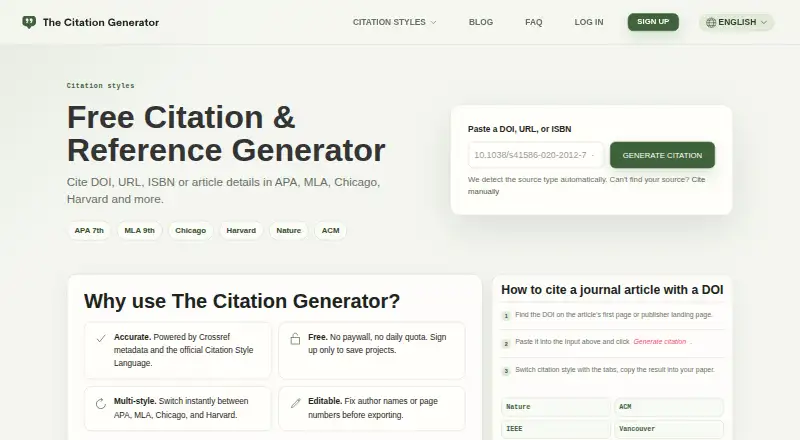
What The Citation Generator is
The Citation Generator is a free web tool for formatting references from DOIs, ISBNs, webpage URLs, source titles, or manually entered details. It looks up source information using Crossref, OpenLibrary, and page metadata; if it cannot find a source automatically, users can complete a manual citation form. Its FAQ lists 12 built-in styles, including APA 7, MLA 9, Chicago, Harvard, IEEE, ACM, Vancouver, AMA 11, Nature, ACS, Cell, and Elsevier Harvard. One-off citations do not require an account. An account adds projects for saving references, adding notes, and switching styles across a bibliography. Bibliographies can be exported as BibTeX, BibLaTeX, RIS, HTML, or plain text, with RIS listed for importing into EndNote, Zotero, and Mendeley. The service is intended for students, researchers, and academic writers, and citation lookup, formatting, and export are free for individual academic use. A DOI, ISBN, URL, or search string may be sent to third-party metadata providers when needed. Saved projects are private to the account, and users can request access, correction, or deletion of account data by email.
Who it suits
The Citation Generator suits students, researchers, and academic writers who need to format and export references. Project features may be useful for people organizing sources across a bibliography.
What it does well
- One-off citations need no account
- Offers 12 citation styles
- Exports BibTeX, BibLaTeX, RIS, HTML, and plain text
- Manual form covers failed lookups
- Free for individual academic use
What to know first
- Search details may go to metadata providers
- Saved projects remain until deleted or account deletion is requested
- Optional paid team plans may be introduced in the future
Limits
The Free plan is for individual academic use. Optional paid team plans may be introduced in the future.
Plans
| Plan | Billed and limits | Price |
|---|---|---|
| Free | Free for individual academic use · no account required for one-off citations · no daily quota stated | Free |
As thecitationgenerator.com lists them, read 8 Oct 2026. The maker's own page has the final word.
Getting started
- Open https://thecitationgenerator.com/
- Enter a DOI, ISBN, webpage URL, or source title
- Use the manual citation form when lookup cannot find the source
- Choose one of the listed citation styles
- Create an account to save references in projects
- Export a project bibliography in the available format
Verdict
The Citation Generator covers lookup, manual entry, formatting, and bibliography export at no charge for individual academic use. Consider its metadata-sharing and project-deletion terms when deciding whether to save references in an account.
Questions
How much does The Citation Generator cost?
The Free plan costs nothing and covers individual academic use.
Can I create a citation without an account?
Yes. One-off citations do not require an account.
Which citation styles are available?
The FAQ lists 12 styles, including APA 7, MLA 9, Chicago, Harvard, IEEE, Vancouver, and AMA 11.
Can I export bibliographies?
Yes. Project bibliographies can be exported as BibTeX, BibLaTeX, RIS, HTML, or plain text.
Is there an account privacy policy?
Saved projects are private to the account, and the service says it does not sell personal data.
Facts from The Citation Generator's own pages
- Citation generation
- It formats references from DOIs, ISBNs, webpage URLs, source titles, or manually entered details. · thecitationgenerator.com, 8 Oct 2026
- Citation styles
- The FAQ lists 12 built-in styles, including APA 7, MLA 9, Chicago, Harvard, IEEE, ACM, Vancouver, AMA 11, Nature, ACS, Cell, and Elsevier Harvard. · thecitationgenerator.com, 8 Oct 2026
- Data deletion
- Users can request access, correction, or deletion of account data by email, and saved projects remain until deleted or an account-deletion request is made. · thecitationgenerator.com, 8 Oct 2026
- Data privacy
- The privacy policy says saved projects are private to the account and the service does not sell personal data. · thecitationgenerator.com, 8 Oct 2026
- Exports and integrations
- Project bibliographies can be exported as BibTeX, BibLaTeX, RIS, HTML, or plain text, with RIS listed for EndNote, Zotero, and Mendeley imports. · thecitationgenerator.com, 8 Oct 2026
- Free-use scope
- The FAQ says citation lookup, formatting, and export are free for individual academic use, while optional paid team plans may be introduced in the future. · thecitationgenerator.com, 8 Oct 2026
- Intended users
- The site describes the tool as intended for students, researchers, and academic writers. · thecitationgenerator.com, 8 Oct 2026
- Manual citations
- If automatic lookup cannot find a source, users can enter its details in a manual citation form. · thecitationgenerator.com, 8 Oct 2026
- Metadata lookup
- The service says it uses Crossref, OpenLibrary, and page metadata to find source details. · thecitationgenerator.com, 8 Oct 2026
- Metadata sharing
- A DOI, ISBN, URL, or search string may be sent to third-party metadata providers when needed to find source metadata. · thecitationgenerator.com, 8 Oct 2026
- Projects
- An account lets users save references in projects, add notes, and switch styles across a bibliography. · thecitationgenerator.com, 8 Oct 2026
- Support
- The FAQ directs users with questions to email support. · thecitationgenerator.com, 8 Oct 2026
Where The Citation Generator stands on Freedom251
- Citation generators#37 of 57
- Citation Generator Tools#27 of 29