TerminalShot
What TerminalShot is
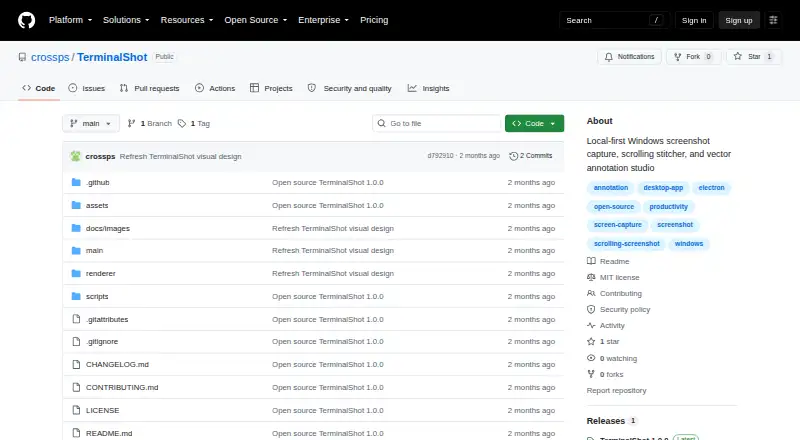
TerminalShot is a free screenshot studio for Windows that runs from the system tray. It captures full pages, selected areas, windows, full screens, or manually scrolled content. During full-page capture, it scrolls the selected content and stitches the resulting images. Manual scrolling requires overlapping frames, and horizontal scrolling is not stitched. Its editor keeps arrows, shapes, text, highlights, step markers, pixelation, and crop as editable vector objects until export. Finished captures are PNG files shown in floating cards. You can open a card in the editor or drag its PNG into Explorer, Discord, an issue, or a browser. The project says no account is required, telemetry is not used, captures are not uploaded, and screenshots and settings remain on the PC. TerminalShot targets Windows 10/11 x64 and includes a portable build without an installer. Community builds are not code-signed, so Windows may show a SmartScreen notice. The repository provides it under the MIT License.
Who it suits
TerminalShot suits Windows users who need annotated screenshots and several capture modes. It is also suited to people who want local storage and direct PNG handoff to other apps.
What it does well
- Free plan with no account requirement
- Captures full pages, areas, windows, and screens
- Editable vector annotations before export
- Drag PNG cards into other applications
- No telemetry or capture uploads
What to know first
- Windows 10/11 x64 only
- Horizontal scrolling is not stitched
- Automatic scrolling cannot control elevated windows
- Community builds are not code-signed
Verdict
TerminalShot combines varied Windows capture modes with editable annotations and straightforward PNG sharing. Its scrolling and elevation limits, plus Windows-only support, matter for some workflows.
Facts from TerminalShot's own pages
- Annotations
- Its editor supports arrows, shapes, text, highlighter, step markers, pixelation, and crop, with objects remaining editable until export. · github.com, 11 Oct 2026
- Capture modes
- It supports full-page, area, window, full-screen, and manual scrolling capture. · github.com, 11 Oct 2026
- Distribution caveat
- The README says Windows may show a SmartScreen notice because community builds are not code-signed. · github.com, 11 Oct 2026
- Image handoff
- Users can drag a capture card’s PNG into Explorer, Discord, an issue, or a browser, or open it in the editor. · github.com, 10 Oct 2026
- Integrations
- The README describes dragging PNGs into Explorer, Discord, an issue, or a browser. · github.com, 11 Oct 2026
- License
- The repository is licensed under the MIT License. · github.com, 11 Oct 2026
- Notable limits
- Horizontal scrolling is not stitched, and automatic scrolling cannot control an elevated window from a non-elevated TerminalShot process. · github.com, 10 Oct 2026
- Platform and download
- TerminalShot targets Windows 10/11 x64 and offers a portable Windows build with no installer; community builds are not code-signed. · github.com, 10 Oct 2026
- Privacy
- The project says it does not send capture data anywhere and that captures and settings stay on the user's PC. · github.com, 11 Oct 2026
- Purpose
- TerminalShot is a tray-resident Windows screenshot tool for capture, annotation, and sharing. · github.com, 11 Oct 2026
- Release
- The repository's latest release page lists version 1.0.0, dated 2026-07-18. · github.com, 11 Oct 2026
- Scrolling capture
- Full-page capture rewinds and scrolls the selected content, then stitches the captures together. · github.com, 10 Oct 2026
- Scrolling limits
- Horizontal scrolling is not stitched, manual scrolling needs overlapping frames, and automatic scrolling cannot control an elevated window from a non-elevated process. · github.com, 11 Oct 2026
- Security boundary
- Automatic full-page capture sends window-addressed WM_MOUSEWHEEL messages and does not use system-wide input injection. · github.com, 10 Oct 2026
- Security reporting
- The security policy asks users to report vulnerabilities through GitHub's Report a vulnerability flow rather than a public issue. · github.com, 11 Oct 2026
- Sharing
- Captured PNGs appear in floating cards that can be dragged into other apps or opened in the editor. · github.com, 11 Oct 2026
- Storage
- Settings are stored as JSON in the current user's application-data directory, and screenshots default to Pictures\\TerminalShot. · github.com, 11 Oct 2026
- Support
- The project invites bug reports and focused pull requests, and directs security reports through GitHub's repository vulnerability reporting flow. · github.com, 10 Oct 2026
- Supported system
- TerminalShot targets Windows 10/11 x64 and offers a portable Windows build that requires no installer. · github.com, 11 Oct 2026
Where TerminalShot stands on Freedom251
- Menu Bar Apps#11 of 23
- Visual Testing#10 of 17
- Screen Capture Software#47 of 61