Freedom251 › Remote Connection Manager Software
TermDesk
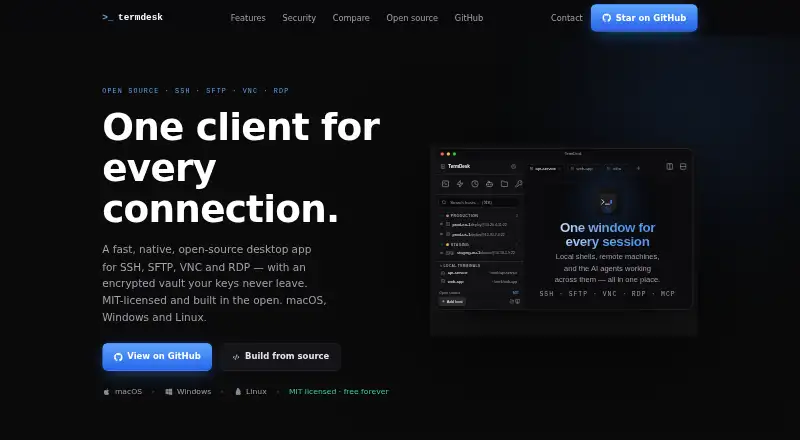
What TermDesk is
TermDesk is a free, open-source desktop app for connecting to systems over SSH, SFTP, VNC and RDP. It organizes saved SSH hosts into tagged groups and supports jump hosts, agent and port forwarding, tabs, split views and drag-and-drop SFTP transfers. It also reads the user's existing SSH configuration. VNC sessions are tunneled over SSH, while Windows hosts connect over RDP with trust-on-first-use certificate pinning. Hosts, keys, snippets and known hosts are stored in a local SQLite vault; passwords and passphrases are protected using the operating system keychain. Named secret-storage systems include macOS Keychain, Windows DPAPI and Linux libsecret. The built-in MCP server can list hosts and run commands through Claude, Cursor and other MCP clients; agent access is off by default and approval-gated. TermDesk runs on Linux, macOS and Windows. The project is MIT-licensed, has no mandatory cloud account or telemetry, and can be built from source. The site says it currently runs from source, with prebuilt signed installers on the way. It is offered at no cost.
Who it suits
TermDesk suits people who manage SSH hosts or need SFTP, VNC and RDP connections from a desktop app. Its local vault and source-based availability may suit users who prefer locally stored connection data and are able to build from source.
What it does well
- Supports SSH, SFTP, VNC and RDP.
- Reads existing SSH configuration.
- Stores host data in a local SQLite vault.
- Supports operating-system keychain secret storage.
- MIT-licensed with no mandatory cloud account or telemetry.
What to know first
- Prebuilt signed installers are not yet available.
- Currently runs from source.
- MCP agent access requires approval and is off by default.
Plans
| Plan | Billed and limits | Price |
|---|---|---|
| Free forever | MIT-licensed; runs from source today; prebuilt signed installers are on the way | Free |
As termdesk.pro lists them, read 5 Oct 2026. The maker's own page has the final word.
Getting started
- Visit https://termdesk.pro/.
- Build TermDesk from source.
- Run it on Linux, macOS, or Windows.
- Use saved hosts or the existing ~/.ssh/config for SSH connections.
- Set up connections using SSH, SFTP, VNC, or RDP as needed.
Verdict
TermDesk combines several remote access protocols with a local vault and integrations for MCP clients. It is free and runs across three desktop platforms, but currently requires running from source rather than using a prebuilt signed installer.
Questions
Is TermDesk free?
Yes. Its Free forever plan is listed as free.
Which platforms does TermDesk support?
It runs on Linux, macOS, and Windows.
Is TermDesk open source?
Yes. It is MIT-licensed, developed in public, and available to build from source.
Which protocols does TermDesk support?
It supports SSH, SFTP, VNC, and RDP.
Where does TermDesk store connection data?
Hosts, keys, snippets, and known hosts are stored in a local SQLite vault. Passwords and passphrases are encrypted using the operating system keychain.
Does TermDesk require a cloud account?
No mandatory cloud account or telemetry is required; hosts, keys, and history stay on the user's machine.
Facts from TermDesk's own pages
- AI integrations
- Its built-in MCP server supports Claude, Cursor and other MCP clients for listing hosts and running commands; agent access is off by default and approval-gated. · termdesk.pro, 5 Oct 2026
- Availability limit
- The site says TermDesk runs from source today and that prebuilt signed installers are on the way. · termdesk.pro, 5 Oct 2026
- Keychain support
- The site names macOS Keychain, Windows DPAPI and Linux libsecret as supported secret-storage systems. · termdesk.pro, 5 Oct 2026
- Open source
- TermDesk is MIT-licensed, developed in public and available to build from source. · termdesk.pro, 5 Oct 2026
- Privacy
- The site says there is no mandatory cloud account or telemetry and that hosts, keys and history stay on the user's machine. · termdesk.pro, 5 Oct 2026
- Purpose
- TermDesk is an open-source desktop app for SSH, SFTP, VNC and RDP with a local encrypted vault. · termdesk.pro, 5 Oct 2026
- Remote desktop
- VNC sessions are tunneled over SSH, and Windows hosts connect over RDP with trust-on-first-use certificate pinning. · termdesk.pro, 5 Oct 2026
- Security controls
- The site says the renderer is sandboxed without Node access and secrets remain in the main process behind a Zod-validated IPC contract. · termdesk.pro, 5 Oct 2026
- SSH and SFTP
- It supports saved hosts, jump hosts, agent and port forwarding, drag-and-drop SFTP transfers, tabs, splits and tagged host groups. · termdesk.pro, 5 Oct 2026
- SSH configuration
- TermDesk reads the user's existing ~/.ssh/config. · termdesk.pro, 5 Oct 2026
- Support
- The site directs users to GitHub Issues for bugs and feature requests and provides a contact form for other questions and security disclosures. · termdesk.pro, 5 Oct 2026
- Vault storage
- Hosts, keys, snippets and known hosts are stored in a local SQLite vault, while passwords and passphrases are encrypted using the operating system keychain. · termdesk.pro, 5 Oct 2026
Where TermDesk stands on Freedom251
- Remote Connection Manager Software#20 of 29