
mRemoteNG
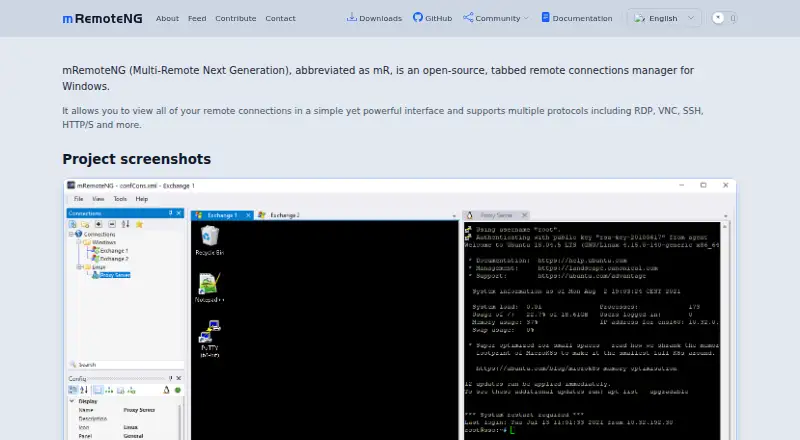
What mRemoteNG is
mRemoteNG is a free, open-source Windows application for managing remote connections in a tabbed interface. It supports RDP, VNC, SSH, Telnet, HTTP and HTTPS, rlogin, raw sockets, PowerShell remoting and AnyDesk. Connections can be imported from XML or CSV files, Active Directory and port scans; settings can also be exported as XML or CSV for sharing or backup. For SSH file transfers, the tool uses SFTP or SCP over an encrypted tunnel, and port forwarding is supported. The project lists Windows 8.1, Windows 10, Windows 11 and Windows Server 2012 R2 through 2022 as supported systems. Downloads include MSI and ZIP packages for stable and preview channels, along with x64 and ARM64 nightly builds. mRemoteNG is released under the GNU GPL v2 license. SQL connection storage with MSSQL or MySQL is documented as an early beta feature and is not intended for production use. The documentation also notes possible SSH problems in versions older than 1.77.2 and limited prospects for support of proprietary RFB 4.0-and-newer VNC versions.
Who it suits
mRemoteNG suits Windows users who manage connections across protocols such as RDP, SSH and VNC. Its import and export options may also suit people sharing or backing up connection settings.
What it does well
- Free and open source under GNU GPL v2
- Tabbed interface for remote connections
- Imports connections from files, Active Directory, or port scans
- SFTP and SCP file transfers use an encrypted tunnel
- Supports listed Windows desktop and server versions
What to know first
- SQL connection storage is early beta and not for production
- Older versions below 1.77.2 may have SSH problems
- Proprietary RFB versions 4.0 and newer are unlikely to be supported
Limits
SQL connection storage through MSSQL or MySQL is an early beta feature and is not intended for production. The documentation says proprietary RFB versions 4.0 and newer are unlikely to be supported soon.
Plans
| Plan | Billed and limits | Price |
|---|---|---|
| mRemoteNG | Open source · GNU GPL v2 · Windows remote connections manager | Free |
As mremoteng.org lists them, read 7 Oct 2026. The maker's own page has the final word.
Getting started
- Visit https://mremoteng.org/.
- Choose an MSI or ZIP package from the stable or preview channel, or an x64 or ARM64 nightly build.
- Install or unpack the Windows download.
- Import connections from XML or CSV, Active Directory, or a port scan, or configure connections in the tabbed interface.
Verdict
mRemoteNG brings many remote connection types into one free Windows application and offers file transfer and connection import/export tools. Note the documented limits around beta SQL storage, older SSH versions and newer proprietary VNC variants.
Questions
Is mRemoteNG free?
Yes. The listed plan is free, and the project releases it under GNU GPL v2.
Which operating systems does it support?
It supports Windows 8.1, Windows 10 and 11, and Windows Server 2012 R2, 2016, 2019, and 2022.
Which connection protocols does mRemoteNG support?
It supports RDP, VNC, SSH, Telnet, HTTP/HTTPS, rlogin, raw sockets, PowerShell remoting, and AnyDesk. Its SSH file-transfer tool supports SFTP and SCP.
Can I import and export connection settings?
Yes. Imports can come from XML or CSV files, Active Directory, and port scans. Settings can be exported as XML or CSV.
Is mRemoteNG open source?
Yes. It is released under the GNU GPL v2 license.
Does it have a free trial?
No free trial is listed; mRemoteNG is offered as free software.
Facts from mRemoteNG's own pages
- Connection export
- Connection settings can be exported as XML or CSV for sharing or backup. · mremoteng.readthedocs.io, 7 Oct 2026
- Connection import
- Connections can be imported from XML or CSV files, Active Directory, and port scans. · mremoteng.readthedocs.io, 7 Oct 2026
- Downloads
- The download page offers MSI and ZIP packages for stable and preview channels, plus x64 and ARM64 nightly builds. · mremoteng.org, 7 Oct 2026
- Intended users
- The project describes itself as a multi-protocol tool for managing and viewing remote connections, including RDP, SSH, VNC, and other connection types. · github.com, 7 Oct 2026
- License
- The project site says mRemoteNG is released under GNU GPL v2. · mremoteng.org, 7 Oct 2026
- Product
- mRemoteNG is an open-source, tabbed remote connections manager for viewing remote connections in one interface. · mremoteng.org, 7 Oct 2026
- Protocols
- It supports RDP, VNC, SSH, Telnet, HTTP/HTTPS, rlogin, raw sockets, PowerShell remoting, and AnyDesk. · github.com, 7 Oct 2026
- Shared storage
- The documentation lists MSSQL and MySQL as supported databases for SQL connection storage, but warns the feature is early beta and not intended for production. · mremoteng.readthedocs.io, 7 Oct 2026
- SSH file transfer
- The SSH file transfer tool transfers files to remote hosts over an encrypted tunnel using SFTP or SCP. · mremoteng.readthedocs.io, 7 Oct 2026
- SSH version note
- The documentation says older versions below 1.77.2 may have SSH connection problems and recommends updating mRemoteNG or replacing PuTTYNG.exe manually. · mremoteng.readthedocs.io, 7 Oct 2026
- Support
- The documentation provides troubleshooting pages, known issues, FAQs, and contact links to chat, Reddit, and email. · mremoteng.readthedocs.io, 7 Oct 2026
- VNC limitation
- The documentation says mRemoteNG is unlikely to support proprietary RFB versions 4.0 and newer anytime soon. · mremoteng.readthedocs.io, 7 Oct 2026
- Windows support
- The project lists Windows 10, Windows 11, Windows 8.1, and Windows Server 2012 R2 through 2022 among supported operating systems. · github.com, 7 Oct 2026
Where mRemoteNG stands on Freedom251
- SSH Clients#14 of 33
- Remote Connection Manager Software#18 of 29