Freedom251 › Mobile App Monitoring
Tencent Cloud Mobile Performance Monitoring
Visit Tencent Cloud Mobile Performance Monitoring Alternatives Pricing
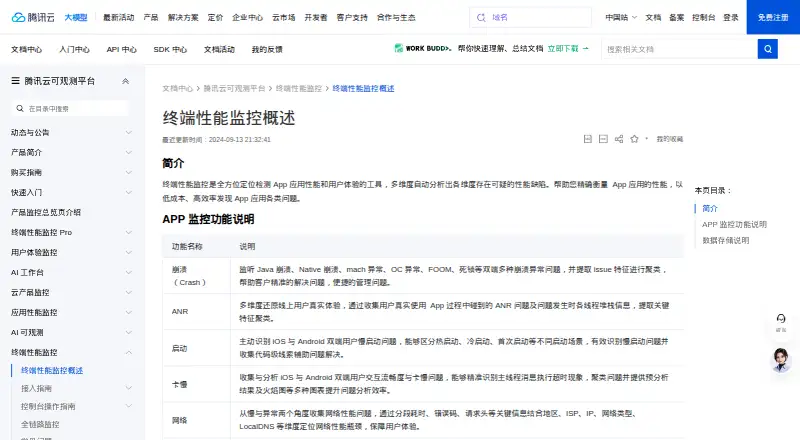
What Tencent Cloud Mobile Performance Monitoring is
Tencent Cloud Mobile Performance Monitoring helps teams find app performance and user-experience problems across mobile applications. It analyzes suspicious defects and covers crashes, ANRs, startup speed, interaction smoothness, network quality, and embedded web content. Crash monitoring covers Java, Native, mach, Objective-C, FOOM, and deadlock crashes, grouping issues by shared characteristics. ANR monitoring collects real-user incidents and thread stacks. Startup monitoring distinguishes hot, cold, and first launches on iOS and Android. Jank analysis identifies main-thread execution timeouts and provides flame graphs and pre-analysis. Network analysis examines latency and errors across timing segments, error codes, headers, region, ISP, IP, network type, and LocalDNS. WebView monitoring includes performance views, JavaScript error analysis, and SourceMap code-line restoration. Metric and problem-sample data are retained for 90 days. The service is paid and has no free plan; Pay-as-you-go is $33.36, paid once, billed hourly and postpaid. New applications need a purchased, bound resource package to upload data.
Who it suits
It suits teams monitoring app performance on Android, iOS, Windows, Flutter, Unity, or React Native. Teams should account for the required resource package and configure performance sampling, which is disabled by default.
What it does well
- Covers crashes, ANRs, startup, jank, network, and WebView.
- Groups crash issues by shared characteristics.
- Retains metric and problem-sample data for 90 days.
- Supports end-to-end monitoring through trace_id and supported APM instances.
What to know first
- No free plan is listed.
- New applications need an active, bound resource package to upload data.
- Performance monitoring is disabled until sampling is configured.
- iOS network-quality monitoring covers NSURLSession requests only.
Limits
A newly created application cannot upload data without an active purchased and bound resource package; uploads are also unavailable if the package is exhausted. Performance monitoring is disabled by default until configured, and metric and problem-sample data are stored for 90 days.
Plans
| Plan | Billed and limits | Price |
|---|---|---|
| Pay-as-you-go | hourly, postpaid · reported data volume · performance events plus metric events | $33.36, paid once |
As cloud.tencent.com lists them, read 30 Sept 2026. The maker's own page has the final word.
Getting started
- Open the Tencent Cloud Mobile Performance Monitoring documentation website.
- Choose a supported application SDK target for integration.
- Purchase and bind a resource package to a newly created application before uploading data.
- Configure performance monitoring and sampling if you need performance data.
- Use the Pay-as-you-go plan at $33.36, paid once, billed hourly and postpaid, based on reported performance and metric event volume.
Verdict
The service offers broad app diagnostics, including crash clustering, network analysis, and WebView monitoring. Before choosing it, account for the required resource package and the stated network-integration limits.
Questions
Is there a free plan?
No. The pricing model is paid.
How much does Pay-as-you-go cost?
The listed plan is $33.36, paid once. It is billed hourly, postpaid, based on reported data volume across performance events and metric events.
Which platforms and SDK targets are supported?
Platforms listed are Android, iOS, web and Windows. Supported SDK targets include Android, iOS, Harmony, Flutter, Windows and Electron; additional supported platforms listed are Unity and React Native.
What does monitoring cover?
It includes crashes, ANRs, startup monitoring, jank analysis, network monitoring and WebView monitoring. Network request tracing and app performance monitoring are also supported.
What must an application have before it can upload data?
A newly created application needs a purchased and bound resource package. Uploading is unavailable without an active package or when the package is exhausted.
How does iOS network monitoring work?
iOS network-quality monitoring covers HTTP requests made through NSURLSession. Requests through NSURLConnection, CFNetwork or socket-based connections are not covered.
Facts from Tencent Cloud Mobile Performance Monitoring's own pages
- Android network integration
- Android network monitoring uses OkHttp3 EventListener and can monitor HTTP/HTTPS requests through BuglyListenerFactory-created OkHttpClient or the native HttpURLConnection proxy. · cloud.tencent.com, 30 Sept 2026
- ANR monitoring
- ANR monitoring collects real-user ANR problems and thread stacks and clusters key characteristics. · cloud.tencent.com, 30 Sept 2026
- Crash monitoring
- Crash monitoring covers Java, Native, mach, Objective-C, FOOM and deadlock crashes, and clusters issue characteristics. · cloud.tencent.com, 30 Sept 2026
- Data retention
- Metric data and problem-sample data are stored for 90 days. · cloud.tencent.com, 30 Sept 2026
- End-to-end integration
- End-to-end monitoring can connect mobile applications to APM using trace_id, and currently supports APM instances integrated through OpenTelemetry or SkyWalking. · cloud.tencent.com, 30 Sept 2026
- iOS network limit
- iOS network-quality monitoring supports HTTP requests made through NSURLSession; requests through NSURLConnection, CFNetwork or socket-based connections are not covered. · cloud.tencent.com, 30 Sept 2026
- Jank analysis
- Jank monitoring analyzes iOS and Android interaction smoothness, identifies main-thread execution timeouts, and provides flame graphs and pre-analysis. · cloud.tencent.com, 30 Sept 2026
- Network monitoring
- Network monitoring analyzes latency and errors using timing segments, error codes, request headers, region, ISP, IP, network type and LocalDNS dimensions. · cloud.tencent.com, 30 Sept 2026
- Privacy data systems
- The terminal-monitoring privacy notice says monitoring data integrates with CVM, TKE and TCHouse-C and is stored in MySQL and ClickHouse, while account and configuration data integrate with CVM, TKE and Redis and are stored in MySQL and Redis. · intl.cloud.tencent.com, 30 Sept 2026
- Purpose
- Terminal Performance Monitoring locates and detects app performance and user-experience problems and automatically analyzes suspicious defects across dimensions. · cloud.tencent.com, 30 Sept 2026
- Resource requirement
- A newly created application must have a purchased and bound resource package to upload data; without an active package or with an exhausted package, uploading is unavailable. · cloud.tencent.com, 30 Sept 2026
- Sampling
- Crash monitoring is enabled by default without sampling, while performance monitoring supports sampling and is disabled by default until configured. · cloud.tencent.com, 30 Sept 2026
- Startup monitoring
- Startup monitoring identifies slow iOS and Android launches and distinguishes hot, cold and first launches. · cloud.tencent.com, 30 Sept 2026
- Supported SDK targets
- The Pro quick-start guide lists Android, iOS, Harmony, Flutter, Windows and Electron application SDK integrations. · cloud.tencent.com, 30 Sept 2026
- WebView monitoring
- WebView monitoring provides embedded-web performance analysis, waterfall and distribution views, JavaScript error analysis and SourceMap code-line restoration. · cloud.tencent.com, 30 Sept 2026
Where Tencent Cloud Mobile Performance Monitoring stands on Freedom251
- Mobile App Monitoring#22 of 23