Freedom251 › Teleprompter Software
Telepromptr
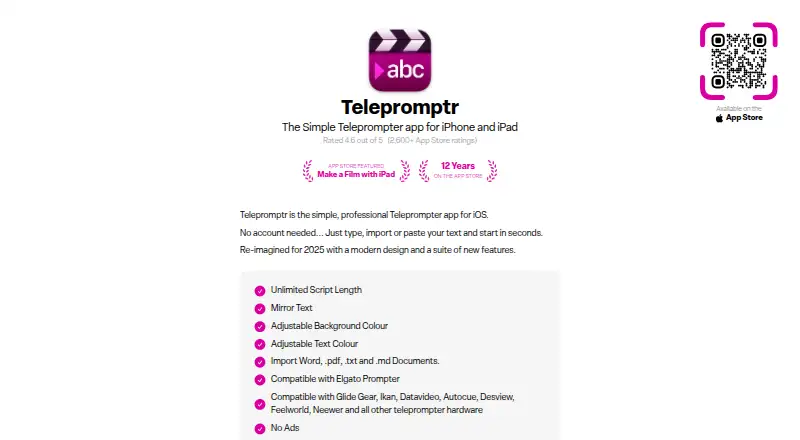
What Telepromptr is
Telepromptr is an iPhone and iPad app for displaying scripts during video production, presentations, speeches, meetings, and music performances. No account is needed to get started: users can type, paste, or import text. Scripts can be unlimited in length, and the app accepts Word, PDF, TXT, and Markdown documents. Display controls include mirrored text, adjustable text and background colours, portrait and landscape orientation, and a countdown timer.
Scrolling can be controlled with a keyboard or compatible controller, with customizable keyboard and game controller controls. The maker lists compatibility with Elgato Prompter and teleprompter hardware from Glide Gear, Ikan, Datavideo, Autocue, Desview, Feelworld, and Neewer. The App Store listing describes video recording, Eyeline Mode that places text beside the camera, and output to connected displays through AirPlay or HDMI. The app is free, with an optional Telepromptr Pro subscription at $19.99 a year. The US App Store listing requires iOS 17.0 or later on iPhone and iPadOS 17.0 or later on iPad.
Who it suits
Telepromptr suits people who need to read scripts while presenting, recording video, speaking, or performing music. Its hardware compatibility and external display options may also fit users with a supported teleprompter setup.
What it does well
- No account needed to start
- Imports Word, PDF, TXT, and Markdown
- Unlimited script length
- Supports keyboard and compatible controller controls
- Can send scripts to displays through AirPlay or HDMI
What to know first
- Requires iOS 17.0 or later on iPhone
- Requires iPadOS 17.0 or later on iPad
- Pro is an optional paid subscription
Limits
The free app has an optional Pro upgrade; Telepromptr Pro costs $19.99 a year. The US App Store listing requires iOS 17.0 or later on iPhone and iPadOS 17.0 or later on iPad.
Plans
| Plan | Billed and limits | Price |
|---|---|---|
| Free | App listed as free; optional Pro upgrade available | Free |
| Telepromptr Pro | Subscription; optional Pro upgrade | $19.99 a year |
| Telepromptr Pro | One-time in-app purchase; unlocks optional Pro upgrade | $59.99, paid once |
As telepromptr.com lists them, read 9 Oct 2026. The maker's own page has the final word.
Getting started
- Visit the Telepromptr website or find the app for iPhone or iPad.
- Install it on an iPhone with iOS 17.0 or later, or iPad with iPadOS 17.0 or later.
- Open the app and type, paste, or import a script without creating an account.
- Adjust display settings or connect a compatible controller or external display.
- Use the free app or choose the optional Telepromptr Pro subscription.
Verdict
Telepromptr provides script display controls, multiple import formats, and options for remote control and external displays. Check the operating system requirements and hardware compatibility before choosing it.
Questions
How much does Telepromptr cost?
The app is listed as free. The optional Telepromptr Pro subscription costs $19.99 a year.
Is there a free plan?
Yes. The app is listed as free, with an optional Pro upgrade.
Which platforms does Telepromptr support?
It supports iPhone and iPad. The US App Store listing requires iOS 17.0 or later for iPhone and iPadOS 17.0 or later for iPad.
Can I use it without an account?
Yes. Users can type, paste, or import text to start without an account.
What file types can it import?
It imports Word, PDF, TXT, and Markdown documents.
Can it send scripts to another display?
Yes. The App Store listing says scripts can be output to connected displays through AirPlay or HDMI.
Facts from Telepromptr's own pages
- Ads
- The maker's homepage lists “No Ads” as a feature. · telepromptr.com, 9 Oct 2026
- Compatibility requirement
- The US App Store listing requires iOS 17.0 or later for iPhone and iPadOS 17.0 or later for iPad. · apps.apple.com, 9 Oct 2026
- Display controls
- Features include mirrored text, adjustable background and text colours, portrait and landscape orientation, and a countdown timer. · telepromptr.com, 9 Oct 2026
- External displays
- The listing says scripts can be output to connected displays through AirPlay or HDMI. · apps.apple.com, 9 Oct 2026
- Getting started
- The app says no account is needed and users can type, import, or paste text to start. · telepromptr.com, 9 Oct 2026
- Hardware compatibility
- The maker lists compatibility with Elgato Prompter and teleprompter hardware from Glide Gear, Ikan, Datavideo, Autocue, Desview, Feelworld, and Neewer. · telepromptr.com, 9 Oct 2026
- Privacy
- The linked privacy policy lists User ID for RevenueCat payment handling and email address, first name, Trackers, and Usage Data for ConvertKit contact management and messaging. · iubenda.com, 9 Oct 2026
- Product
- Telepromptr is a teleprompter app for iPhone and iPad, intended for video production, presenting, speaking, meetings, and music performances. · apps.apple.com, 9 Oct 2026
- Remote controls
- The app listing describes remote control using a keyboard or compatible controller, and the homepage specifies customizable keyboard and game controller controls. · apps.apple.com, 9 Oct 2026
- Scripts
- The homepage lists unlimited script length and importing Word, PDF, TXT, and Markdown documents. · telepromptr.com, 9 Oct 2026
- Security
- The privacy policy says the owner takes appropriate security measures to prevent unauthorised access, disclosure, modification, or destruction of data. · iubenda.com, 9 Oct 2026
- Support
- An App Store developer response says the app has built-in chat support for assistance. · apps.apple.com, 9 Oct 2026
- Video and eye line
- The App Store listing says the app can record video and includes Eyeline Mode, which places text beside the camera to support eye contact. · apps.apple.com, 9 Oct 2026
Where Telepromptr stands on Freedom251
- Teleprompter Software#24 of 32