Freedom251 › Softphone and calling apps
Telephone
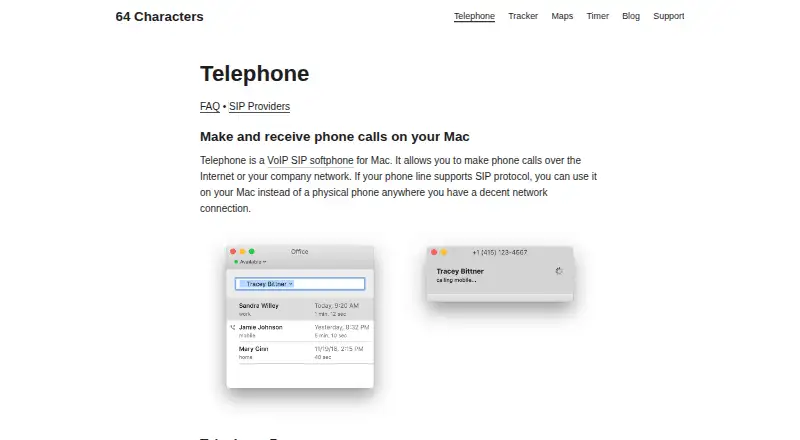
What Telephone is
Telephone is a SIP softphone for making and receiving VoIP calls on a Mac over the Internet or a company network. Calling requires a SIP account from a phone provider or a compatible router. The free version supports up to three simultaneous calls and displays the last three calls in its history; Telephone Pro raises the simultaneous-call limit to 30 and reveals up to the last thousand calls. Telephone can answer or decline calls from notifications, find names in macOS Contacts, and become the default handler for calls initiated there. It also opens sip: and tel: links and can call a number selected in another app through macOS Services. Supported codecs include Opus, G.722, G.711 A-law, and G.711 μ-law, and the maker says most SIP providers should work. With TLS selected as SIP transport, voice uses mandatory SRTP; UDP and TCP connections to the configured server are in cleartext. The maker says application data is stored locally and its apps collect no user data or usage analytics. Telephone 1.6 added Apple Silicon support and the modern macOS look. The product is made by 64 Characters UG, based in Berlin, Germany.
Who it suits
Telephone suits Mac users who want a desktop softphone and already have access to a SIP account through a phone provider or compatible router. Its Contacts and macOS Services support may also suit people who want calling integrated with those Mac features.
What it does well
- Works with SIP accounts from providers or compatible routers.
- Answers and declines calls from notifications.
- Integrates with macOS Contacts and Services.
- Supports Opus, G.722, and G.711 codecs.
- Maker says application data stays on the device.
What to know first
- The free version shows only the last three calls.
- Available for macOS only, with no browser or mobile app.
Limits
The free plan allows three simultaneous calls and shows only the last three calls in history.
Plans
| Plan | Billed and limits | Price |
|---|---|---|
| Telephone (free) | 3 simultaneous calls · last 3 calls visible in history | Free |
| Telephone Pro | Subscription; price not stated on the pages opened · Full call history · up to 30 simultaneous calls · supports app development | On request |
As 64characters.com lists them, read 8 Oct 2026. The maker's own page has the final word.
Getting started
- Visit https://www.64characters.com/telephone/.
- Use a Mac running macOS and install the desktop app.
- Get a SIP account from a phone provider or compatible router.
- Configure the account using the provider's setup guidance.
- Use the free plan, or choose Telephone Pro for full call history and up to 30 simultaneous calls.
Verdict
Choose Telephone if you want a Mac SIP softphone with Contacts, call-link, and notification support.
Questions
Is Telephone free?
Yes. Telephone (free) costs nothing and allows three simultaneous calls, with the last three calls visible in history.
What platform does Telephone support?
Telephone is a macOS desktop app. It does not offer browser calling or a mobile app.
Do I need a SIP account?
Yes. You need an account from a phone provider or a compatible router to make calls.
Who makes Telephone?
The maker is 64 Characters UG, whose Impressum lists an address in Berlin, Germany.
Does Telephone support encrypted voice?
With TLS selected as SIP transport, SRTP is mandatory for voice. UDP and TCP connections to the configured server are in cleartext.
Facts from Telephone's own pages
- Audience
- The maker describes Telephone as a streamlined Mac softphone for people who want VoIP calling on a Mac. · 64characters.com, 8 Oct 2026
- Call handling
- Telephone supports answering and declining calls from notifications. · 64characters.com, 8 Oct 2026
- Call history
- The free version shows the last three calls, while the last thousand are saved and revealed after purchasing Telephone Pro. · 64characters.com, 8 Oct 2026
- Codecs
- Supported codecs listed by the maker are Opus, G.722, G.711 A-law, and G.711 μ-law. · 64characters.com, 8 Oct 2026
- Compatibility
- Telephone 1.6 added support for Apple Silicon and the modern macOS look. · 64characters.com, 8 Oct 2026
- Contacts
- Telephone can look up names in macOS Contacts and can be set as the default handler for calls from Contacts. · 64characters.com, 8 Oct 2026
- Encryption
- With TLS selected as SIP transport, SRTP is mandatory for voice; UDP and TCP connections to the configured server are in cleartext. · 64characters.com, 8 Oct 2026
- Headquarters
- Berlin, Germany · 64characters.com, 28 Sept 2026
- Links and calling
- Telephone handles sip: and tel: links and can call a number selected in another application through macOS Services. · 64characters.com, 8 Oct 2026
- Maker location
- The maker’s Impressum lists 64 Characters UG at Pappelallee 78/79, 10437 Berlin. · 64characters.com, 8 Oct 2026
- Privacy
- The maker says its apps collect no user data or usage analytics and store application data locally on the device. · 64characters.com, 8 Oct 2026
- Provider compatibility
- The maker says any SIP provider should generally work and lists setup guidance for providers including FRITZ!Box, Sipgate, Vonage, and Zadarma. · 64characters.com, 8 Oct 2026
- Provider requirement
- You need a SIP account from a phone provider or compatible router to make calls. · 64characters.com, 8 Oct 2026
- Purpose
- Telephone is a VoIP SIP softphone for Mac that makes and receives calls over the Internet or a company network. · 64characters.com, 8 Oct 2026
- Support
- The FAQ explains troubleshooting, logging, call controls, and setup; the provider page gives the support email [email protected]. · 64characters.com, 8 Oct 2026
Where Telephone stands on Freedom251
- Softphone and calling apps#23 of 33
- Network Simulation Software#23 of 31