Freedom251 › Presentation Management Software

TeamSlide
What TeamSlide is
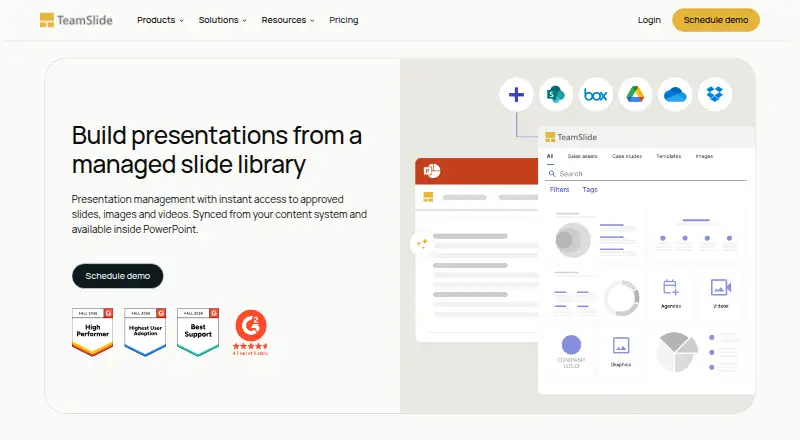
TeamSlide is a PowerPoint solution for finding, reusing, updating, and managing approved slides, images, and videos. Search can reach text in tables, diagrams, and notes, with filters, tags, and metadata. A slide checker identifies typos, formatting issues, inconsistencies, and departures from brand fonts, colors, and layouts. When repository slides are updated, TeamSlide flags older versions and lets users replace them. It connects to SharePoint, OneDrive, Box, Google Drive, Dropbox, and Widen while keeping the connected system as the source of truth. Optional AI tools generate editable slides from text and support prompt-based edits using templates and brand layouts. The product runs on macOS, Windows, and the web, with cloud or on-premise deployment; on-premise costs extra. Annual subscriptions start at $29 a month per user and require at least three users. There is no free plan, though a 30-day trial is offered. TeamSlide is aimed at PowerPoint-dependent groups, particularly in marketing, sales, consulting, and finance.
Who it suits
TeamSlide is intended for PowerPoint-dependent teams that need to find, manage, update, or generate slides, especially in marketing, sales, consulting, and finance. It may suit organizations that keep approved content in connected cloud repositories or choose on-premise deployment.
What it does well
- Search reaches text in tables, diagrams, and notes.
- Flags older slides when repository content changes.
- Connects to six named content systems.
- Optional AI creates editable PowerPoint slides.
What to know first
- No free plan is available.
- Annual subscriptions require at least three users.
- On-premise deployment costs extra.
Limits
The least expensive listed subscriptions start at $29 per user per month, are billed annually and require at least three users. There is no free plan; the trial lasts 30 days.
Plans
| Plan | Billed and limits | Price |
|---|---|---|
| Slide Management | Annual subscription; minimum 3 users · Centralized slide library · Secure search · Version control · Template management · Brand checker · Permissions · Usage analytics · PowerPoint integration · Onboarding and support | $29 a month |
| Slide Generation | AI slide generation · Consulting-style templates · AI text rewriting · Layout options · Prompt-based edits · Editable PowerPoint slides · Onboarding and support | $29 a month |
| Slide Generation + Management | Everything in Slide Generation · Centralized slide library · Secure search · Version control · Templates · Brand checker · Permissions · Usage analytics | $49 a month |
| Slide Management + Generation | Annual subscription; minimum 3 users · Everything in Slide Management · AI slide generation · Consulting-style templates · AI text rewriting · Layout options · Prompt-based edits · Editable PowerPoint slides | $49 a month |
| Enterprise | Customized; annual subscriptions have a minimum of 3 users · Everything in Slide Management + Generation · Custom layouts and brand voice · APIs and MCP · Enterprise SSO · Role-based access · Support service accounts · Optional on-premise deployment | On request |
As teamslide.com lists them, read 30 Sept 2026. The maker's own page has the final word.
Getting started
- Visit the TeamSlide website.
- Start the 30-day trial.
- Use TeamSlide on macOS, Windows or the web.
- Connect a content system such as SharePoint, OneDrive, Box, Google Drive, Dropbox or Widen.
- Choose an annual subscription with at least three users if continuing after the trial.
Verdict
TeamSlide combines slide search and version management with optional AI generation and brand checks. Teams should consider its annual subscription, minimum user count, and added on-premise cost.
Questions
How much does TeamSlide cost?
Slide Management and Slide Generation each cost $29 per user per month on annual subscriptions. The combined plans are listed at $49 per month; Enterprise pricing is customized.
Is there a free plan or trial?
There is no free plan. TeamSlide offers a 30-day trial.
Which platforms does TeamSlide support?
It is available on macOS, Windows and the web. The maker offers cloud and on-premise deployment, with on-premise available for an added cost.
Which services does TeamSlide connect to?
It connects to SharePoint, OneDrive, Box, Google Drive, Dropbox and Widen. The connected content system remains the source of truth.
Does TeamSlide include AI slide generation?
Optional AI features generate editable PowerPoint slides from text and support prompt-based edits using templates and brand layouts. The maker says slide and prompt data is not used for model training.
What are the subscription requirements?
Subscriptions are annual and require at least three users. The maker says every customer receives premium support and access to a real person.
Facts from TeamSlide's own pages
- AI generation
- Optional AI features generate editable PowerPoint slides from text and support prompt-based edits using templates and brand layouts. · teamslide.com, 30 Sept 2026
- AI privacy
- The maker says slide and prompt data is not used for model training and that AI features use Microsoft Entra OpenAI service. · teamslide.com, 30 Sept 2026
- Authentication
- TeamSlide supports SAML 2.0 and OpenID Connect SSO, including Microsoft Entra ID and Okta. · teamslide.com, 30 Sept 2026
- Brand compliance
- The slide checker is described as detecting typos, formatting problems, inconsistencies, and off-brand fonts, colors, and layouts. · teamslide.com, 30 Sept 2026
- Deployment
- The maker offers cloud and on-premise deployment, with on-premise available for an added cost. · teamslide.com, 30 Sept 2026
- Headquarters
- Hamburg, Germany · teamslide.com, 28 Sept 2026
- Integrations
- TeamSlide connects to SharePoint, OneDrive, Box, Google Drive, Dropbox, and Widen, and keeps the connected content system as the source of truth. · teamslide.com, 30 Sept 2026
- Intended users
- TeamSlide is aimed at PowerPoint-dependent teams, especially marketing, sales, consulting, and finance teams. · teamslide.com, 30 Sept 2026
- Platforms
- TeamSlide says it works on Mac, Windows, and PowerPoint online, and is optimized for PowerPoint rather than Google Slides. · teamslide.com, 30 Sept 2026
- Pricing constraint
- Pricing FAQ states subscriptions are annual and require at least three users; the free trial duration is not stated there. · teamslide.com, 30 Sept 2026
- Product
- TeamSlide is a PowerPoint solution for finding, reusing, updating, and managing approved slides, images, and videos. · teamslide.com, 30 Sept 2026
- Search
- Search covers slide text including tables, diagrams, and notes, with filters, tags, and metadata. · teamslide.com, 30 Sept 2026
- Security
- The maker says data is encrypted at rest and in transit, systems receive annual independent penetration testing, and its privacy practices align with GDPR. · teamslide.com, 30 Sept 2026
- Support
- The maker says every customer receives premium support and access to a real person, with expert guidance and best practices. · teamslide.com, 30 Sept 2026
- Version control
- When repository slides are updated, TeamSlide flags older versions and lets users replace them with a click. · teamslide.com, 30 Sept 2026
Where TeamSlide stands on Freedom251
- Presentation Management Software#19 of 24