Freedom251 › Tab Management Software
TabXpert
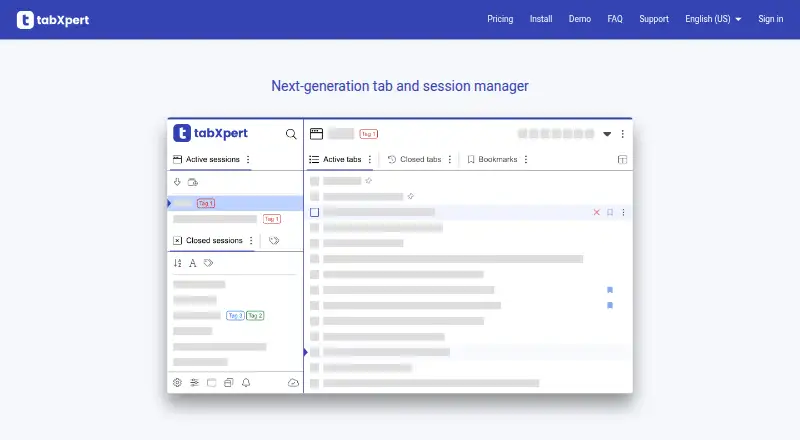
What TabXpert is
TabXpert is a browser extension that saves browser sessions in real time and helps users organize tabs and bookmarks. Sessions can retain active tabs, groups, closed-tab history, and session bookmarks, and can be resumed after a window closes or crashes. Users can move, merge, and organize tab groups, save them as bookmark folders, and use auto-naming and auto-grouping. Search covers session, tab, and bookmark titles and URLs, including Chinese and Japanese. Bookmarks can be local to a session, global with tags, or browser bookmarks. Cloud sync covers sessions, tabs, bookmarks, and tags across profiles, including active and closed sessions. TabXpert supports Chromium-based browsers such as Chrome, Edge, Opera, and Vivaldi, but says it only tests in Chrome; Firefox is not supported. Its free plan includes unlimited sessions. Paid subscriptions are required for local and cloud backups, and deleted sessions and session history are excluded from backups. The pricing note lists plans from $24/yr and a 14-day trial.
Who it suits
TabXpert may suit people who need to save, restore, search, and organize browser sessions across Chromium-based browsers. It is not suited to Firefox users, which the FAQ says are unsupported.
What it does well
- Saves sessions in real time
- Restores sessions after window closure or crashes
- Searches session, tab, and bookmark titles and URLs
- Syncs tabs, sessions, bookmarks, and tags across profiles
What to know first
- Firefox is not supported
- Only Chrome is tested
- Backups require a paid subscription
- Deleted sessions and history are excluded from backups
Limits
The free plan includes unlimited sessions, but local and cloud backups require a paid subscription. Deleted sessions and session history are not included in backups.
Plans
| Plan | Billed and limits | Price |
|---|---|---|
| Free | Unlimited sessions | Free |
| TabXpert Plus monthly subscription | Cloud and local backups require a paid subscription | On request |
| TabXpert Plus lifetime subscription | — | On request |
As tabxpert.com lists them, read 8 Oct 2026. The maker's own page has the final word.
Getting started
- Open https://tabxpert.com/
- Install the extension in a supported Chromium-based browser
- Create or use the free plan with unlimited sessions
- Start saving and organizing browser sessions
- Use the 14-day trial for a paid plan if backup features are needed
Verdict
TabXpert offers session recovery, tab organization, search, and cross-profile sync, with unlimited sessions on its free plan. A paid subscription is required for backups, and Firefox is not supported.
Questions
What browsers does TabXpert support?
It supports Chromium-based browsers including Chrome, Edge, Opera, and Vivaldi. Firefox is not supported.
Is there a free plan?
Yes. The Free plan costs nothing and includes unlimited sessions.
How much do paid plans cost?
The pricing note says plans start at $24/yr and include a 14-day trial.
Does TabXpert sync across devices?
Yes. Cloud sync covers sessions, tabs, bookmarks, and tags across profiles, including active and closed sessions.
Does TabXpert offer backups?
Local and cloud backups require a paid subscription, and deleted sessions and session history are excluded from backups.
Can TabXpert search tabs and bookmarks?
Yes. Search covers session, tab, and bookmark titles and URLs, with Chinese and Japanese language support.
Facts from TabXpert's own pages
- Backups
- Local and cloud backups require a paid subscription, and deleted sessions and session history are not included in backups. · tabxpert.com, 8 Oct 2026
- Bookmarks
- TabXpert supports local session bookmarks, global tag bookmarks, and browser bookmarks, with drag-and-drop organization and sharing. · tabxpert.com, 8 Oct 2026
- Browser support
- TabXpert supports Chromium-based browsers including Chrome, Edge, Opera, and Vivaldi, but says it only tests in Chrome. · tabxpert.com, 8 Oct 2026
- Cloud sync
- Cloud sync synchronizes sessions, tabs, bookmarks, and tags across profiles, including active or closed sessions. · tabxpert.com, 8 Oct 2026
- Data collection
- The privacy policy says session data includes window and tab titles, URLs, pinned status, and tab group metadata; it says TabXpert cannot read page content. · tabxpert.com, 8 Oct 2026
- Data location
- The privacy policy says data is stored in Frankfurt, EU, and may be accessed by support staff in Ukraine under Standard Contractual Clauses. · tabxpert.com, 8 Oct 2026
- Imports
- The FAQ documents imports from Session Buddy, OneTab, Spaces, Tab Manager for Chrome, Tab Manager Plus for Chrome, and Cluster. · tabxpert.com, 8 Oct 2026
- Not supported
- The FAQ says Firefox is not supported and there are no plans to support it. · tabxpert.com, 8 Oct 2026
- Purpose
- TabXpert is a browser tab and session manager that automatically saves sessions in real time. · tabxpert.com, 8 Oct 2026
- Search
- Search covers session, tab, and bookmark titles and URLs, with Chinese and Japanese language support. · tabxpert.com, 8 Oct 2026
- Security
- The privacy policy states traffic uses HTTPS with TLS 1.2+, Cloudant data is AES-256 encrypted at rest with keys rotated every 90 days, and sign-in uses one-time email codes. · tabxpert.com, 8 Oct 2026
- Session recovery
- Sessions retain active tabs, tab groups, closed tab history, and session bookmarks, and can be resumed after a browser window is closed or crashes. · tabxpert.com, 8 Oct 2026
- Support
- Users can report bugs or ask questions by email and join the Reddit community for discussion and feedback. · tabxpert.com, 8 Oct 2026
- Tab groups
- Users can drag and drop, merge, and move tab groups, save groups as bookmark folders, and use auto-naming and auto-grouping. · tabxpert.com, 8 Oct 2026
Where TabXpert stands on Freedom251
- Tab Management Software#24 of 27