Freedom251 › Mobile Development IDEs
Swift Playgrounds
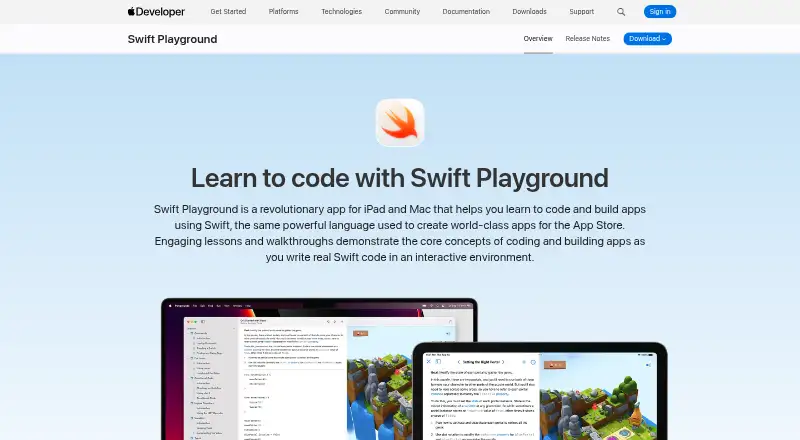
What Swift Playgrounds is
Swift Playgrounds is a free app for learning Swift and creating apps on iPad and Mac. Interactive lessons teach coding through puzzles and experimentation, introducing commands, loops, functions, and variables. Users can build app projects with SwiftUI, multiple Swift files, images, and audio assets, then submit them to App Store Connect. The app supports frameworks including SpriteKit, Bluetooth, and Metal, and uses Swift Package Manager to find and integrate publicly available packages. On iPad, playgrounds can respond to touch and use hardware such as the accelerometer, gyroscope, and camera. The editor identifies mistakes as users type and offers code suggestions, inline completion, and touch-based editing tools. iCloud Drive syncs files between iPad and Mac, and projects can also be opened in Xcode on Mac. The App Store listing requires iPadOS 18.0 or later for iPad and macOS 15.0 or later for Mac. Apps created in Swift Playgrounds must request permission before accessing protected resources or device features such as the camera or contacts.
Who it suits
Swift Playgrounds suits people learning Swift through interactive exercises and users making SwiftUI app projects on iPad or Mac. Its device-based editing and hardware features make iPad users a particular fit.
What it does well
- Free on iPad and Mac
- Lessons cover core coding concepts
- Can submit app projects to App Store Connect
- Syncs files between iPad and Mac
What to know first
- Requires iPadOS 18.0 or later on iPad
- Requires macOS 15.0 or later on Mac
- Created apps must request permission for protected access
Limits
The free plan is the listed Swift Playgrounds plan for iPad and Mac. The apps require iPadOS 18.0 or later on iPad and macOS 15.0 or later on Mac.
Plans
| Plan | Billed and limits | Price |
|---|---|---|
| Swift Playgrounds | iPad and Mac apps · Requires iPadOS 18.0 or later on iPad · Requires macOS 15.0 or later on Mac | Free |
As developer.apple.com lists them, read 8 Oct 2026. The maker's own page has the final word.
Getting started
- Open the Swift Playgrounds website
- Install the iPad app on iPadOS 18.0 or later or the Mac app on macOS 15.0 or later
- Start an interactive Swift lesson or walkthrough
- Create a SwiftUI app project with Swift files and assets
- Use iCloud Drive to sync files or open the project in Xcode on Mac
- Submit a finished app project to App Store Connect
Verdict
Swift Playgrounds combines guided Swift lessons with tools for building app projects. Check the operating system requirements before using it, and remember that apps must request permission for protected device capabilities.
Questions
How much does Swift Playgrounds cost?
The Swift Playgrounds plan costs nothing.
Which platforms support it?
It supports iOS and iPadOS through the iPad app, plus macOS through the Mac app.
What language does it teach?
Swift is the supported language.
Can projects be submitted to the App Store?
App projects can be submitted to App Store Connect.
Can projects continue in Xcode?
App projects can be opened in Xcode on Mac, and iCloud Drive syncs files between iPad and Mac.
Facts from Swift Playgrounds's own pages
- App development
- Users can create apps with SwiftUI, multiple Swift files, images, and audio assets, then submit app projects to App Store Connect. · developer.apple.com, 8 Oct 2026
- Device features
- On iPad, playgrounds can respond to touch and interact with hardware such as the accelerometer, gyroscope, and camera. · developer.apple.com, 8 Oct 2026
- Editing assistance
- On iPad, Swift Playgrounds identifies mistakes as users type and offers code suggestions, inline completion, and touch-based editing tools. · developer.apple.com, 8 Oct 2026
- Founded
- 1976 · developer.apple.com, 28 Sept 2026
- Frameworks
- The app supports SwiftUI and access to frameworks including SpriteKit, Bluetooth, and Metal. · developer.apple.com, 8 Oct 2026
- Headquarters
- Cupertino, California, USA · developer.apple.com, 28 Sept 2026
- Learning
- Interactive lessons use puzzles and experimentation to teach coding concepts including commands, loops, functions, and variables. · developer.apple.com, 8 Oct 2026
- Packages
- Swift Playgrounds uses Swift Package Manager to locate, download, and integrate publicly available Swift packages into app playgrounds. · developer.apple.com, 8 Oct 2026
- Permissions
- Apps created in Swift Playgrounds must request user permission before accessing protected resources or device capabilities such as the camera or contacts. · developer.apple.com, 8 Oct 2026
- Platform requirements
- The App Store listing requires iPadOS 18.0 or later for iPad and macOS 15.0 or later for Mac. · apps.apple.com, 8 Oct 2026
- Privacy
- The App Store listing says Apple may collect device identifiers, product interaction usage data, and performance diagnostics for analytics, not linked to the user. · apps.apple.com, 8 Oct 2026
- Purpose
- Swift Playgrounds helps people learn to code and build apps using Swift through interactive lessons and walkthroughs. · developer.apple.com, 8 Oct 2026
- Sharing
- iCloud Drive syncs Swift Playgrounds files between iPad and Mac, and app projects can also be opened in Xcode on Mac. · developer.apple.com, 8 Oct 2026
- Support
- Apple provides Swift Playgrounds documentation and developer forums for questions and discussion with Apple experts and other developers. · developer.apple.com, 8 Oct 2026
Where Swift Playgrounds stands on Freedom251
- Mobile Development IDEs#31 of 41