Freedom251 › Code Formatting Tools
swift-format
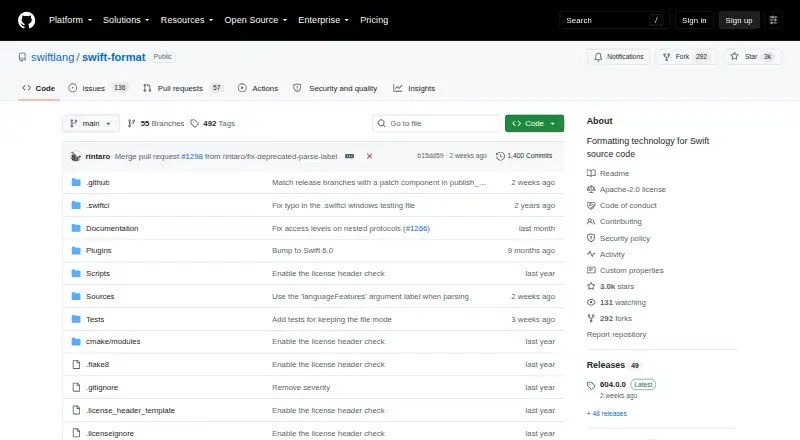
What swift-format is
swift-format is a free, open-source formatter and linter for Swift source code, also providing components for code-formatting transformations. Its format command processes one or more Swift files or Swift code read from standard input. The lint command checks Swift files for style violations and writes diagnostics to standard error. A JSON configuration file lets users customize supported behavior, and the tool searches parent directories for a .swift-format file. Swift applications can import the SwiftFormat package module, including SwiftFormatter and SwiftLinter APIs. Swift Package Manager command plugins provide formatting and linting operations, while SourceKit-LSP can use swift-format’s formatting technology. Installation is documented through the Swift toolchain, Homebrew, or a source build. The project README says Swift 6, included with Xcode 16, and later include swift-format in the toolchain. The repository identifies an Apache-2.0 license. Earlier releases may not understand syntax introduced by newer language and parser versions. The project describes its current style as one experimental possibility because no default Swift style guidelines have yet been proposed.
Who it suits
swift-format suits Swift developers who need command-line formatting, lint checks, configurable style behavior, or reusable formatting APIs. It also fits projects using Swift Package Manager plugins, SourceKit-LSP, or the Swift toolchain.
What it does well
- Formats files or standard-input Swift code
- Lint command reports style violations
- JSON configuration supports customization
- SwiftFormatter and SwiftLinter APIs
- Swift Package Manager command plugins
- Apache-2.0 open-source license
What to know first
- Earlier versions may not recognize newer Swift syntax
- Current style is presented as experimental
- Installation is documented through the Swift toolchain, Homebrew, or a source build
Limits
Earlier swift-format versions may not recognize syntax introduced by later language and parser versions. The project’s current style is an experimental possibility rather than a proposed default Swift style.
Plans
| Plan | Billed and limits | Price |
|---|---|---|
| swift-format | Apache-2.0 licensed · available via Swift toolchain, Homebrew, or source | Free |
As github.com lists them, read 11 Oct 2026. The maker's own page has the final word.
Getting started
- Install through the Swift toolchain, Homebrew, or by building from source
- Run the format command on Swift files or provide code through standard input
- Run the lint command to print style diagnostics
- Add a JSON configuration file to customize supported behavior
- Use a .swift-format file in a parent directory for project settings
- Add Swift Package Manager plugins or import the SwiftFormat module
Verdict
Choose swift-format for a free, Apache-2.0 tool that formats and lints Swift with command-line, plugin, API, and editor integration options. It is especially useful when you want configurable behavior or SourceKit-LSP support. Consider another approach if your code relies on syntax unsupported by the version you use or if you need an established default style standard.
Questions
Is swift-format free?
Yes. It is open source, available at $0.00 USD, and licensed under Apache-2.0.
Which language does it support?
swift-format supports Swift source code.
How can it be installed?
The project documents installation through the Swift toolchain, Homebrew, or building from source.
Does it include linting?
Yes. Its lint command checks Swift files for style violations and prints diagnostics to standard error.
Can applications use its APIs?
Yes. Swift applications can use the SwiftFormat package module, including SwiftFormatter and SwiftLinter APIs.
Facts from swift-format's own pages
- Configuration
- Users can customize supported behavior with a JSON configuration file, and the tool searches parent directories for a .swift-format file. · github.com, 11 Oct 2026
- Formatting
- Its format command formats one or more Swift source files or source code read from standard input. · github.com, 11 Oct 2026
- Install options
- The project documents installation through the Swift toolchain, Homebrew, or building from source. · github.com, 11 Oct 2026
- Integrations
- swift-format provides formatting technology for SourceKit-LSP. · github.com, 11 Oct 2026
- Language compatibility
- Earlier swift-format versions may not recognize syntax added in later language and parser versions. · github.com, 11 Oct 2026
- License
- The repository identifies its license as Apache-2.0. · github.com, 11 Oct 2026
- Linting
- Its lint command checks Swift files for style violations and prints diagnostics to standard error. · github.com, 11 Oct 2026
- Operating systems
- The README documents using the tool through the Swift toolchain and Homebrew and building it from source; it does not specify operating system support on that page. · github.com, 11 Oct 2026
- Purpose
- swift-format provides formatting technology for Swift source code and building blocks for code formatting transformations. · github.com, 11 Oct 2026
- Style caveat
- The project says no default Swift code style guidelines have yet been proposed and describes its current style as one possibility for experimentation. · github.com, 11 Oct 2026
- Swift API
- Swift applications can use the SwiftFormat package module, including SwiftFormatter and SwiftLinter APIs. · github.com, 11 Oct 2026
- SwiftPM plugins
- The package provides Swift Package Manager command plugins for formatting and linting source code. · github.com, 11 Oct 2026
- Toolchain inclusion
- The README says Swift 6, included with Xcode 16, and later include swift-format in the toolchain. · github.com, 11 Oct 2026
Where swift-format stands on Freedom251
- Code Formatting Tools#27 of 34