Freedom251 › Code Formatting Tools
Spotless
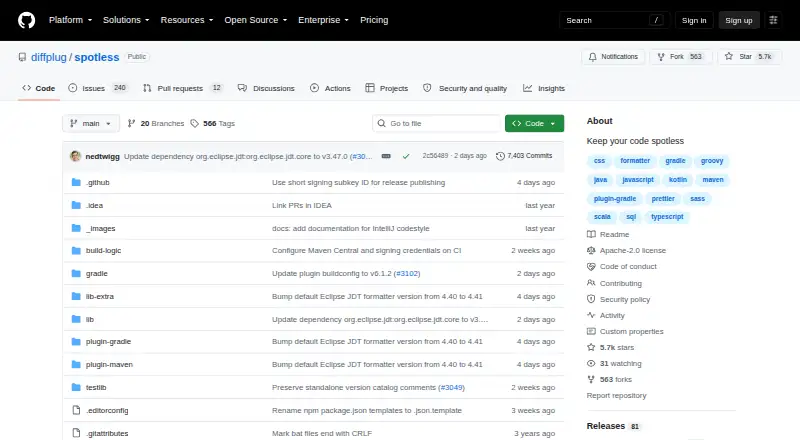
What Spotless is
Spotless is a source-code formatting tool that checks files for formatting violations and can apply fixes. It works with Gradle and Maven, links to an external SBT integration, and supports other build systems. Its listed languages and formats include Java, Kotlin, JavaScript, Python, SQL, YAML, Markdown, TypeScript, C, C++, C#, Go, HTML, CSS, JSON, and Scala, among others. Formatter options include Google Java Format, ktlint, Prettier, ESLint, Black, and ScalaFmt. Developers can use Spotless through integrations linked for VS Code and IntelliJ, or access its library API. It can format changed lines and ignore selected files. For Gradle, Maven, and SBT, the feature matrix lists automatic idempotency and encoding safeguards; Git-defined line endings are also listed for all three. Gradle and Maven support ratcheting from a Git reference, while some capabilities, including ratcheting and fast incremental formatting, are unavailable in SBT. Spotless is open source under the Apache-2.0 license and is available for Linux, macOS, and Windows. Its free plan costs nothing, is free forever, and requires no registration.
Who it suits
Spotless suits developers and teams who want formatting checks and automatic fixes within a Gradle, Maven, SBT, or other build-system workflow. Its broad language coverage and editor integrations may also suit projects that format several languages or prefer working through VS Code or IntelliJ.
What it does well
- Checks files for formatting violations and can apply fixes.
- Supports many languages and formats, including Java, Python, and Markdown.
- Offers formatter options such as Prettier, Black, and ktlint.
- Supports changed-lines formatting, ignore files, and a library API.
- Free forever at no cost, with no registration required.
What to know first
- Some capabilities, including ratcheting, are unavailable in SBT.
- Fast incremental formatting is unavailable in SBT.
- SBT integration is linked externally.
Limits
The free plan is free forever at no cost and requires no registration. In SBT, ratcheting and fast incremental formatting are unavailable.
Plans
| Plan | Billed and limits | Price |
|---|---|---|
| Free | free forever, no registration required · Groundbreaking git interface · Syntax highlighting for over 40 languages · View and diff images · View Simulink, Stateflow, and Simscape models | Free |
| dp.simstate.differ | per license / month year · Everything in Free · Diff Simulink, Stateflow, and Simscape models · Export diffs as PDF and DOCX reports | On request |
As github.com lists them, read 9 Oct 2026. The maker's own page has the final word.
Getting started
- Open the Spotless GitHub website.
- Choose the integration for Gradle or Maven, or follow the external SBT integration link.
- Use the editor integrations linked for VS Code or IntelliJ if you want an editor workflow.
- Start with the free plan, which requires no registration.
Verdict
Choose Spotless if you need an open-source formatter that can check and fix code across multiple languages and build systems. Check the build-tool feature matrix before choosing SBT, since some listed capabilities are unavailable there.
Questions
How much does Spotless cost?
The Free plan costs nothing and is billed free forever. No registration is required.
Is Spotless open source?
Yes. Spotless is open source, and its repository identifies the license as Apache-2.0.
Which build tools does Spotless support?
The project provides Gradle and Maven integrations and links to an external SBT integration. Other build systems are also listed as supported.
Which languages and formatters does it support?
Listed languages and formats include Java, Kotlin, JavaScript, Python, SQL, YAML, and Markdown, among many others. Formatter steps include Google Java Format, ktlint, Prettier, ESLint, Black, and ScalaFmt.
Which platforms can run Spotless?
The listed platforms are Linux, macOS, and Windows.
Are there editor integrations?
Yes. The README links integrations for VS Code and IntelliJ.
Facts from Spotless's own pages
- Build tools
- The project provides integrations for Gradle and Maven, and links to an external SBT integration. · github.com, 9 Oct 2026
- Editor integrations
- The README links Spotless integrations for VS Code and IntelliJ. · github.com, 9 Oct 2026
- Formatter integrations
- The feature matrix lists formatter steps including Google Java Format, ktlint, Prettier, ESLint, Black, and ScalaFmt. · github.com, 9 Oct 2026
- Formatting safeguards
- The feature matrix lists automatic idempotency and encoding safeguards for Gradle, Maven, and SBT. · github.com, 9 Oct 2026
- Git support
- The feature matrix lists ratcheting from a Git reference for Gradle and Maven, and Git-defined line endings for Gradle, Maven, and SBT. · github.com, 9 Oct 2026
- Languages
- Spotless lists support for languages and formats including Java, Kotlin, JavaScript, Python, SQL, YAML, and Markdown. · github.com, 9 Oct 2026
- License
- The GitHub repository identifies its license as Apache-2.0. · github.com, 9 Oct 2026
- Maker location
- DiffPlug says it is based in San Francisco, California. · diffplug.com, 9 Oct 2026
- Maturity of build-tool support
- The README feature matrix marks some capabilities as unavailable in SBT, including ratcheting and fast incremental formatting. · github.com, 9 Oct 2026
- Purpose
- Spotless formats source code and can check files for formatting violations or apply fixes. · github.com, 9 Oct 2026
- Security contact
- The repository asks users to email [email protected] for security disclosures. · github.com, 9 Oct 2026
- Support
- DiffPlug directs questions to its forum and lists a technical support contact on its About page. · diffplug.com, 9 Oct 2026
Where Spotless stands on Freedom251
- Code Formatting Tools#26 of 34