Freedom251 › LLM Evaluation Tools
SWE-bench
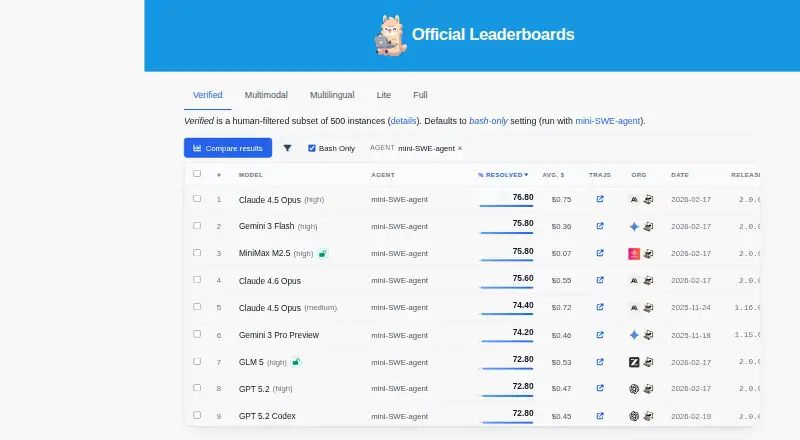
What SWE-bench is
SWE-bench is a free benchmark for evaluating language models on software issues collected from GitHub. A model produces a patch for an issue; the evaluation harness applies it in Docker and runs repository tests to check whether the problem is resolved. The original dataset contains 2,294 tasks drawn from 12 Python repositories. Other datasets include Lite, Verified, Multimodal, and Multilingual. Verified has 500 instances engineers checked as solvable; Multilingual covers 300 instances across nine languages and 42 repositories. Multimodal has 100 development instances with screenshots and interface elements, with test evaluation through the SWE-bench API. Its CLI can submit predictions, retrieve reports, manage evaluation runs, and track cloud performance. Evaluations can run locally with Docker or in the cloud using Modal and sb-cli. Installation requires Python 3.9 or later and Docker. Setup guides cover macOS, Linux, and Windows, with WSL 2 required for Windows. The Docker guide recommends at least 120 GB of free disk space and 16 GB or more of RAM; caching all Docker images can require about 2,000 GB. The project also documents loading data through Hugging Face datasets and using Modal for cloud evaluations.
Who it suits
SWE-bench suits people evaluating language models on software issue resolution. It is relevant to users who can work with Docker locally or use its documented cloud evaluation options.
What it does well
- Free to use.
- Original dataset draws from 12 Python repositories.
- Offers Verified, Multimodal, and Multilingual datasets.
- CLI submits predictions and retrieves reports.
- Cloud evaluations can use Modal and sb-cli.
What to know first
- Docker is required for consistent evaluation.
- Installation requires Python 3.9 or later and Docker.
- Guide recommends at least 120 GB free disk space.
- Caching all Docker images can require about 2,000 GB.
Limits
Docker is required for consistent evaluation. The guide recommends at least 120 GB of free disk space and 16 GB of RAM, while caching all Docker images can require about 2,000 GB.
Getting started
- Open the SWE-bench website
- Install Python 3.9 or later
- Install Docker
- Follow the setup guide for macOS, Linux or Windows
- Use WSL 2 on Windows
- Load datasets with Hugging Face or submit runs through the CLI
Verdict
SWE-bench provides datasets and an evaluation harness for checking model-generated patches against repository tests. Docker is central to consistent evaluations, and its storage requirements can be substantial.
Questions
What does SWE-bench evaluate?
It evaluates language models by asking them to generate patches for GitHub software issues, then running repository tests after applying each patch in Docker.
Is SWE-bench free?
Yes. The project lists a free plan.
Which operating systems are supported?
Setup instructions cover macOS, Linux and Windows. Windows requires WSL 2.
What datasets are available?
The project lists SWE-bench, Lite, Verified, Multimodal and Multilingual datasets. Verified has 500 instances, while Multilingual has 300 across nine languages and 42 repositories.
Can evaluations run in the cloud?
Yes. Documentation describes cloud evaluations using Modal and the sb-cli tool.
Facts from SWE-bench's own pages
- Benchmark variants
- The site lists SWE-bench Lite, Verified, Multimodal, and Multilingual datasets alongside the original benchmark. · swebench.com, 8 Oct 2026
- CLI
- SWE-bench CLI can submit model predictions for evaluation, retrieve reports, manage evaluation runs, and track performance in the cloud. · swebench.com, 8 Oct 2026
- Cloud evaluation
- Evaluations can run in the cloud using Modal, or be submitted through the sb-cli tool. · swebench.com, 9 Oct 2026
- Cloud evaluations
- The documentation describes cloud-based evaluations using Modal and the sb-cli tool. · swebench.com, 8 Oct 2026
- Dataset variants
- The project lists SWE-bench, SWE-bench Lite, SWE-bench Verified, and SWE-bench Multimodal as available datasets. · swebench.com, 9 Oct 2026
- Evaluation limit
- Docker is required for consistent evaluation environments, according to the FAQ. · swebench.com, 8 Oct 2026
- Evaluation limits
- The guide notes that caching all Docker images can require about 2,000 GB of storage. · swebench.com, 9 Oct 2026
- Evaluation method
- Evaluation applies generated patches to repositories and runs tests in Docker containers to check whether issues are resolved. · swebench.com, 9 Oct 2026
- Founded
- 2023 · swebench.com, 28 Sept 2026
- Installation
- The project requires Python 3.9 or later and Docker for the evaluation environment. · swebench.com, 9 Oct 2026
- Integrations
- The project documents using Hugging Face datasets to load SWE-bench data and Modal for cloud evaluations. · swebench.com, 9 Oct 2026
- Multilingual dataset
- SWE-bench Multilingual contains 300 tasks from 42 repositories across nine programming languages. · swebench.com, 9 Oct 2026
- Multimodal dataset
- SWE-bench Multimodal contains 480 instances with issues described using visual elements. · swebench.com, 9 Oct 2026
- Operating systems
- The Docker setup guide provides installation instructions for macOS, Linux, and Windows, with WSL 2 required on Windows. · swebench.com, 9 Oct 2026
- Original dataset
- The original benchmark contains 2,294 task instances drawn from pull requests and issues in 12 Python repositories. · swebench.com, 9 Oct 2026
- Purpose
- SWE-bench evaluates language models on real-world GitHub software issues by asking them to generate patches that resolve the issues. · swebench.com, 9 Oct 2026
- Resource requirements
- The Docker guide recommends at least 120 GB of free disk space and 16 GB or more of RAM. · swebench.com, 9 Oct 2026
- Support
- The contact page directs general inquiries to the SWE-bench team by email. · swebench.com, 9 Oct 2026
- Verified dataset
- SWE-bench Verified is a human-filtered subset containing 500 instances. · swebench.com, 9 Oct 2026
Where SWE-bench stands on Freedom251
- LLM Evaluation Tools#21 of 29