Freedom251 › AI Vector Generators

SVGtoCode
What SVGtoCode is
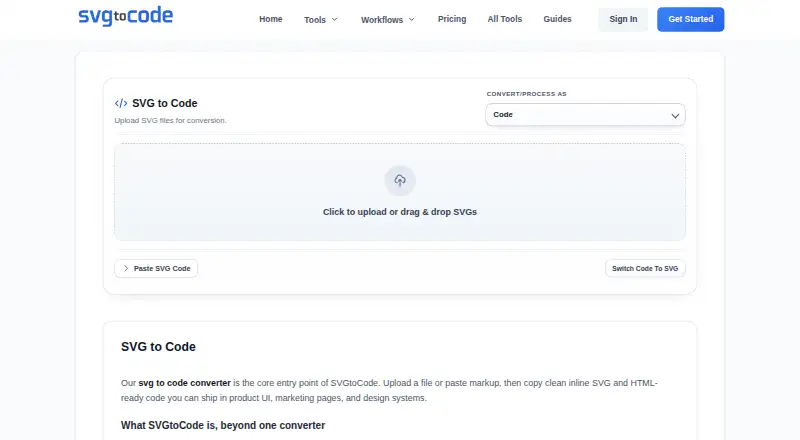
SVGtoCode is a browser-based toolkit for converting, editing, optimizing, and analyzing SVG files. Its code conversion options include JSX, TSX, Vue, HTML, CSS, React Native, Angular, Svelte, and JSON. Image export options include PNG, JPG, WebP, GIF, BMP, ICO, TIFF, PDF, and EPS; the tool list also includes an SVG editor, viewer, prettifier, compressor, and dimensions tool. Guest use and a free account are available. Guest batches are limited to 10 files, each up to 5 MB; a free account allows batches of 20 files, each up to 10 MB. Neither free option includes AI generation or priority support, and Guest use lacks ZIP downloads. Pro adds AI text-to-SVG generation and priority support, with no ads. Pro Monthly is $2.99 a month, Pro Yearly is $24.99 a year, and Lifetime Access is $39.99, paid once. The homepage describes processing as browser-based, and the SVG-to-PNG page says that tool’s files are not uploaded. SVGtoCode identifies developers, designers, agency teams, and product marketers as users.
Who it suits
SVGtoCode suits frontend developers, UI engineers, designers, agency teams, and product marketers who work with SVG files or need SVG-based code and image exports.
What it does well
- Converts SVGs to nine listed code formats.
- Exports to SVG, PNG, JPG, WebP, and other formats.
- Free Account allows batches of 20 files.
- SVG editor, viewer, prettifier, compressor, and dimensions tool included.
- Browser processing is described on the homepage.
What to know first
- Guest use is limited to 10 files per batch.
- Free Account files are limited to 10 MB each.
- Free options exclude AI generation and priority support.
- Pro Monthly costs $2.99 a month.
Limits
Guest use allows 10 files per batch with a 5 MB maximum file size; Free Account allows 20 files per batch with a 10 MB maximum. Both exclude AI generation and priority support, and Guest also excludes ZIP downloads.
Plans
| Plan | Billed and limits | Price |
|---|---|---|
| Free Account | forever · 20 files per batch · 10 MB max file · no AI generation · no priority support · ZIP downloads | Free |
| Guest | instant use · 10 files per batch · 5 MB max file · no AI generation · no priority support · no ZIP downloads | Free |
| Pro Yearly | yearly · All monthly features · 2 months free · early access to beta tools | $24.99 a year |
| Pro Monthly | monthly · Unlimited batch size · AI generation · priority support · no ads | $2.99 a month |
| Lifetime Access | lifetime · One-time payment · forever updates · VIP support | $39.99, paid once |
As svgtocode.com lists them, read 3 Oct 2026. The maker's own page has the final word.
Getting started
- Open https://svgtocode.com/ in a browser.
- Use the tools as a guest or create a free account.
- Choose an SVG conversion, editing, viewing, or optimization tool.
- Use Pro if you need AI Text to SVG, priority support, or its larger batch allowance.
Verdict
SVGtoCode combines SVG conversion, editing, optimization, and analysis tools in a browser-based service. Compare the free batch and file limits with Pro’s added AI generation and support.
Questions
Does SVGtoCode have a free option?
Yes. Guest use is free for instant use, and Free Account costs nothing, billed forever. Both exclude AI generation and priority support.
How much do the paid plans cost?
Pro Monthly costs $2.99 a month. Pro Yearly costs $24.99 a year, and Lifetime Access costs $39.99, paid once.
What are the free batch limits?
Guest allows 10 files per batch and 5 MB per file. Free Account allows 20 files per batch and 10 MB per file.
What platforms does SVGtoCode support?
The listed platform is web, and the site describes SVG processing as browser-based.
What code and asset formats can it produce?
Code workflows include JSX, TSX, Vue, HTML, CSS, React Native, Angular, Svelte, and JSON. Listed asset formats include SVG, PNG, JPG, WebP, GIF, BMP, ICO, TIFF, PDF, and EPS.
Who operates SVGtoCode?
Its About page identifies Abhishek Sharma as the operator and gives a business address in Jaipur, Rajasthan, India.
Facts from SVGtoCode's own pages
- AI generation
- AI Text to SVG generates vector icon concepts from prompts and is described as a Pro-only feature. · svgtocode.com, 3 Oct 2026
- Asset conversions
- The tools list SVG image exports including PNG, JPG, WebP, GIF, BMP, ICO, TIFF, PDF, and EPS. · svgtocode.com, 3 Oct 2026
- Audience
- The homepage identifies frontend developers, UI engineers, designers, agency teams, and product marketers as intended users. · svgtocode.com, 3 Oct 2026
- Batch limits
- The pricing comparison lists batch sizes of 10 files for Guest, 20 for Free Account, and 100 for Pro, while the Pro card says unlimited batch size. · svgtocode.com, 3 Oct 2026
- Code outputs
- Its listed code workflows include SVG conversions to JSX, TSX, Vue, HTML, CSS, React Native, Angular, Svelte, and JSON. · svgtocode.com, 3 Oct 2026
- Data collected
- The privacy policy says the service collects account details, billing-related information, technical usage data, and support communications. · svgtocode.com, 3 Oct 2026
- Data sharing
- The privacy policy says personal data is not sold and may be shared with service providers supporting hosting, analytics, payments, security, and communication. · svgtocode.com, 3 Oct 2026
- Editing and optimization
- The site lists an SVG editor, viewer, prettifier, compressor, and dimensions tool. · svgtocode.com, 3 Oct 2026
- Headquarters
- Jaipur, Rajasthan, India · svgtocode.com, 28 Sept 2026
- Maker
- The About page says SVGtoCode is operated by Abhishek Sharma and gives a business address in Jaipur, Rajasthan, India. · svgtocode.com, 3 Oct 2026
- Payments
- The privacy policy names Stripe, PayPal, and Razorpay as possible payment processors and says full card details are not stored on its servers. · svgtocode.com, 3 Oct 2026
- Privacy and processing
- The homepage says SVG processing is browser-based, and the SVG to PNG page says that tool processes files in the browser so they are never uploaded. · svgtocode.com, 3 Oct 2026
- Purpose
- SVGtoCode provides browser-based tools to convert, optimize, analyze, and work with SVG files. · svgtocode.com, 3 Oct 2026
- Support
- The contact page says support covers account, billing, payment, and tool issues, aims to respond within 24 business hours, and operates Monday to Friday. · svgtocode.com, 3 Oct 2026
Where SVGtoCode stands on Freedom251
- AI Vector Generators#21 of 26