Freedom251 › AI Vector Generators
SVG Generator
What SVG Generator is
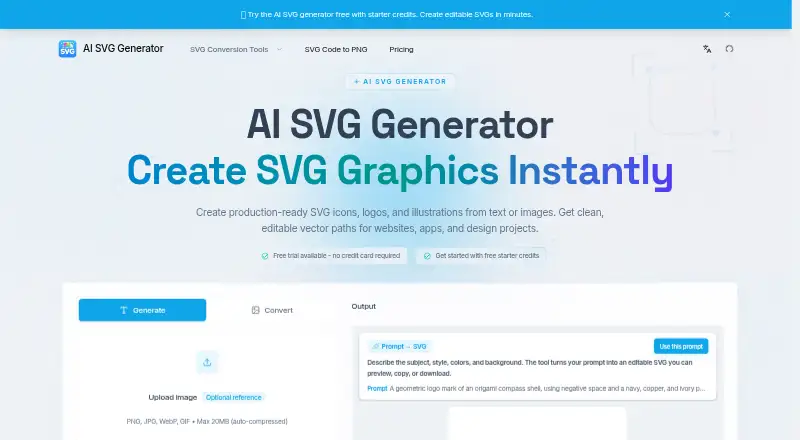
SVG Generator creates icons, logos, and illustrations from text prompts, uploaded images, or both. Its results remain editable vector graphics with paths, shapes, colors, and strokes rather than flattened pixels. Uploads accept PNG, JPG, WebP, and GIF files up to 20 MB, with automatic compression. Paid plans provide SVG, PNG, and other exports with unlimited downloads. The service also describes raw SVG markup and optimized React components as SVGO optimized, JSX compatible, and Tailwind-ready; inline SVG can be styled with CSS. Generated files can be refined in Figma, Illustrator, Sketch, or another SVG editor. Most generations use one to four credits, while downloads and exports use none. Standard costs $19.90/mo with 100 credits; Pro costs $39.90/mo with 350 credits. Both include commercial usage rights and priority support. Free starter credits and a no-card trial are advertised, without a stated duration.
Who it suits
SVG Generator suits designers and developers who need editable vector assets or React-ready SVG output. Paid plans fit commercial projects requiring export rights and recurring credits.
What it does well
- Accepts text, image, or hybrid inputs
- Outputs editable vector paths and shapes
- Provides SVG and PNG exports
- Paid plans include commercial usage rights
- React markup is described as JSX compatible
What to know first
- No free plan is listed
- Uploads are limited to 20 MB
- Generation consumes one to four credits
Limits
Standard includes 100 credits per month for 19.90 USD monthly, while Pro includes 350 credits for 39.90 USD monthly. Each generation usually uses one to four credits; downloads and exports do not consume credits.
Plans
| Plan | Billed and limits | Price |
|---|---|---|
| Standard | $19.9/ mo · 100 credits/month · generations use 1–4 credits · unlimited downloads and exports · commercial usage rights · priority support | $19.90 a month |
| Pro | $39.9/ mo · 350 credits/month · generations use 1–4 credits · unlimited downloads and exports · commercial usage rights · priority support | $39.90 a month |
As svggenerator.org lists them, read 7 Oct 2026. The maker's own page has the final word.
Getting started
- Open SVG Generator in a web browser
- Start the advertised free trial without entering a credit card
- Enter a text prompt, upload a supported image, or combine both
- Edit the resulting vectors in an SVG editor such as Figma, Illustrator, or Sketch
- Choose a paid plan for commercial rights and unlimited downloads or exports
Verdict
SVG Generator connects prompt-based creation with editable vectors and developer-oriented output. Compare the monthly credit allowance with expected generation volume before choosing Standard or Pro.
Questions
How much does SVG Generator cost?
Standard is $19.90 a month with 100 credits. Pro is $39.90 a month with 350 credits.
Is there a free option?
There is no listed free plan. The site advertises starter credits and a free trial without a credit card.
What files can I upload and export?
Uploads support PNG, JPG, WebP, and GIF files up to 20 MB. Exports include SVG, PNG, and more formats.
Are generated graphics editable?
Yes. Results use editable vector paths, shapes, colors, and strokes and can be refined in common SVG editors.
Can I use outputs commercially?
Commercial usage rights are included with both paid plans.
Can I cancel monthly billing?
The maker says monthly plans can be canceled anytime.
Facts from SVG Generator's own pages
- Cancellation
- The maker says monthly plans can be canceled anytime. · svggenerator.org, 7 Oct 2026
- Code output
- The site describes optimized React components and raw SVG markup, and labels its output SVGO optimized, JSX compatible, and Tailwind-ready. · svggenerator.org, 7 Oct 2026
- Commercial rights
- The paid plans include commercial usage rights for generated SVGs. · svggenerator.org, 7 Oct 2026
- Credits
- Most generations use 1–4 credits, and downloads and exports do not use extra credits. · svggenerator.org, 7 Oct 2026
- Design tools
- The maker says generated SVGs can be refined in Figma, Illustrator, Sketch, or any SVG editor. · svggenerator.org, 7 Oct 2026
- Developer workflow
- The maker describes copying inline SVG markup into React and styling fills and strokes with CSS. · svggenerator.org, 7 Oct 2026
- Editable output
- Generated graphics have editable vector paths, shapes, colors, and strokes rather than flattened pixels. · svggenerator.org, 7 Oct 2026
- Exports
- The pricing page lists SVG, PNG, and more as export formats, with unlimited downloads and exports on the paid plans. · svggenerator.org, 7 Oct 2026
- Free access
- The site advertises free starter credits and a free trial without a credit card, but does not state a trial duration. · svggenerator.org, 7 Oct 2026
- Input limit
- Image uploads support PNG, JPG, WebP, and GIF, with a maximum size of 20 MB and automatic compression. · svggenerator.org, 7 Oct 2026
- Local conversion privacy
- The separate SVG-to-PNG converter page says conversion runs locally in the browser without server involvement. · svggenerator.org, 7 Oct 2026
- Support
- Both paid plans list priority support. · svggenerator.org, 7 Oct 2026
- What it does
- Creates production-ready SVG icons, logos, and illustrations from text prompts, uploaded images, or hybrid inputs. · svggenerator.org, 7 Oct 2026
Where SVG Generator stands on Freedom251
- AI Vector Generators#24 of 26