Freedom251 › Vector Graphics Software
SVG-Edit
What SVG-Edit is
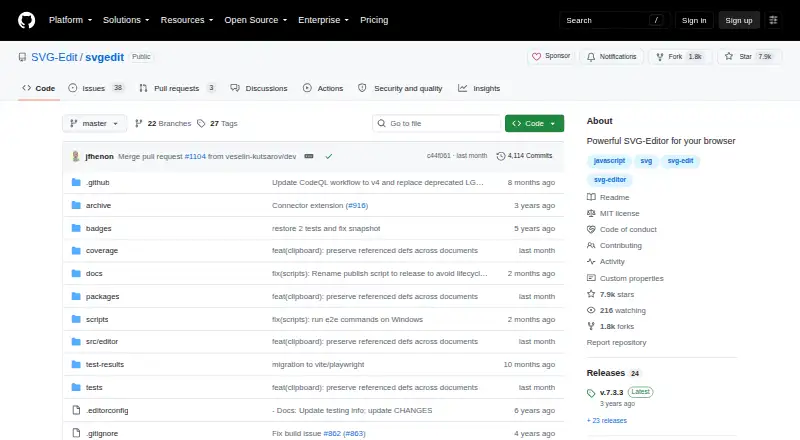
SVG-Edit is a free, open-source editor for drawing SVG graphics in modern web browsers. The project links to browser builds for its current V7 master branch and the latest version published on npm. It is made up of an editor interface and an underlying svgcanvas component, which developers can use to build a separate editor. A web application can initialize the editor inside a div with numeric width and height settings and configure extensions; the project also documents a sample React-based extension. Developers can install svgcanvas from npm and import it into an application. SVG-Edit can be built from a cloned or copied repository and served from a user's own web server, and the source is published under the MIT license. Recent Chrome, Firefox, and Safari versions are supported. Older browsers may require an earlier version; the README links to 6.1.0 and 5.1.0 builds for older browser support or abandoned features. The project points users to GitHub issues and discussions for community help.
Who it suits
SVG-Edit suits people who want a browser-based SVG drawing editor, as well as developers embedding the editor or using svgcanvas in their own applications. Its self-hosting and extension options may suit teams adapting the editor for a web application.
What it does well
- Free and published under the MIT license
- Browser builds available for V7 master and latest npm version
- svgcanvas can be used to build a separate editor
- Can be built and served from a user's own web server
- SVG and PDF export are listed
What to know first
- Older browsers may require an earlier version
- No desktop app is listed
Limits
The free plan is the MIT-licensed SVG editor. Older browsers may need an earlier version, and self-hosting requires building and serving the bundle yourself.
Plans
| Plan | Billed and limits | Price |
|---|---|---|
| SVGEdit | Open source SVG editor · MIT license | Free |
As github.com lists them, read 8 Oct 2026. The maker's own page has the final word.
Getting started
- Open the project website on GitHub.
- Use a linked browser build for the current V7 master branch or latest npm release.
- For self-hosting, clone or copy the repository, build it and serve the bundle from your web server.
- For a custom editor, install svgcanvas from npm or initialize the full editor in a web application div.
- Configure extensions through userExtensions if needed.
Verdict
SVG-Edit offers a free browser editor alongside components and integration options for developers. Its documented browser support focuses on recent Chrome, Firefox, and Safari versions.
Questions
How much does SVG-Edit cost?
The listed plan is free, and the project is published under the MIT license.
Can I use SVG-Edit in a browser?
Yes. The project links to browser builds for its current V7 master branch and the latest published npm version. Recent Chrome, Firefox and Safari versions are supported.
Can I install it as a desktop app?
No desktop app is listed. SVG-Edit is available as a browser app.
Can developers integrate or extend SVG-Edit?
A web application can initialize the editor in a div with numeric width and height settings and configure extensions. Developers can also install svgcanvas from npm and use it to build a separate editor.
Can I host SVG-Edit myself?
Yes. You can clone or copy the repository, build it and serve the bundle from your own web server.
Where can I get help?
The project points users to GitHub issues and discussions, a Stack Overflow group and a Google Groups email address.
Facts from SVG-Edit's own pages
- Browser access
- The project links to browser builds for the current V7 master branch and the latest published npm version. · github.com, 8 Oct 2026
- Browser builds
- The README links to browser builds of SVGEdit V7 from the master branch and the latest version published on npm. · github.com, 8 Oct 2026
- Canvas package
- The underlying svgcanvas can be installed from npm and used to build a custom SVG editor. · github.com, 8 Oct 2026
- Community support
- The README directs contributors to create an issue or discussion and links to a Stack Overflow group. · github.com, 8 Oct 2026
- Components
- SVGEdit consists of an underlying svgcanvas and an editor UI, and the canvas can be used to build a separate editor. · github.com, 8 Oct 2026
- Developer integration
- The svgcanvas package can be installed from npm and imported into an application. · github.com, 8 Oct 2026
- Extensions
- The project documents a sample React-based extension that can be built and enabled through userExtensions configuration. · github.com, 8 Oct 2026
- Hosting
- Users can clone or copy the repository, build it, and serve the bundle from their own web server. · github.com, 8 Oct 2026
- Integration
- A web application can initialize the editor in a div with numeric width and height and configure extensions. · github.com, 8 Oct 2026
- Legacy versions
- The README links to SVGEdit 6.1.0 and 5.1.0 builds and notes that older versions may be needed for older browsers or abandoned features. · github.com, 8 Oct 2026
- License
- The repository provides SVGEdit under the MIT license. · github.com, 8 Oct 2026
- Older browsers
- The README says older browsers may require an older SVGEdit version. · github.com, 8 Oct 2026
- Open source
- The repository is published under the MIT license. · github.com, 8 Oct 2026
- Product
- SVGEdit is a fast, web-based, JavaScript-driven SVG drawing editor that works in modern browsers. · github.com, 8 Oct 2026
- Project history
- The README says the project began more than 15 years ago and was revived after a period without maintenance. · github.com, 8 Oct 2026
- Purpose
- SVGEdit is a fast, web-based, JavaScript-driven SVG drawing editor for modern browsers. · github.com, 8 Oct 2026
- Security
- The repository page links to GitHub's Security and quality section; the README does not state a product security certification or compliance claim. · github.com, 8 Oct 2026
- Security advisories
- GitHub reports no published security advisories for the repository. · github.com, 8 Oct 2026
- Security policy
- GitHub reports that the project has not set up a SECURITY.md file. · github.com, 8 Oct 2026
- Self-hosting
- Users can build SVGEdit and serve it from their own web server. · github.com, 8 Oct 2026
- Support
- The project directs users to GitHub issues and discussions and lists a Google Groups email address for the SVG-Edit organization. · github.com, 8 Oct 2026
- Supported browsers
- The project says recent Chrome, Firefox, and Safari versions are supported, and older browsers may require an older package version. · github.com, 8 Oct 2026
Where SVG-Edit stands on Freedom251
- Vector Graphics Software#15 of 51