Freedom251 › AI Poster Generators
Summagraph
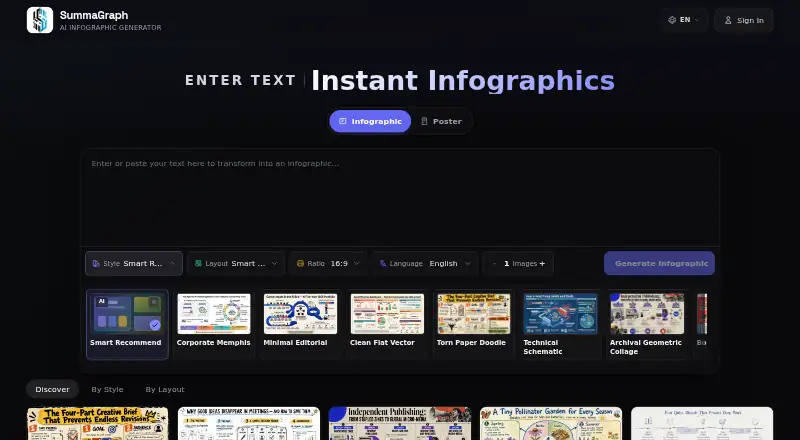
What Summagraph is
Summagraph is a web-based tool that uses AI to turn text into infographic images for sharing. It accepts articles, notes, outlines, product comparisons, and research summaries, then offers a choice of 22 active visual styles and 20 layouts. The homepage lists output in 9+ languages. Finished images can be downloaded for use on blogs, landing pages, social media, or for internal knowledge sharing. Summagraph names marketers, educators, creators, and students among the people it serves.
The Free plan provides 10 credits on sign-up and access to all styles and layouts, but its downloads carry a watermark. Paid plans use one-time Stripe payments for credit packs rather than subscriptions. Lite costs $1.99, paid once and includes 50 credits, described as 10 generations; its downloads have no watermark, and the credits never expire. Pro costs $6.90, paid once for 200 credits, or 40 generations, with unwatermarked downloads and priority support. The service uses static publishing mode and supports data import. Email is the primary channel for billing questions, account help, generation issues, and product feedback.
Who it suits
Summagraph suits marketers, educators, creators, and students who need to turn written material into shareable infographic images. Its range of accepted text inputs and output languages can serve people preparing visuals for web pages, social posts, or internal knowledge sharing.
What it does well
- Accepts articles, notes, outlines, comparisons, and research summaries.
- Offers 22 active styles and 20 layouts.
- Supports 9+ output languages.
- Images can be downloaded for several sharing contexts.
- Lite credits never expire.
- Paid packs use one-time payments, not subscriptions.
What to know first
- Free-plan downloads carry a watermark.
- Lite includes 50 credits, or 10 generations.
- Pro is a one-time payment of $6.90, paid once.
Limits
The Free plan includes 10 credits on sign-up, and its downloads are watermarked. Lite provides 50 credits, or 10 generations, while Pro provides 200 credits, or 40 generations; both paid plans include unwatermarked downloads.
Plans
| Plan | Billed and limits | Price |
|---|---|---|
| Free | 10 credits on sign-up · all styles and layouts · watermarked downloads | Free |
| Lite | one-time · 50 credits (10 generations) · no-watermark downloads · credits never expire | $1.99, paid once |
| Pro | one-time · 200 credits (40 generations) · no-watermark downloads · priority support | $6.90, paid once |
As summagraph.com lists them, read 9 Oct 2026. The maker's own page has the final word.
Getting started
- Visit https://www.summagraph.com/ in a web browser.
- Start with the Free plan, which provides 10 credits on sign-up, or choose a paid credit pack.
- Import or provide an article, note, outline, product comparison, or research summary.
- Choose from the available visual styles and layouts and select an output language.
- Generate and download the infographic image for sharing.
Verdict
Choose Summagraph if you want to convert varied written material into downloadable infographic images and prefer one-time credit packs. The Free plan provides access to all styles and layouts, but its downloads are watermarked; unwatermarked downloads require Lite or Pro.
Questions
Is Summagraph free?
Yes. The Free plan costs nothing and provides 10 credits on sign-up, all styles and layouts, and watermarked downloads.
What do the paid plans cost?
Lite costs $1.99, paid once for 50 credits, or 10 generations. Pro costs $6.90, paid once for 200 credits, or 40 generations.
Are paid plans subscriptions?
No. Paid credit packs use one-time Stripe payments rather than subscriptions.
Which platforms can I use Summagraph on?
Summagraph is available on the web.
What can I turn into an infographic?
It accepts articles, notes, outlines, product comparisons, and research summaries.
How can I contact support?
Email is the primary support channel for billing questions, account help, generation issues, and product feedback.
Facts from Summagraph's own pages
- Audience
- Summagraph says it serves marketers, educators, creators, and students. · summagraph.com, 9 Oct 2026
- Credit expiry
- Lite plan credits never expire. · summagraph.com, 9 Oct 2026
- Downloads
- Users can download infographic images for blogs, landing pages, social media, or internal knowledge sharing. · summagraph.com, 9 Oct 2026
- Free plan limit
- Free plan downloads are watermarked. · summagraph.com, 9 Oct 2026
- Input
- It accepts articles, notes, outlines, product comparisons, and research summaries as input. · summagraph.com, 9 Oct 2026
- Languages
- The homepage says it supports 9+ output languages. · summagraph.com, 9 Oct 2026
- Payments
- Summagraph says paid credit packs use one-time Stripe payments rather than subscriptions. · summagraph.com, 9 Oct 2026
- Product
- Summagraph converts text into share-ready infographic images using AI. · summagraph.com, 9 Oct 2026
- Security and compliance
- The opened maker pages did not state specific security certifications or compliance standards. · summagraph.com, 9 Oct 2026
- Styles and layouts
- The homepage lists 22 active visual styles and 20 layouts. · summagraph.com, 9 Oct 2026
- Support
- The contact page says email is the primary support channel for billing questions, account help, generation issues, and product feedback. · summagraph.com, 9 Oct 2026
Where Summagraph stands on Freedom251
- AI Poster Generators#18 of 24
- Infographic Software#36 of 42