Freedom251 › AI Video Caption Generators
SubFlow AI
by SubFlow AI
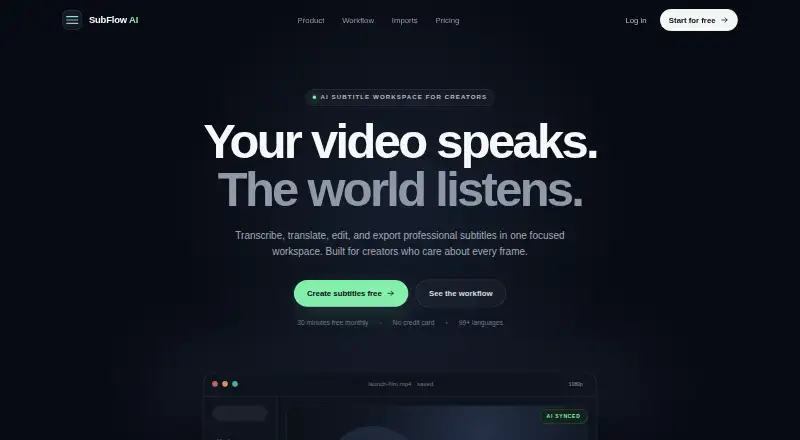
What SubFlow AI is
SubFlow AI brings video transcription, translation, subtitle editing, and export into one workspace. It uses Whisper speech recognition and contextual translation to create a synced bilingual draft, which users can refine by changing wording, splitting or merging captions, and keeping translations aligned with the original timing. The service supports more than 99 target languages and accepts MP4, MOV, MKV, and WebM uploads. Captions can be styled, exported as SRT or VTT, or rendered into a video. Paid plans provide watermark-free Full HD video export. The Free plan includes 30 processing minutes monthly and allows videos up to 15 minutes; Basic costs $2.99 a month for 200 minutes and videos up to 60 minutes. Pro costs $9.99 a month and includes 1,000 minutes, videos up to 180 minutes, and AI voiceover dubbing. SubFlow AI is available on the web and Android, with the web workspace intended for detailed editing on larger screens. Projects are private to the account, and users can delete project media and account data.
Who it suits
It suits people who need to create and edit bilingual subtitles for video, especially when they want exports or burned-in captions. Teams needing longer videos, more processing time, or AI dubbing can consider a paid plan.
What it does well
- Supports more than 99 target languages.
- Edits bilingual wording and caption timing.
- Exports SRT and VTT subtitle files.
- Burns styled captions into video.
- Offers web and Android access.
What to know first
- Free accounts get 30 processing minutes monthly.
- Free plan limits videos to 15 minutes.
- Watermark-free Full HD export requires a paid plan.
Plans
| Plan | Billed and limits | Price |
|---|---|---|
| Free | Monthly allowance; no charge · 30 processing minutes/month · 15-minute videos · 99+ languages · SRT and watermarked video | Free |
| Basic | Monthly billing · 200 processing minutes/month · 60-minute videos · No export watermark · Full HD video export | $2.99 a month |
| Pro | Monthly billing · 1,000 processing minutes/month · 180-minute videos · AI voiceover dubbing · Priority processing + H.265 | $9.99 a month |
As speaksubtitle.com lists them, read 11 Oct 2026. The maker's own page has the final word.
Verdict
SubFlow AI combines transcription, translation, subtitle editing, and video rendering in a single workspace. Check the monthly processing allowance and maximum video length for the plan you need.
Facts from SubFlow AI's own pages
- Burn-in captions
- Yes · speaksubtitle.com, 22 Sept 2026
- Caption styling
- Yes · speaksubtitle.com, 22 Sept 2026
- Data retention
- Website uploads and generated subtitles are retained until project or account deletion; mobile-app audio is deleted after successful processing, or kept up to 24 hours after a failure for retry. · speaksubtitle.com, 11 Oct 2026
- Dubbing
- The Pro plan includes AI voiceover dubbing, which the pricing page says covers about 85 languages, including Persian and Arabic. · speaksubtitle.com, 11 Oct 2026
- Editing
- The bilingual editor lets users edit wording, split or merge captions, and keep translations aligned with the original timing. · speaksubtitle.com, 11 Oct 2026
- Exports
- Users can export SRT or VTT subtitles, or render subtitles into a video; paid plans support watermark-free Full HD export. · speaksubtitle.com, 11 Oct 2026
- Free plan
- Yes · speaksubtitle.com, 22 Sept 2026
- Headquarters
- Shanghai, China · speaksubtitle.com, 19 Oct 2026
- Integrations
- Google Drive, Dropbox, TikTok, and Instagram are covered by workflow guides; users download or save a media file and upload it to SubFlow. · speaksubtitle.com, 11 Oct 2026
- Languages
- The platform supports more than 99 target languages. · speaksubtitle.com, 11 Oct 2026
- Max video length
- 60 · speaksubtitle.com, 22 Sept 2026
- Media formats
- The homepage lists MP4, MOV, MKV, and WebM as upload formats. · speaksubtitle.com, 11 Oct 2026
- Mobile app
- An Android app is available on Google Play, while the web workspace is designed for detailed editing on larger screens. · speaksubtitle.com, 11 Oct 2026
- Payments
- The privacy policy says subscription billing is handled by Google Play or PayPal and SubFlow AI does not store payment card or bank details. · speaksubtitle.com, 11 Oct 2026
- Privacy
- Projects are private to the account, and users can delete project media and account data from the product at any time. · speaksubtitle.com, 11 Oct 2026
- Security
- The privacy policy says data is encrypted in transit with TLS/SSL and at rest with AES-256, and that access is restricted to authorized personnel. · speaksubtitle.com, 11 Oct 2026
- Paid from
- 2.99 · speaksubtitle.com, 22 Sept 2026
- Subtitle export
- other formats · speaksubtitle.com, 22 Sept 2026
- Support
- The site lists [email protected] as its support contact. · speaksubtitle.com, 11 Oct 2026
- Transcription and translation
- The service uses Whisper speech recognition and contextual translation to create a synced bilingual draft. · speaksubtitle.com, 11 Oct 2026
- Usage limits
- Free accounts receive 30 processing minutes per month and can process videos up to 15 minutes; processing pauses when the allowance is exhausted until it resets 30 days after it started. · speaksubtitle.com, 11 Oct 2026
- What it does
- SubFlow AI transcribes, translates, edits, and exports subtitles for video in one workspace. · speaksubtitle.com, 11 Oct 2026
Where SubFlow AI stands on Freedom251
- AI Video Caption Generators#32 of 99