Freedom251 › AI Video Caption Generators

AirCaption
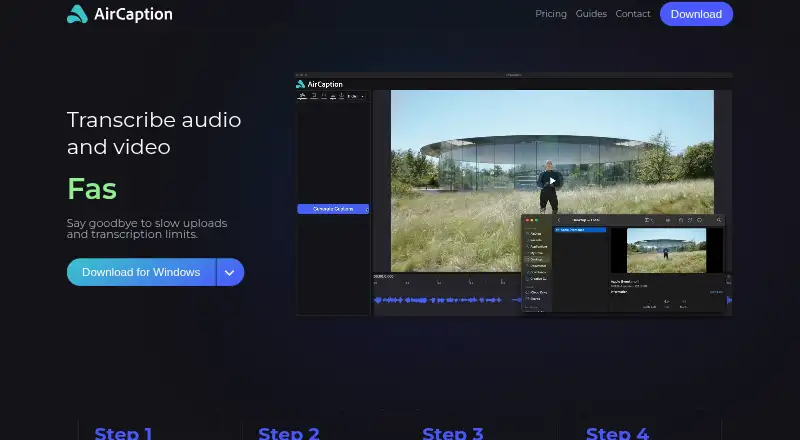
What AirCaption is
AirCaption is desktop software for turning audio and video into captions and transcripts on macOS and Windows. Transcription can run on the user’s machine with NVIDIA, Cohere, or Whisper models, and the site says it works offline by default. Users can edit caption text and timing with hotkeys, find-and-replace tools, and a waveform. Subtitles can be translated into more than 80 languages, including through an optional cloud translation feature. Exports include SRT, VTT, plain text, and video with captions burned in. Entire folders can be dragged into a transcription queue. The free plan is available, while the listed Pro plan costs $9.99 a month and adds 30 hours of cloud translation, medium and large AI models, and multiple queued files. AirCaption says content stays on the machine unless submitted to cloud translation or support.
Who it suits
It suits video editors, podcasters, journalists, course creators, language learners, and others preparing captions or transcripts. It is also relevant to users who need offline processing on macOS or Windows.
What it does well
- Offline transcription runs on the user’s machine
- Translates subtitles into more than 80 languages
- Exports SRT, VTT, text, or captioned video
- Batch transcription accepts entire folders
- Free plan available
What to know first
- Cloud translation sends selected text to Google Gemini
- Pro cloud translation is limited to 30 hours monthly
- Cloud and support submissions leave the machine
Plans
| Plan | Billed and limits | Price |
|---|---|---|
| Pro | $9.99/Month · Cloud translation — 30 hours per month · Medium and large AI models · Multiple files in transcription queue | $9.99 a month |
| Essentials | Unlimited AI transcription · Cloud translation — 10 minutes per month | Free |
As aircaption.com lists them, read 11 Oct 2026. The maker's own page has the final word.
Verdict
AirCaption combines local transcription, caption editing, broad subtitle translation, and several export formats. The free plan covers core use, while Pro adds cloud translation and larger models for users who need those options.
Facts from AirCaption's own pages
- Batch transcription
- Users can drag and drop entire folders into a queue, while the Pro plan lists multiple files in the transcription queue. · aircaption.com, 11 Oct 2026
- Burn-in captions
- Yes · aircaption.com, 22 Sept 2026
- Cloud data handling
- Cloud translation sends selected caption text to Google Gemini API, and AirCaption says submitted content and results are deleted within 30 days of job completion. · aircaption.com, 11 Oct 2026
- Data safeguards
- AirCaption says it implements reasonable administrative, technical, and physical safeguards and cannot guarantee absolute security. · aircaption.com, 11 Oct 2026
- Editing
- Users can edit caption text and timing with hotkeys, find and replace, and a waveform. · aircaption.com, 11 Oct 2026
- Exports
- Users can export SRT, VTT, plain text, or video with captions burned in. · aircaption.com, 11 Oct 2026
- Free plan
- Yes · aircaption.com, 22 Sept 2026
- Intended users
- The site names video editors, podcasters, language learners, legal professionals, marketers, researchers, event organizers, course creators, and journalists as users. · aircaption.com, 11 Oct 2026
- Offline use
- The site says transcription works offline and the software runs on the user's machine by default. · aircaption.com, 11 Oct 2026
- Payment processor
- Stripe processes subscription payments and stores payment details; AirCaption says it does not directly store payment card details. · aircaption.com, 11 Oct 2026
- Privacy
- AirCaption says it does not collect, transmit, or store user content except when submitted to a cloud feature or support request. · aircaption.com, 11 Oct 2026
- Purpose
- AirCaption transcribes audio and video into captions and transcripts. · aircaption.com, 11 Oct 2026
- Paid from
- 9.99 · aircaption.com, 22 Sept 2026
- Subtitle export
- other formats · aircaption.com, 22 Sept 2026
- Support
- Users can send ideas and feedback to the AirCaption development team through a form requesting name, email, subject, and feedback. · aircaption.com, 11 Oct 2026
- Supported systems
- The download page lists Mac with Apple Silicon on macOS 11.00+, Mac Intel on macOS 10.15+, and Windows 7+. · aircaption.com, 11 Oct 2026
- Transcription models
- It offers NVIDIA, Cohere, or Whisper models running on the user's machine. · aircaption.com, 11 Oct 2026
- Translation
- It can translate subtitles into more than 80 languages, including through optional cloud translation. · aircaption.com, 11 Oct 2026
Where AirCaption stands on Freedom251
- AI Video Caption Generators#33 of 99