Freedom251 › Speed Reading Apps
Strobe
What Strobe is
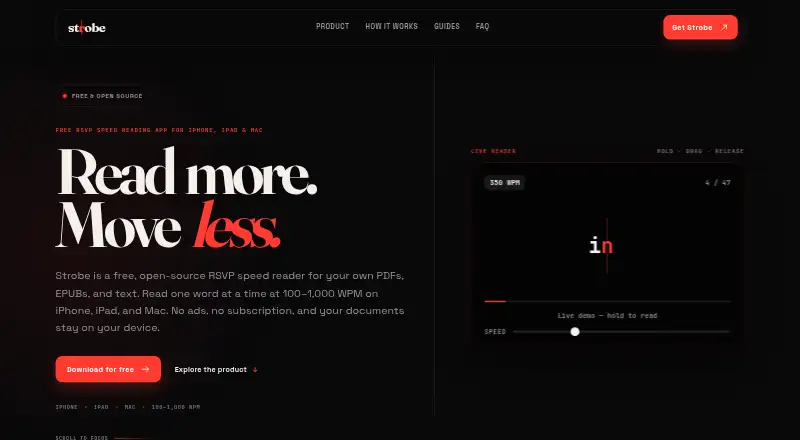
Strobe is a free RSVP reader for PDFs, EPUBs, and text on iOS, iPadOS, and macOS. It displays one word at a time at a fixed point, with reading speed adjustable from 100 to 1,000 words per minute. Smart Timing varies the interval between words based on length, punctuation, sentence endings, and complexity. Readers can import PDF, EPUB, TXT, and Markdown files or paste text. Search, chapter browsing, and resuming at the exact word where reading stopped help with longer documents. Imported text works offline, while documents, settings, and reading progress stay on the device. Strobe has no account, analytics, document uploads, or cloud sync between devices. Accessibility support includes VoiceOver, larger text, Reduced Motion, Dynamic Type, and keyboard controls on compatible devices. The maker describes it for researchers reading papers, students working through course materials, and heavy readers handling long documents. Strobe’s source code is public on GitHub, and the site says it was developed by Jaafar Abdeen. It is free, with no subscription or in-app purchases, and there is no free trial. DRM-protected EPUBs and password-protected PDFs cannot be imported; PDFs need a text layer because Strobe does not run OCR.
Who it suits
Strobe suits researchers, students, and heavy readers who want to read documents through a one-word-at-a-time display. It is also a fit for readers who value offline access, on-device document storage, and accessibility options such as VoiceOver and Dynamic Type.
What it does well
- Adjustable reading speed from 100 to 1,000 words per minute.
- Imports PDF, EPUB, TXT, and Markdown files and accepts pasted text.
- Smart Timing accounts for punctuation, sentence endings, and word complexity.
- Search, chapter browsing, and exact-word resume support longer documents.
- Documents and progress stay on the device; imported text works offline.
- Free plan has no subscription or in-app purchases.
What to know first
- No cloud sync between devices.
- DRM-protected EPUBs and password-protected PDFs cannot be imported.
- PDFs need a text layer; Strobe does not run OCR.
Limits
The free plan costs nothing and includes the app without a subscription or in-app purchases. DRM-protected EPUBs and password-protected PDFs are unsupported, and PDFs need a text layer because Strobe does not run OCR.
Plans
| Plan | Billed and limits | Price |
|---|---|---|
| Free | No ads · No subscription · No in-app purchases · iPhone, iPad, Mac | Free |
As strobefast.app lists them, read 7 Oct 2026. The maker's own page has the final word.
Getting started
- Open https://strobefast.app/.
- Use Strobe on iOS, iPadOS, or macOS.
- Import a PDF, EPUB, TXT, or Markdown file, or paste text.
- Set the reading speed between 100 and 1,000 words per minute.
- Use search or chapter browsing, then resume from the word where you stopped.
Verdict
Choose Strobe if you want a free RSVP reader for supported documents, with adjustable pacing, offline reading, and on-device storage. Look elsewhere if your EPUBs have DRM, your PDFs are password-protected or image-only, or you need reading progress synced across devices.
Questions
How much does Strobe cost?
Its Free plan costs nothing. The plan has no subscription or in-app purchases.
Which devices support Strobe?
Strobe is listed for iOS, iPadOS, and macOS.
What file types can I read?
Strobe imports PDF, EPUB, TXT, and Markdown files, and accepts pasted text. DRM-protected EPUBs and password-protected PDFs cannot be imported; PDFs need a text layer.
Does Strobe work offline or sync between devices?
Imported text can be read offline. Strobe does not offer cloud sync between devices.
Is Strobe open source?
Yes. Its source code is public on GitHub.
Who developed Strobe?
The site says Strobe was developed by Jaafar Abdeen.
Facts from Strobe's own pages
- Accessibility
- Strobe supports VoiceOver, larger text, Reduced Motion, Dynamic Type, and keyboard controls on compatible devices. · strobefast.app, 7 Oct 2026
- Developer
- The site says Strobe was developed by Jaafar Abdeen. · strobefast.app, 7 Oct 2026
- File limits
- DRM-protected EPUBs and password-protected PDFs cannot be imported; PDFs need a text layer because Strobe does not run OCR. · strobefast.app, 7 Oct 2026
- Intended readers
- The maker describes use for researchers reading papers, students reading course materials, and heavy readers handling long-form documents. · strobefast.app, 7 Oct 2026
- Navigation
- Readers can search passages, browse chapters, and resume from the exact word where they stopped. · strobefast.app, 7 Oct 2026
- Offline use
- Imported text can be read offline, and Strobe does not offer cloud sync between devices. · strobefast.app, 7 Oct 2026
- Open source
- Strobe’s source code is public on GitHub. · strobefast.app, 7 Oct 2026
- Privacy
- Documents, reading progress, and settings stay on the device, and the app has no account, analytics, or document uploads. · strobefast.app, 7 Oct 2026
- Reading speed
- Reading speed is adjustable from 100 to 1,000 words per minute. · strobefast.app, 7 Oct 2026
- Support
- The maker lists [email protected] as its contact email. · strobefast.app, 7 Oct 2026
- Supported input
- It imports PDF, EPUB, TXT, and Markdown files and accepts pasted text. · strobefast.app, 7 Oct 2026
- Timing
- Smart Timing adjusts intervals for word length, punctuation, sentence endings, and word complexity. · strobefast.app, 7 Oct 2026
- What it does
- Strobe is an RSVP reader that presents words one at a time at a fixed point for reading PDFs, EPUBs, and text. · strobefast.app, 7 Oct 2026
Where Strobe stands on Freedom251
- Speed Reading Apps#20 of 27