Freedom251 › Bookmark Managers
StowLink
What StowLink is
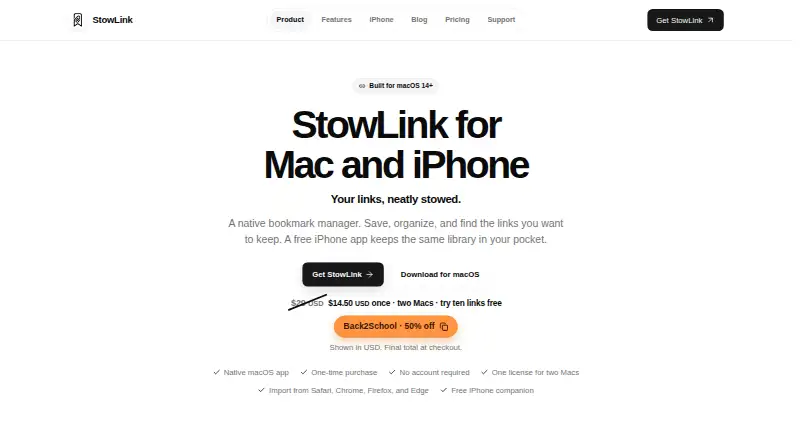
StowLink is a bookmark manager for Mac, with a companion iPhone app for saving and organizing links. On Mac, a copied URL can be captured with Command-V or a global keyboard shortcut, even when the app window is closed. Bookmarks can be imported from Safari, Chrome, Firefox, or Edge, or from a bookmarks.html export. Nested folders and notes help organize saved links. Search can locate entries by title, URL, domain, description, or folder, and saved pages can display rich previews, including playable video previews.
The Mac app requires macOS 14 or later. The iPhone app requires iOS 17 or later, saves links through the Share Sheet, and works without a Mac license. Library data remains on the device by default; optional iCloud sync uses the owner's Apple Account and Apple's CloudKit. The maker says optional anonymous usage signals require consent, can be disabled in Settings, and exclude saved URLs, titles, notes, folder names, license keys, and instance IDs. The iPhone plan is free. The Mac plan is $14.50, paid once, allows activation on up to two Macs, and includes saving ten links before unlocking the rest.
Who it suits
StowLink suits developers, designers, researchers, and people who manage everyday link collections. It is aimed at people using Mac or iPhone who want folders, notes, and searchable saved links.
What it does well
- Capture copied URLs with Command-V or a global shortcut.
- Import from four named browsers or a bookmarks.html export.
- Organize links in nested folders and add notes.
- Search by title, URL, domain, description, or folder.
- Optional iCloud sync; library data stays on-device by default.
What to know first
- Mac requires macOS 14 or later.
- iPhone requires iOS 17 or later.
- The Mac plan allows ten links before unlocking the rest.
- A Windows version is not out yet.
Limits
The free iPhone plan is billed Free on the App Store and does not need a Mac license. The Mac plan costs $14.50, paid once, permits up to two active Macs, and allows ten links to be saved before unlocking the rest.
Plans
| Plan | Billed and limits | Price |
|---|---|---|
| StowLink for iPhone | Free on the App Store · Works on its own; does not need a Mac license | Free |
| StowLink for Mac | $14.50 USD once (page also shows “$29 USD Originally $29 USD, now $14.50 USD”) · up to two Macs · save ten links free before unlocking the rest | $14.50, paid once |
As stowlink.app lists them, read 8 Oct 2026. The maker's own page has the final word.
Getting started
- Visit the StowLink website.
- Install the Mac app on a Mac running macOS 14 or later, or the iPhone app on iOS 17 or later.
- Use the free iPhone app on its own, or choose the Mac plan for the Mac app.
- Import bookmarks from Safari, Chrome, Firefox, Edge, or a bookmarks.html export.
- Save links on Mac with Command-V or the global keyboard shortcut; on iPhone, use the Share Sheet.
- Turn on optional iCloud sync if you want to sync through your Apple Account.
Verdict
Pick StowLink if you want a Mac bookmark library with nested folders, notes, varied search fields, and an iPhone companion. The iPhone app is free and independent, while the Mac plan costs $14.50, paid once. Look elsewhere if you need a Windows version, full-text search, or a browser extension.
Questions
How much does StowLink cost?
StowLink for iPhone is free. StowLink for Mac is $14.50, paid once; the pricing page also shows $29 USD originally and $14.50 USD now.
Is there a free plan?
Yes. The iPhone app is free and works on its own. The Mac plan lets users save ten links before unlocking the rest.
Which platforms does it support?
The listed platforms are iOS and macOS. The maker says the Windows version is not out yet.
Does StowLink sync bookmarks?
Library data stays on the device by default. Optional iCloud sync uses the user's Apple Account and Apple's CloudKit.
Does it have full-text search or a browser extension?
Full-text search and a browser extension are both listed as unavailable. Search can find links by title, URL, domain, description, or folder.
How many Macs can use one license?
One Mac license can be active on up to two Macs at a time. A Mac can be deactivated to free its slot.
Facts from StowLink's own pages
- Capture
- On Mac, users can save a copied URL with Command-V or a global keyboard shortcut when the app window is closed. · stowlink.app, 8 Oct 2026
- Import
- Users can import bookmarks from Safari, Chrome, Firefox, and Edge, or import a bookmarks.html export. · stowlink.app, 8 Oct 2026
- iPhone requirements
- The iPhone app requires iOS 17 or later and can save links through the Share Sheet. · stowlink.app, 8 Oct 2026
- License limit
- One Mac license can be active on up to two Macs at a time, and a Mac can be deactivated to free its slot. · stowlink.app, 8 Oct 2026
- Mac requirements
- The native Mac app requires macOS 14 or later. · stowlink.app, 8 Oct 2026
- Notable platform limit
- The maker says a Windows version is not out yet. · stowlink.app, 8 Oct 2026
- Organization
- Saved links can be organized into nested folders and annotated with notes. · stowlink.app, 8 Oct 2026
- Search and previews
- The library can be searched by title, URL, domain, description, or folder, and saved pages can show rich previews including playable video previews. · stowlink.app, 8 Oct 2026
- Security and privacy
- The maker says StowLink does not send saved URLs, titles, notes, folder names, license keys, or instance IDs in anonymous usage signals. · stowlink.app, 8 Oct 2026
- Support
- Support is provided by email at [email protected]. · stowlink.app, 8 Oct 2026
- Sync and storage
- Library data stays on the device by default; optional iCloud sync uses the user's Apple Account and Apple's CloudKit. · stowlink.app, 8 Oct 2026
- Usage telemetry
- Anonymous usage signals are optional, require user consent before sending, and can be turned off in Settings. · stowlink.app, 8 Oct 2026
- What it does
- StowLink is a native bookmark manager for saving, organizing, and finding links on Mac, with a free iPhone companion. · stowlink.app, 8 Oct 2026
- Who it is for
- The maker identifies developers, designers, researchers, and people managing everyday collections as intended users. · stowlink.app, 8 Oct 2026
Where StowLink stands on Freedom251
- Bookmark Managers#31 of 43