StoryBox
What StoryBox is
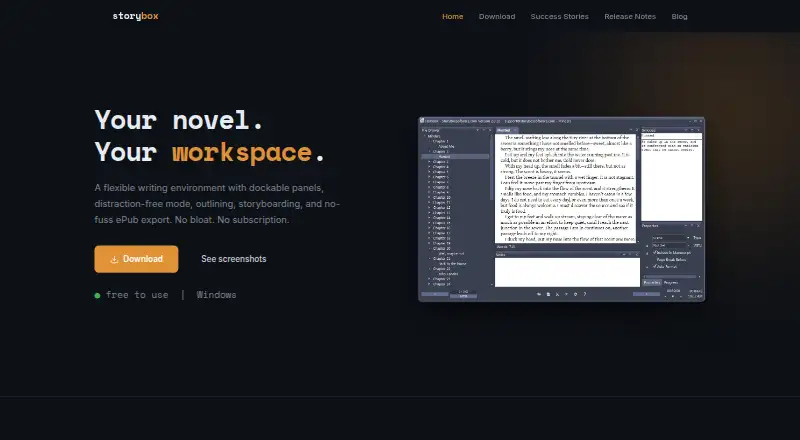
StoryBox is Windows software for writing and organizing novels in a flexible workspace. Six dockable panels can be arranged and saved for each project. Full-screen mode can keep selected tools visible and display two documents side by side. Writers can plan scenes in a tree outline or index-card storyboard, then drag scenes to change their order. Progress tracking provides six measurements, a countdown timer, and a progress bar. StoryBox exports ePub files and lets users save export profiles for vendors including Amazon, Barnes & Noble, and Kobo. It saves while users type and can back up a project to another folder or drive when the project closes; the maker suggests Dropbox for cloud backup. The software is free forever and is no longer for sale. The download page lists version 2.0.19, dated June 3, 2016, for Windows XP SP3 through Windows 10, requiring Microsoft .NET Framework 4.0. A 45-day trial is described before continued free use.
Who it suits
StoryBox suits personal novel writers who want outlining, drafting, progress tracking, and ePub export on Windows. It is most relevant to users comfortable with older Windows software.
What it does well
- Six configurable panels support project workspaces
- Offers tree and index-card outlining
- Tracks writing with six measurements
- Exports ePub with saved vendor profiles
- Automatically saves and backs up projects
What to know first
- Has not been updated since 2016
- Supports Windows only
- Requires Microsoft .NET Framework 4.0
Plans
| Plan | Billed and limits | Price |
|---|---|---|
| Free | Free forever · Windows · novel writing software | Free |
As storyboxsoftware.com lists them, read 12 Oct 2026. The maker's own page has the final word.
Verdict
StoryBox provides focused novel-writing and planning tools at no cost. Its dated release and Windows requirements should be considered before adoption.
Facts from StoryBox's own pages
- Backup
- StoryBox saves as users type and can automatically back up a project to a second folder or drive when the project closes. · storyboxsoftware.com, 12 Oct 2026
- Dockable panels
- It has six dockable tool panels, and panel layouts save per project. · storyboxsoftware.com, 12 Oct 2026
- Export
- StoryBox exports ePub and lets users save export profiles for different vendors, including Amazon, Barnes & Noble, and Kobo. · storyboxsoftware.com, 12 Oct 2026
- Export formats
- extensive · storyboxsoftware.com, 22 Sept 2026
- Free plan
- Yes · storyboxsoftware.com, 22 Sept 2026
- Integration
- The maker suggests pairing StoryBox with Dropbox for cloud backup. · storyboxsoftware.com, 12 Oct 2026
- Intended user
- The maker describes building StoryBox for personal novel writing and using it daily to write novels. · storyboxsoftware.com, 12 Oct 2026
- Maintenance
- The download page says StoryBox has not been updated since 2016; it lists version 2.0.19, dated June 3, 2016. · storyboxsoftware.com, 12 Oct 2026
- Mobile apps
- No · storyboxsoftware.com, 22 Sept 2026
- Outlining
- Users can organize scenes in a tree-view outline or an index-card storyboard and drag scenes to rearrange them. · storyboxsoftware.com, 12 Oct 2026
- Platform and requirements
- The download page lists Windows XP SP3, Vista, 7, 8, or 10 and requires Microsoft .NET Framework 4.0. · storyboxsoftware.com, 12 Oct 2026
- Pricing
- The maker says StoryBox is free to use forever and is no longer for sale. · storyboxsoftware.com, 12 Oct 2026
- Progress tracking
- Word tracking includes six measurements and a countdown timer with a progress bar. · storyboxsoftware.com, 12 Oct 2026
- Publishing tools
- Yes · storyboxsoftware.com, 22 Sept 2026
- Purpose
- StoryBox is novel-writing software with a flexible workspace for writing and organizing a novel. · storyboxsoftware.com, 12 Oct 2026
- Support
- The release notes invite users with project-file problems to email the maker for help fixing the file. · storyboxsoftware.com, 12 Oct 2026
- Trial
- The maker describes a 45-day trial and says the software remains free afterward. · storyboxsoftware.com, 12 Oct 2026
- Writing modes
- Full-screen mode can keep selected tools visible and supports viewing two documents side by side. · storyboxsoftware.com, 12 Oct 2026
Where StoryBox stands on Freedom251
- Writing Apps#87 of 135