Freedom251 › Encrypted Messaging Apps
Status
What Status is
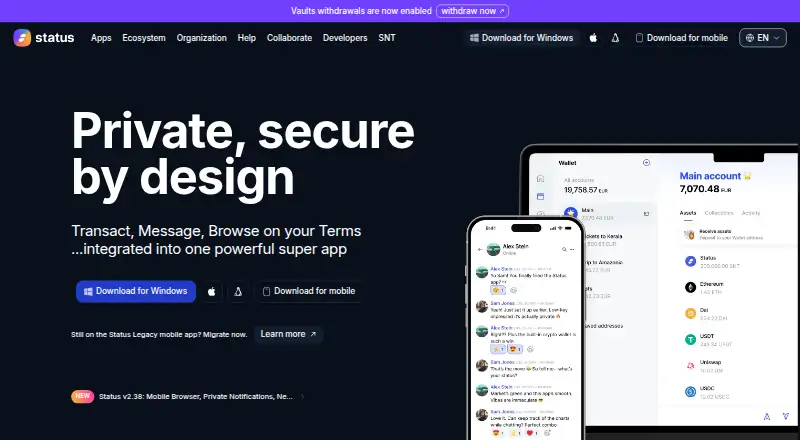
Status brings a cryptocurrency wallet, messenger and browser together in one app. Its wallet can send, swap and bridge crypto, and provides a token list that updates live with information synced from decentralized exchanges across multiple chains. The messenger supports decentralized conversations with metadata privacy and end-to-end encryption by default. Status says people can use it without supplying a phone number, email address, bank card or social media account.
Status also supports token-gated communities. Its desktop app can create and administer communities, and running it contributes to keeping the Waku peer-to-peer messaging network decentralized. The Status Wallet Connector browser extension connects the app to decentralized applications while keeping keys inside Status. Keycard is a secure contactless hardware wallet that can be used with Status.
Status is available on Android, iOS, Linux, macOS and Windows, as well as through an extension. The project is open source, and its community can build, contribute to or fork the code. The maker is Status Research & Development GmbH, founded in 2017 and headquartered in Zug, Switzerland. The Status plan is free, with no ads, paid tier or imposed limits.
Who it suits
Status suits people who want crypto transactions, private messaging and browser access in one app, including those who prefer pseudonymous use. Its desktop community tools may also suit people who create or administer token-gated communities.
What it does well
- Wallet supports sending, swapping and bridging crypto.
- Messaging has default end-to-end encryption and metadata privacy.
- Use does not require a phone number, email, bank card or social account.
- Desktop app can create and administer token-gated communities.
- Open source project can be built on, contributed to or forked.
- Free plan has no ads, paid tier or imposed limits.
What to know first
- Maximum group size is 20 members.
- Using Status Wallet Connector requires its browser extension for dapp connections.
- Desktop network contribution is specific to the Waku peer-to-peer network.
Limits
The Status plan is free and has no imposed limits. The maximum group size is 20 members.
Plans
| Plan | Billed and limits | Price |
|---|---|---|
| Status | No ads · No paid tier · No imposed limits | Free |
As status.app lists them, read 7 Oct 2026. The maker's own page has the final word.
Getting started
- Visit https://status.app/.
- Choose the platform that matches your device: Android, iOS, Linux, macOS, Windows or the extension.
- Use Status without providing a phone number, email address, bank card or social media account.
- For dapp connections, use the Status Wallet Connector browser extension.
- Consider Keycard if you want a secure contactless hardware wallet to use with Status.
Verdict
Choose Status if you want a free app that combines a crypto wallet with encrypted messaging and browser access, while allowing use without personal contact or payment details. Its desktop features also support administering token-gated communities.
Questions
How much does Status cost?
The Status plan is free. It has no ads or paid tier.
Is there a free plan or trial?
Yes, Status has a free plan. There is no free trial.
Which platforms support Status?
Status is available on Android, iOS, Linux, macOS and Windows, and as an extension.
Is Status open source?
Yes. Status says the community project is open source and anyone can build, contribute to or fork its code.
Who makes Status?
The maker is Status Research & Development GmbH, founded in 2017 and headquartered in Zug, Switzerland.
Can I connect Status to decentralized apps?
Yes. The Status Wallet Connector browser extension connects Status to dapps while keeping keys inside Status.
Facts from Status's own pages
- Chains
- Status offers a live-updating token list synced from DEXes across multiple chains. · status.app, 7 Oct 2026
- Communities
- Status supports token-gated communities, and its desktop app can create and administer communities. · status.app, 7 Oct 2026
- Dapp connection
- The Status Wallet Connector browser extension connects Status to dapps while keeping keys inside Status. · status.app, 7 Oct 2026
- Desktop network role
- Running Status Desktop contributes to keeping the Waku peer-to-peer messaging network decentralised. · status.app, 7 Oct 2026
- Founded
- 2017 · status.app, 28 Sept 2026
- Headquarters
- Zug, Switzerland · status.app, 28 Sept 2026
- Keycard
- Keycard is described as a secure contactless hardware wallet that can be used with Status. · status.app, 7 Oct 2026
- Maker
- The site identifies the maker as Status Research & Development GmbH. · status.app, 7 Oct 2026
- Messaging
- The messenger offers decentralised messaging with metadata privacy and end-to-end encryption. · status.app, 7 Oct 2026
- Open source
- Status says its community project is open source and anyone can build, contribute to or fork its code. · status.app, 7 Oct 2026
- Product
- Status combines a wallet, messenger and browser in one app. · status.app, 7 Oct 2026
- Pseudonymous use
- Status says users do not need a phone number, email, bank card or social media account to use it. · status.app, 7 Oct 2026
- Security reporting
- Status directs users to report security incidents by email and vulnerabilities through its HackenProof bounty programme. · status.app, 7 Oct 2026
- Wallet
- The wallet supports sending, swapping and bridging crypto. · status.app, 7 Oct 2026
Where Status stands on Freedom251
- Encrypted Messaging Apps#23 of 43
- Secure messaging apps#20 of 36