Freedom251 › Start Menu Customization Software

Start Menu X
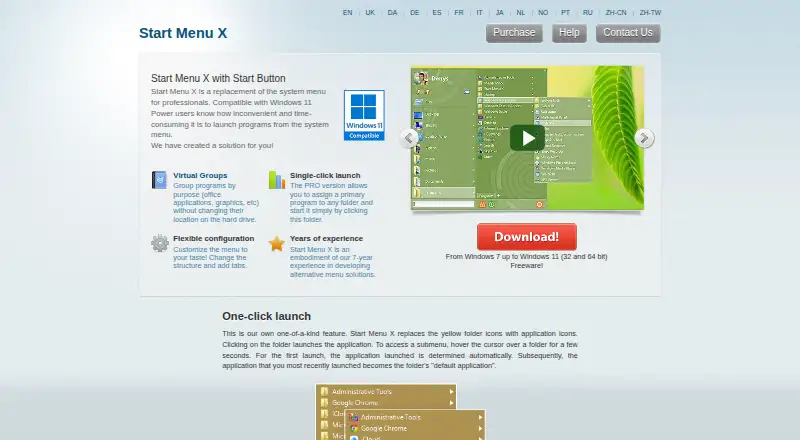
What Start Menu X is
Start Menu X replaces the Windows system Start menu with an overlay designed for professionals and power users. It lets you arrange programs into virtual groups by purpose without moving them on disk, and fold or unfold groups as needed. You can change the menu structure, add tabs, and build a customized folder list from 25 system folders plus folders or applications you add yourself. Opening a folder can show its applications across the full screen. The PRO version lets you assign a primary program to a folder and launch it with one click. The menu can also set a delayed shutdown or sleep timer. The installer includes Group Manager, a tool for organizing programs into virtual groups. The maker describes compatibility with Windows 7 through Windows 11 and provides 32-bit and 64-bit versions. Start Menu X has a free version with virtual groups limited to five. Start Menu X PRO costs $14.99, paid once, with no subscription; it includes single-click launch, menu structure and tabs, virtual-group management, file sorting by name, and free minor 7.x updates.
Who it suits
Start Menu X suits Windows users who want to organize the Start menu around program purpose, customize its structure, or add tabs. The PRO version may suit people who want to launch an assigned program directly from a folder or manage more virtual groups.
What it does well
- Organizes programs into foldable virtual groups without moving them on disk.
- Customizable menu structure and tabs.
- Builds folder lists from 25 system folders and user additions.
- Sets delayed shutdown or sleep timers.
- Available for Windows 7 through Windows 11 in 32-bit and 64-bit versions.
What to know first
- The free version limits virtual groups to five.
- PRO costs $14.99, paid once.
Limits
The free version limits virtual groups to five. PRO costs $14.99, paid once and has no subscription.
Plans
| Plan | Billed and limits | Price |
|---|---|---|
| Freeware | free version; virtual groups limited to 5 | Free |
| Start Menu X PRO | No subscription · Single-click launch · menu structure and tabs · manage virtual groups · sort files by name · free minor 7.x updates | $14.99, paid once |
As startmenux.com lists them, read 30 Sept 2026. The maker's own page has the final word.
Getting started
- Visit https://www.startmenux.com/.
- Choose the free version or Start Menu X PRO.
- Select the 32-bit or 64-bit version for Windows.
- Install Start Menu X; the installer includes Group Manager.
- Organize programs into virtual groups and customize the menu structure or tabs.
Verdict
Choose Start Menu X if you want an overlay Start menu with customizable structure, tabs, and virtual program groups. The free version is limited to five groups; PRO costs $14.99, paid once and adds features including single-click folder launch and virtual-group management.
Questions
Does Start Menu X have a free plan?
Yes. The Freeware plan costs nothing and limits virtual groups to five.
How much does Start Menu X PRO cost?
Start Menu X PRO costs $14.99, paid once, with no subscription.
Which Windows versions does it support?
The maker describes compatibility from Windows 7 through Windows 11. Both 32-bit and 64-bit versions are offered.
What does PRO add?
PRO includes single-click launch, menu structure and tabs, virtual-group management, file sorting by name, and free minor 7.x updates.
What is included in the installer?
The installer includes Start Menu X and Group Manager, a tool for organizing programs into virtual groups.
Facts from Start Menu X's own pages
- Customization
- Users can change the menu structure and add tabs. · startmenux.com, 30 Sept 2026
- Data storage
- The program stores settings under the user's AppData folder and in the current user's Windows registry; the portable version stores settings in its program folder. · startmenux.com, 30 Sept 2026
- Folder access
- The menu can show a customized list drawn from 25 system folders and folders or applications users add themselves. · startmenux.com, 30 Sept 2026
- Folder launch
- The PRO version lets users assign a primary program to a folder and launch it by clicking the folder. · startmenux.com, 30 Sept 2026
- Fullscreen application list
- Folder contents use the entire screen to display applications in the menu. · startmenux.com, 30 Sept 2026
- Installation contents
- The installer includes Start Menu X and Group Manager, a tool for organizing programs into virtual groups. · startmenux.com, 30 Sept 2026
- Power management
- The menu can set a delayed shutdown or sleep timer for the computer. · startmenux.com, 30 Sept 2026
- Purpose
- Start Menu X replaces the Windows system Start menu and is described as a solution for professionals and power users. · startmenux.com, 30 Sept 2026
- Support
- The site provides help topics and a contact page for sending a message by email. · startmenux.com, 30 Sept 2026
- System integration
- The maker says the program uses documented Windows Hook functions and can be enabled or disabled easily. · startmenux.com, 30 Sept 2026
- Virtual groups
- It groups programs by purpose without changing their location on disk, and groups can be folded or unfolded. · startmenux.com, 30 Sept 2026
- Website privacy
- The site's privacy policy says it uses Google Analytics cookies and says submitted personal details are not passed to third parties. · startmenux.com, 30 Sept 2026
- Windows compatibility
- The maker describes compatibility from Windows 7 through Windows 11 and offers 32-bit and 64-bit versions. · startmenux.com, 30 Sept 2026
Where Start Menu X stands on Freedom251
- Start Menu Customization Software#22 of 39