Freedom251 › Music notation software
StaffPad
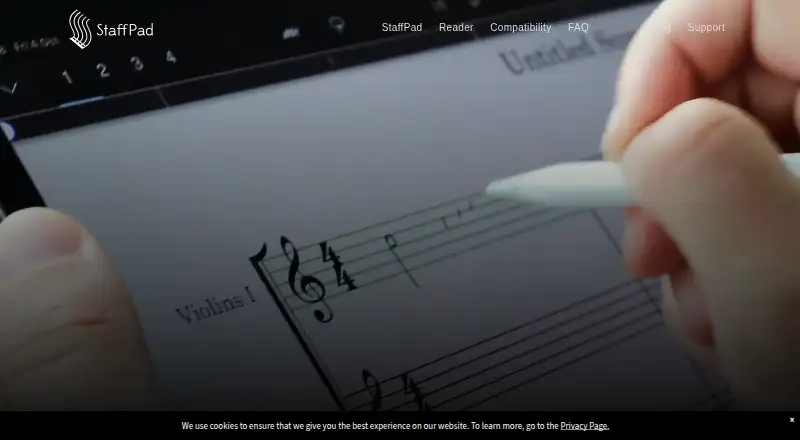
What StaffPad is
StaffPad is a music composition app for writing notation by hand, recording or importing audio, editing with touch, and playing compositions back. It converts handwritten notation into typeset scores, can correct stem directions automatically, and flags beat-count issues. Playback includes a core library of more than 55 instruments. Audio tools include tempo mapping, Adaptive Audio, and effects such as delay, reverb, compression, chorus, and EQ. Exports include MP3, WAV, or AAC audio, MIDI, MusicXML, and print-layout PDF. StaffPad Reader displays individual parts and receives score changes in real time over Wi-Fi, with synchronized playback and annotations. ScoreSync works over local Wi-Fi without internet, and scores remain local rather than being uploaded or stored in the cloud. StaffPad requires an iPad with Apple Pencil or a Windows device with active pen and touch. The site says it is English-only and does not support Android. StaffPad for iPad has no listed price; StaffPad is $49.99, paid once, and Reader is free.
Who it suits
It suits composers who want to write scores by hand and use audio, playback, and notation exports. Reader is for people who need to view parts and follow score changes without editing beyond ink annotations.
What it does well
- Handwriting recognition creates typeset scores.
- Playback includes more than 55 instruments.
- Exports audio, MIDI, MusicXML, and PDF.
- ScoreSync works on local Wi-Fi without internet.
- Scores stay local rather than in cloud storage.
What to know first
- Android is not supported.
- StaffPad is available only in English.
- Apple Silicon Macs cannot be used to write notation.
- Reader cannot edit music beyond ink annotations.
Limits
StaffPad Reader opens StaffPad files rather than raw MIDI or MusicXML, and music editing in Reader is limited to ink annotations. Apple Silicon Macs can read, open, and preview scores, but cannot be used to write notation.
Plans
| Plan | Billed and limits | Price |
|---|---|---|
| StaffPad for iPad | Handwritten notation recognition · MusicXML and MIDI import/export · Audio recording and import · Score playback with included instruments · PDF and printed parts · ScoreSync with StaffPad Reader | On request |
| StaffPad Reader | Free · Displays StaffPad scores · Reader Pro features are available as an upgrade | Free |
| StaffPad | $49.99 · iPad app · in-app purchases | $49.99, paid once |
As staffpad.net lists them, read 19 Sept 2026. The maker's own page has the final word.
Getting started
- Open the StaffPad website to find the app.
- Use an iPad with Apple Pencil or a Windows device with active pen and touch to write notation.
- Get StaffPad for iPad at $49.99, paid once; the app is listed with in-app purchases.
- Use the free StaffPad Reader to display StaffPad scores; a pen is not required for Reader.
- Connect over local Wi-Fi to use ScoreSync with Reader.
Verdict
StaffPad combines handwritten score entry with playback, audio tools, and several export formats. Check the device requirements and Reader's editing limits before choosing it.
Questions
What does StaffPad cost?
The StaffPad plan is listed at $49.99, paid once, billed $49.99, for the iPad app with in-app purchases. The StaffPad for iPad plan has no price listed.
Is there a free plan?
Yes. StaffPad Reader is listed as free and displays StaffPad scores; Reader Pro features are available as an upgrade.
Which platforms does StaffPad support?
The listed platforms are iOS, macOS, and Windows. Android is not supported. Apple Silicon Macs can open and preview scores but cannot be used to write notation.
Does StaffPad support MIDI and MusicXML?
Yes. StaffPad supports MIDI and MusicXML import and export.
Can StaffPad be used without an internet connection?
ScoreSync uses local Wi-Fi without an internet connection, and scores are kept locally rather than uploaded or stored in the cloud.
Who makes StaffPad?
The maker is StaffPad Ltd. The listed founders are David William Hearn and Matthew Tesch.
Facts from StaffPad's own pages
- Audio tools
- StaffPad supports audio recording and import, tempo mapping, Adaptive Audio, and effects including delay, reverb, compression, chorus, and EQ. · staffpad.net, 10 Oct 2026
- Collaboration features
- Yes · staffpad.net, 19 Sept 2026
- Deployment
- desktop · staffpad.net, 19 Sept 2026
- Device requirements
- StaffPad requires an iPad with Apple Pencil or a Windows device with active pen and touch; Reader does not require a pen. · staffpad.net, 10 Oct 2026
- Exports
- StaffPad can export audio as MP3, WAV, or AAC; MIDI and MusicXML; and a PDF of the print layout. · staffpad.net, 10 Oct 2026
- Free plan
- No · staffpad.net, 19 Sept 2026
- Handwriting recognition
- StaffPad converts handwritten notation into typeset scores and can automatically correct stem directions and flag beat-count issues. · staffpad.net, 10 Oct 2026
- Integrations
- The StaffPad Store offers StaffPad Editions from developers including Cinesamples, Orchestral Tools, and Spitfire Audio. · staffpad.net, 10 Oct 2026
- Language
- The site says StaffPad is available only in English. · staffpad.net, 10 Oct 2026
- Maker
- The site identifies StaffPad Ltd and lists David William Hearn and Matthew Tesch as founders. · staffpad.net, 10 Oct 2026
- MIDI support
- Yes · staffpad.net, 19 Sept 2026
- MusicXML support
- Yes · staffpad.net, 19 Sept 2026
- Offline and data handling
- ScoreSync uses the local Wi-Fi network without an internet connection, and scores are kept locally rather than uploaded to the internet or stored in the cloud. · staffpad.net, 10 Oct 2026
- Parts extraction
- Yes · staffpad.net, 19 Sept 2026
- Platform limits
- The site says Android is not supported and that Apple Silicon Macs can read, open, and preview scores but cannot be used to write notation. · staffpad.net, 10 Oct 2026
- Playback
- The included core sound library features more than 55 instruments. · staffpad.net, 10 Oct 2026
- Reader collaboration
- StaffPad Reader displays individual parts and receives score changes in real time over Wi-Fi, with synchronized playback and annotations. · staffpad.net, 10 Oct 2026
- Reader limits
- Reader opens StaffPad files rather than raw MIDI or MusicXML, and cannot edit music beyond ink annotations. · staffpad.net, 10 Oct 2026
- Support
- The site lists [email protected] for support contact. · staffpad.net, 10 Oct 2026
- What it does
- StaffPad is a music composition app for writing notation by hand, recording or importing audio, editing with touch, and playing compositions back. · staffpad.net, 10 Oct 2026
Where StaffPad stands on Freedom251
- Music notation software#13 of 38