Freedom251 › Music notation software
Denemo
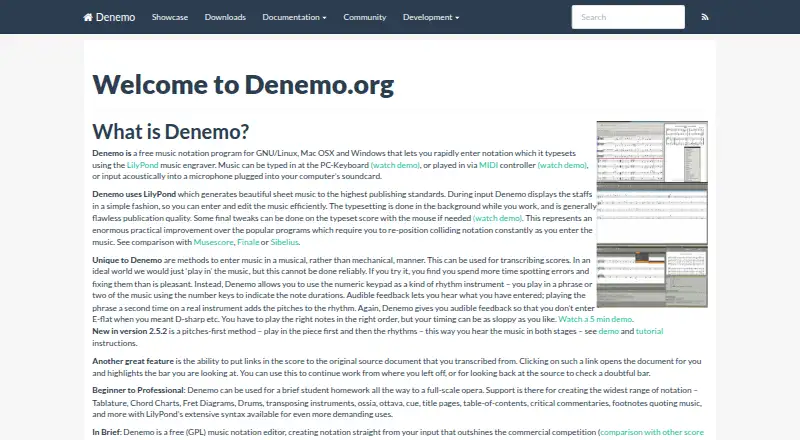
What Denemo is
Denemo is a free desktop music notation program for composing, transcribing, arranging, and listening to music. It runs on Linux, macOS, and Windows, and supports MusicXML, MIDI, parts extraction, and tablature. Music can be entered with a computer keyboard, MIDI controller, mouse, or microphone. Denemo opens its own files and imports MIDI, LilyPond, and MusicXML. As you work, it uses LilyPond in the background to typeset notation. Its notation features include figured bass, historical noteheads and barlines, chords, and tablature. Denemo can help create exercise sheets, aural training, note-reading, and playing exercises. Scores can be printed or exported as images, MIDI, OGG, or WAV files. The program can route MIDI or audio data to other applications, such as JACK, and accepts LilyPond text and commands in a score. Denemo is free to use, share, and change under the GPL. The download page lists version 2.6, dated March 11, 2022, as the current stable release and cautions that some links still point to version 2.2.
Who it suits
Denemo suits composers, arrangers, transcribers, and listeners who want desktop notation software across Linux, macOS, or Windows. It can also serve educators creating music exercises and users who want to route MIDI or audio to other applications.
What it does well
- Free to use, share, and change under the GPL.
- Runs on Linux, macOS, and Windows.
- Accepts input from a keyboard, MIDI controller, mouse, or microphone.
- Imports MIDI, LilyPond, and MusicXML.
- Prints scores and exports images, MIDI, OGG, or WAV files.
What to know first
- The LilyPond parser does not work on many third-party LilyPond files.
- Some download links still point to version 2.2.
Plans
| Plan | Billed and limits | Price |
|---|---|---|
| Denemo | Free to use, share, and change · GPL | Free |
As denemo.org lists them, read 8 Oct 2026. The maker's own page has the final word.
Getting started
- Visit the Denemo website and open its download page.
- Choose the version 2.6 download link for your platform; the page warns that some links still point to version 2.2.
- Install Denemo on Linux, macOS, or Windows.
- Enter music with a keyboard, MIDI controller, mouse, or microphone.
Denemo is free desktop notation software for composing, transcribing, arranging, and listening to music. It is best suited to musicians, educators, and arrangers who need several input methods, broad notation coverage, and export to both score and audio formats. Its LilyPond-based workflow is powerful, though compatibility with many third-party LilyPond files is a clear constraint.
Overview
Denemo lets you edit music while LilyPond handles typesetting in the background. That division suits users who want professionally engraved notation without entering music solely as LilyPond text. Notes can be entered from a computer keyboard, MIDI controller, mouse, or microphone, giving composers and transcribers different ways to start a score.
The program opens native Denemo files and imports MIDI, LilyPond, and MusicXML. Finished work can be printed or exported as images, MIDI, OGG, or WAV files. This makes Denemo useful beyond page layout: the same score can provide rehearsal audio, playback material, or files for another music application. Its LilyPond parser is meant to handle Denemo’s own output and does not work with many LilyPond files created elsewhere.
Key features
Notation and input
MusicXML and MIDI support help move scores between applications, while parts extraction is useful when an arrangement must produce individual performer parts. Tablature, chords, figured bass, historic noteheads, and historic barlines cover styles that a basic staff editor may not. MIDI-controller and microphone entry can help users who do not want to place every note with a mouse, although the choice of method will depend on the source material and the desired cleanup.
Typesetting and output
LilyPond typesetting gives Denemo a notation-focused engraving pipeline. Scores can be printed or rendered as images, and MIDI, OGG, and WAV export supports listening and distribution. Denemo can route MIDI or audio to other applications, including JACK, and accepts LilyPond text and commands in a score. Those options make it more adaptable in Linux-oriented production setups than a purely self-contained editor.
Teaching and practice
Educators can create exercise sheets, aural-training material, note-reading activities, and playing exercises. The combination of editable notation and audio export supports both written assignments and listening-based work.
Pricing
| Plan | Price | What you get |
|---|---|---|
| Denemo | free | Free to use, share, and change under the GPL |
There is no paid tier, subscription, or free trial. The single plan is appropriate for students, independent musicians, educators, and anyone who needs desktop notation without a license fee. GPL licensing also permits users to share and modify the software. The download page identifies version 2.6 as the current stable release, dated March 11, 2022, and warns that some download links still refer to version 2.2, so users should choose the 2.6 links.
Platforms
Denemo is desktop software for Linux, macOS, and Windows. It is not presented as a browser or mobile application, so users who need notation on phones, tablets, or through a web editor should consider alternatives such as Flat or Fender Notion.
Who it's for
Choose Denemo for composition, transcription, arranging, teaching, and practice when flexible entry and LilyPond engraving matter. It is especially relevant to users exchanging MusicXML or MIDI, producing tablature or historical notation, or sending audio through a JACK-based setup. It is a poorer choice for workflows centered on importing arbitrary LilyPond files, because the parser does not reliably handle many files made outside Denemo. Support is community-led through a mailing list; development questions go to [email protected] after the project abandoned its forum.
Pros and cons
Pros
- Free GPL software with no subscription or trial restrictions.
- Keyboard, MIDI, mouse, and microphone input accommodate different composing and transcription workflows.
- MusicXML, MIDI, LilyPond import, parts extraction, tablature, and historical notation support broad scoring needs.
- Print, image, MIDI, OGG, and WAV output connects notation with rehearsal and listening use.
- Educational tools and LilyPond text or command support extend it beyond basic score entry.
Cons
- The LilyPond parser does not handle many third-party LilyPond files, limiting exchange with established LilyPond projects.
- The latest stable release shown is version 2.6 from March 11, 2022, and some download links still point to 2.2.
- Desktop-only deployment excludes users seeking browser or mobile editing.
- Forum support was abandoned, leaving the mailing list as the route for usage questions and development news.
Alternatives
Music notation software is the broader starting point when you want to compare notation tools by category.
MuseScore Studio is a free, open-source desktop alternative for Linux, macOS, and Windows with no account or stated limitations. Pick it when you prefer a mainstream free editor rather than Denemo’s LilyPond-centered workflow.
LilyPond is free software for Linux, macOS, and Windows. Choose it when direct text-based LilyPond work is your priority.
TuxGuitar is a free guitar tablature editor for Android, Linux, macOS, and Windows. It is the more targeted choice for guitar-tab work.
ScoreCloud offers a free tier with 10 online songs, watermarked print, and notation from singing; its Plus plan costs $5.99 a month for unlimited songs. Pick it when singing input and online storage matter more than Denemo’s free GPL desktop model.
Noteflight is a web-based service with a Premium plan at $7.95 a month, including unlimited scores and premium notation features. Choose it for browser access and a subscription-based service.
Dorico is an iOS freemium notation option. Choose it when Apple mobile use is more important than desktop cross-platform deployment.
Verdict
Denemo is a strong choice for anyone who wants free, modifiable desktop notation with multiple entry methods, specialized notation, LilyPond engraving, and audio or MIDI export. Look elsewhere if importing a wide range of third-party LilyPond files, using a browser or mobile device, or relying on a newer-looking support and release cadence is central to your workflow.
Verdict
Choose Denemo if you want free desktop notation software with multiple input methods, music formats, and audio or MIDI export. Look elsewhere if you need its LilyPond parser to handle many third-party LilyPond files.
Questions
Is Denemo free?
Yes. Denemo is free to use, share, and change under the GPL. Its listed plan is free.
Which platforms does Denemo support?
Denemo runs on Linux, macOS, and Windows as desktop software.
Does Denemo support MusicXML and MIDI?
Yes. It imports MusicXML and MIDI and can export scores as MIDI.
Is Denemo open source?
Yes. It is licensed under the GPL and is free to use, share, and change.
Can Denemo import third-party LilyPond files?
Its LilyPond parser does not work on many third-party LilyPond files and should work on Denemo’s own output.
Where can users get help?
The community page directs users to a mailing list for usage questions and development news, or to [email protected]. The project has abandoned its forum.
Facts from Denemo's own pages
- Current stable version
- The download page lists version 2.6 as the current stable release, dated March 11, 2022. · denemo.org, 8 Oct 2026
- Deployment
- desktop · denemo.org, 19 Sept 2026
- Download caveat
- The download page warns that some links still point to version 2.2 and says to look for version 2.6 links. · denemo.org, 8 Oct 2026
- Educational use
- Denemo can be used to create exercise sheets, aural training, note-reading, and playing exercises. · denemo.org, 8 Oct 2026
- Free plan
- Yes · denemo.org, 19 Sept 2026
- Import
- Denemo can load Denemo files and import MIDI, LilyPond, and MusicXML. · denemo.org, 8 Oct 2026
- Input methods
- Music can be entered with a computer keyboard, MIDI controller, mouse, or microphone input. · denemo.org, 8 Oct 2026
- Integrations
- Denemo can route MIDI or audio data to other applications, such as JACK, and accepts LilyPond text and commands in the score. · denemo.org, 8 Oct 2026
- Known import limitation
- The FAQ says Denemo’s LilyPond parser does not work on many third-party LilyPond files and should work on its own output. · denemo.org, 8 Oct 2026
- License
- The download page says Denemo is free of charge, free to use, share, and change, and is licensed under the GPL. · denemo.org, 8 Oct 2026
- MIDI support
- Yes · denemo.org, 19 Sept 2026
- MusicXML support
- Yes · denemo.org, 19 Sept 2026
- Notation features
- It supports historical and special notation including figured bass, historic noteheads and barlines, chords, and tablature. · denemo.org, 8 Oct 2026
- Output
- Scores can be printed or exported as images, MIDI, OGG, or WAV files. · denemo.org, 8 Oct 2026
- Parts extraction
- Yes · denemo.org, 19 Sept 2026
- Platforms
- The home page lists GNU/Linux, Mac OSX, and Windows; the download page provides packages for those platforms. · denemo.org, 8 Oct 2026
- Purpose
- Denemo is a free music notation program for composing, transcribing, arranging, and listening to music. · denemo.org, 8 Oct 2026
- Support
- The community page directs users to a mailing list for usage questions and development news, and to email [email protected] because the project abandoned its forum. · denemo.org, 8 Oct 2026
- Tablature support
- Yes · denemo.org, 19 Sept 2026
- Typesetting
- Denemo uses LilyPond to typeset notation in the background while the user works. · denemo.org, 8 Oct 2026
Where Denemo stands on Freedom251
- Music notation software#9 of 38