SQL Workbench/J
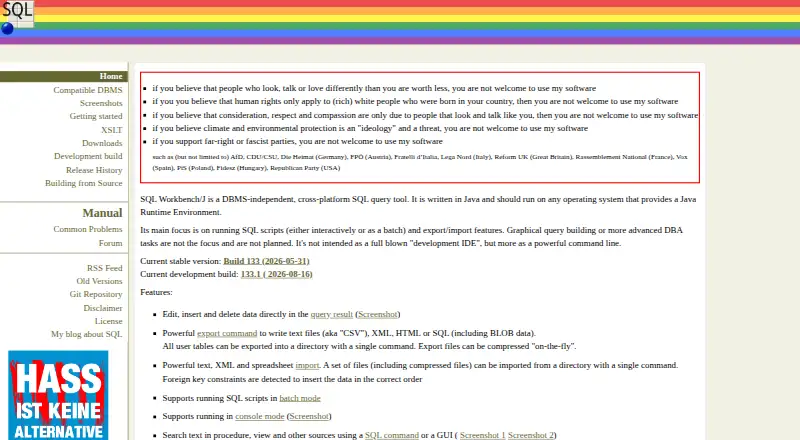
What SQL Workbench/J is
SQL Workbench/J is a free, cross-platform SQL query tool for interactive work and batch scripts, with data import and export. It is DBMS-independent and uses Java and JDBC, so it is expected to work with databases that provide a JDBC driver. The maker specifically lists PostgreSQL, HyperSQL, H2, Firebird, Apache Derby, Oracle 11g or later, Microsoft SQL Server, IBM Db2 LUW, and MySQL as tested. Pivotal Greenplum, HP Vertica, MariaDB, Informix, and SQLite are reported to work but have not been tested. The tool can export text, XML, HTML, or SQL files; import text, XML, and spreadsheet data; and copy data between database servers. It includes JSch to support SSH tunneling. SQL Workbench/J runs on Linux, macOS, and Windows with a Java Runtime Environment. Stable Build 132 requires Java 11 or later; the next build is stated to require Java 21. Excel import and export, and OpenOffice Calc import, require an optional-libraries package described as approximately 30 MB. Its stated focus excludes graphical query building, advanced DBA tasks, and full development IDE use.
Who it suits
It suits people who need a free tool for running SQL scripts and transferring data across databases. It is less suited to users seeking graphical query building, advanced DBA tools, or a full development IDE.
What it does well
- Free to use
- Runs on Linux, macOS, and Windows
- Imports and exports multiple file formats
- Copies data between database servers
- Supports SSH tunneling
What to know first
- Requires a Java Runtime Environment
- Excel support requires optional libraries
- Not intended as a full development IDE
Limits
Excel import and export and OpenOffice Calc import require an optional-libraries package described as approximately 30 MB. Stable Build 132 requires Java 11 or later, and the next build is stated to require Java 21.
Plans
| Plan | Billed and limits | Price |
|---|---|---|
| SQL Workbench/J | Free for almost everyone · modified Apache 2.0 license restricts use for certain organizations | Free |
As sql-workbench.eu lists them, read 4 Oct 2026. The maker's own page has the final word.
Getting started
- Visit https://www.sql-workbench.eu/.
- Download the package for Linux/Unix, macOS, or Windows.
- Install or provide a Java Runtime Environment; Stable Build 132 requires Java 11 or later.
- Connect to a database with a JDBC driver.
- Add the optional-libraries package if you need Excel import or export or OpenOffice Calc import.
Verdict
SQL Workbench/J focuses on SQL execution and data movement across databases, with a broad list of tested systems. Check the Java requirement and optional-library needs, and note that graphical query building and advanced DBA work are outside its stated focus.
Questions
How much does SQL Workbench/J cost?
SQL Workbench/J is free for almost everyone under its modified Apache 2.0 license.
Which operating systems does it support?
The generic package includes Linux/Unix and macOS shell scripts and a Windows launcher. It should run on operating systems with a Java Runtime Environment.
Which databases are listed as tested?
The maker lists PostgreSQL, HyperSQL, H2, Firebird, Apache Derby, Oracle 11g or later, Microsoft SQL Server, IBM Db2 LUW, and MySQL as specifically tested.
Does it support spreadsheet files?
It can import spreadsheet data. Excel import and export and OpenOffice Calc import require the optional-libraries package, described as approximately 30 MB.
Is SQL Workbench/J open source?
It uses a modified Apache 2.0 license. That license withholds use rights from certain governments and organizations directly related to them, and their members may not download or use the software.
What Java version does it require?
Stable Build 132 requires Java 11 or later. The next build is stated to require Java 21.
Facts from SQL Workbench/J's own pages
- Additional databases
- The maker lists Pivotal Greenplum, HP Vertica, MariaDB, Informix, and SQLite as reported to work but not tested. · sql-workbench.eu, 4 Oct 2026
- Database compatibility
- It primarily uses Java/JDBC and is expected to work with DBMSs that have a JDBC driver, though features may not work correctly with unknown databases or limited drivers. · sql-workbench.eu, 4 Oct 2026
- Data transfer
- It can export text, XML, HTML, or SQL files, import text, XML, and spreadsheet data, and copy data between database servers. · sql-workbench.eu, 4 Oct 2026
- Desktop platforms
- The generic package includes Linux/Unix and macOS shell scripts plus a Windows launcher; the application should run on operating systems with a Java Runtime Environment. · sql-workbench.eu, 4 Oct 2026
- Intended use
- The site says graphical query building and advanced DBA tasks are not its focus, and it is not intended as a full development IDE. · sql-workbench.eu, 4 Oct 2026
- Java requirement
- Stable Build 132 requires Java 11 or later, and the next build is stated to require Java 21. · sql-workbench.eu, 4 Oct 2026
- License restriction
- The modified Apache 2.0 license withholds use rights from listed governments and organizations directly related to them, and says their members may not download or use the software. · sql-workbench.eu, 4 Oct 2026
- Purpose
- SQL Workbench/J is a DBMS-independent, cross-platform SQL query tool written in Java, focused on interactive or batch SQL scripts and data import/export. · sql-workbench.eu, 4 Oct 2026
- Spreadsheet support
- Excel import/export and OpenOffice Calc import require the optional-libraries package, which the downloads page describes as approximately 30 MB. · sql-workbench.eu, 4 Oct 2026
- SSH
- The manual says SQL Workbench/J includes JSch to support SSH tunneling. · sql-workbench.eu, 4 Oct 2026
- Support
- The manual invites users to send feedback and problem reports to [email protected] and points users to an online forum. · sql-workbench.eu, 4 Oct 2026
- Tested databases
- The maker lists PostgreSQL, HyperSQL, H2, Firebird, Apache Derby, Oracle 11g or later, Microsoft SQL Server, IBM Db2 LUW, and MySQL as specifically tested. · sql-workbench.eu, 4 Oct 2026
- Warranty
- The license provides the software as-is without warranties, and the disclaimer says to use it at the user's own risk. · sql-workbench.eu, 4 Oct 2026
Where SQL Workbench/J stands on Freedom251
- SQL Query Tools#17 of 31