Freedom251 › Disk Space Analyzers
Space Gremlin
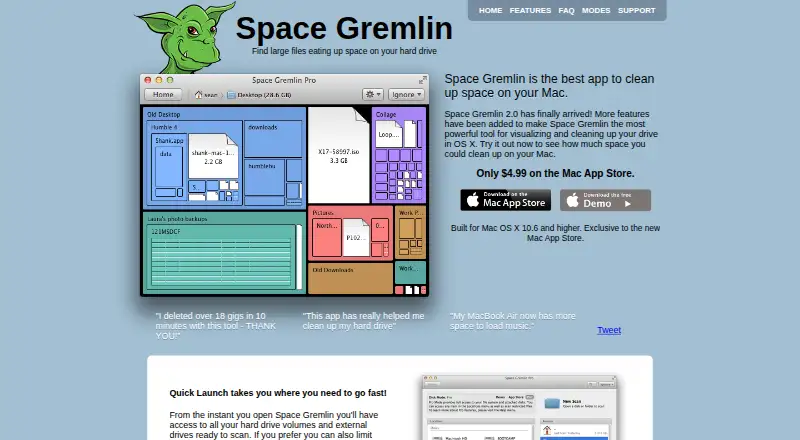
What Space Gremlin is
Space Gremlin is a paid macOS utility for locating large files and folders that consume drive space. It visualizes disk usage with squarified treemaps, helping users inspect connected drives, external drives, or selected folders. Shortcuts open predefined home-directory locations, while the tree view supports zooming, rescanning, and ignoring items that add clutter. Tooltips show file or folder size and location, and Quick Look previews selected items. After finding space-consuming data, users can compress files or folders or move them to the Trash. Pro mode adds quick scans of connected drives, more predefined user folders, and Admin mode for restricted files. The Space Gremlin plan costs $4.99 a month and includes a free trial; no free plan is available. The app moves items to Trash rather than permanently deleting them, and file-system metadata is not reported in any scanning mode. A Pro demo scans limited folders but cannot scan user-selected drives and folders.
Who it suits
Space Gremlin suits Mac users who want a visual way to investigate internal or external storage and then compress or trash selected items. It is less suitable when permanent deletion or file-system metadata reporting is required.
What it does well
- Squarified treemap disk visualization
- Scans external and connected drives
- Compresses files or folders
- Quick Look previews selected items
- Zoomable and rescannable tree view
What to know first
- macOS only
- No free plan
- Moves items to Trash, not permanent deletion
- Metadata unavailable in all scanning modes
Plans
| Plan | Billed and limits | Price |
|---|---|---|
| Space Gremlin | Mac app; Pro features unlock by importing the App Store license | $4.99, paid once |
As spacegremlinapp.com lists them, read 11 Oct 2026. The maker's own page has the final word.
Verdict
Space Gremlin links visual storage analysis with practical cleanup actions on macOS. Its plan cost, Trash-based deletion, and scanning limits should be considered before choosing it.
Facts from Space Gremlin's own pages
- App Store limits
- App Store mode can view connected drives, but scanning them requires choosing a drive or folder through New Scan. · spacegremlinapp.com, 11 Oct 2026
- Deletion limit
- The app moves files to the Trash rather than permanently deleting them. · spacegremlinapp.com, 11 Oct 2026
- Demo
- The Pro demo can scan a limited number of folders but cannot scan user-selected drives and folders. · spacegremlinapp.com, 11 Oct 2026
- External drive scans
- Yes · spacegremlinapp.com, 22 Sept 2026
- File actions
- Users can compress files or folders, or move them to the Trash to recover space after emptying it. · spacegremlinapp.com, 11 Oct 2026
- File details
- Tooltips show file or folder size and location, and Quick Look can preview a selected item. · spacegremlinapp.com, 11 Oct 2026
- Free plan
- No · spacegremlinapp.com, 22 Sept 2026
- Navigation
- The tree view supports zooming into folders, rescanning locations, and ignoring items to reduce visual clutter. · spacegremlinapp.com, 11 Oct 2026
- Desktop platforms
- macos · spacegremlinapp.com, 22 Sept 2026
- Pro features
- Pro mode enables quick scans of connected drives and more predefined user folders, and supports Admin mode for scanning restricted files. · spacegremlinapp.com, 11 Oct 2026
- Purpose
- Space Gremlin helps find large files and folders taking up space on a Mac drive. · spacegremlinapp.com, 11 Oct 2026
- Restricted data
- File system metadata is not reported in any scanning mode, and scanning other restricted data requires Pro and root access. · spacegremlinapp.com, 11 Oct 2026
- Scanning
- Users can scan connected drives, external drives, or selected folders, with quick access to predefined home-directory locations. · spacegremlinapp.com, 11 Oct 2026
- Scan scope
- files_folders · spacegremlinapp.com, 22 Sept 2026
- Paid from
- 4.99 · spacegremlinapp.com, 22 Sept 2026
- Support
- The maker directs users to its FAQ, feedback forum, and support email. · spacegremlinapp.com, 11 Oct 2026
- Treemap view
- Yes · spacegremlinapp.com, 22 Sept 2026
- Visualization
- It uses squarified treemaps to visualize disk usage. · spacegremlinapp.com, 11 Oct 2026
Where Space Gremlin stands on Freedom251
- Disk Space Analyzers#92 of 105