Freedom251 › AI Sound Effect Generators
Sonicker
What Sonicker is
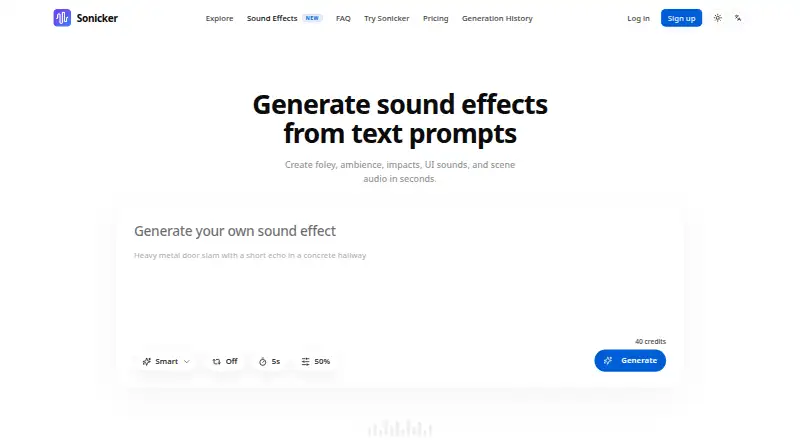
Sonicker is a web-based tool that turns text prompts into sound effects for creators, marketers, and editors. Its examples include foley, ambience, impacts, UI sounds, scene audio, reactions, alerts, weather, money sounds, and cinematic effects. The workbench supports both isolated sounds and fuller environmental audio, and the page says a generation can be created in seconds. Each sound-effects generation is shown as costing 40 credits. Downloads are described as commercial-ready for editing, mockups, social content, and production workflows. A free plan provides 55 credits each month, with 10 additional credits at signup; paid plans are listed from $9.90/mo (annual). Unused subscription credits do not carry forward to the next billing period. Sonicker marks video-to-sound as coming soon, describing a planned option to upload a clip and generate audio to match its context and motion. The linked privacy policy focuses on Sonicker's text-to-speech service and voice data, so its privacy and encryption details do not specifically describe sound-effects generation.
Who it suits
Sonicker may suit creators, marketers, and editors looking for prompt-based effects for editing, mockups, social content, or production workflows. It is accessible through a web page with a text prompt and Generate control.
What it does well
- Generates foley, ambience, impacts, UI sounds, and scene audio.
- Examples cover weather, alerts, reactions, and cinematic impacts.
- Free plan includes 55 monthly credits plus 10 at signup.
- Downloads are described as commercial-ready.
What to know first
- Each sound-effects generation costs 40 credits.
- Unused subscription credits do not roll over.
- Video-to-sound is marked as coming soon.
- Privacy policy details focus on text-to-speech, not sound effects.
Limits
The free plan provides 55 credits each month plus 10 at signup, and each generation costs 40 credits. Subscription credits do not roll over; video-to-sound is coming soon.
Plans
| Plan | Billed and limits | Price |
|---|---|---|
| Free | 120 characters per generation · 55 free credits every month (+10 on signup) · Voice clone up to 2 models · Voice design · Community support · Commercial use | Free |
| Professional | billed annually · 1,500 credits/month · Unlimited voice clone models · Priority processing · Priority support · Commercial use allowed | On request |
| Basic | billed annually · 500 credits/month · 2,000 characters per generation · Voice clone up to 10 models · Email support · Commercial use | On request |
| Enterprise | billed annually · 6,000 credits/month · Priority processing · Dedicated support · Custom integrations · Dedicated account manager · Commercial use allowed | On request |
As sonicker.com lists them, read 9 Oct 2026. The maker's own page has the final word.
Getting started
- Open the Sonicker sound-effects page in a web browser.
- Create an account to use the free plan and receive its signup credits.
- Enter a text prompt describing the sound effect.
- Generate the effect, allowing 40 credits for each generation.
- Download the result for editing, mockups, social content or production workflows.
Verdict
Sonicker offers prompt-based sound-effect generation across short effects and environmental audio, with a free credit allowance and paid plans from $9.90/mo (annual). Keep the 40-credit generation cost and non-rolling credits in mind; video-to-sound is not yet available.
Questions
Is there a free plan?
Yes. The Free plan is listed as free and includes 55 credits each month plus 10 credits on signup.
How much do paid plans cost?
The pricing note says paid plans start at $9.90/mo (annual). Prices for the listed Basic, Professional and Enterprise plans are not given.
What platforms does Sonicker support?
The listed platform is web.
Can I use the downloads commercially?
The sound-effects page describes downloads as commercial-ready for editing, mockups, social content and production workflows. The plan details also list commercial use.
How many credits does a generation use?
The sound-effects generator displays a cost of 40 credits per generation.
Does Sonicker generate audio from video?
Video-to-sound is marked as coming soon. The planned workflow is described as matching generated audio to an uploaded clip’s scene context and motion.
Facts from Sonicker's own pages
- AI training
- Sonicker says it does not use personal text inputs, uploaded audio, or generated voice content to train its AI models without explicit opt-in consent. · sonicker.com, 9 Oct 2026
- Browser access
- Sonicker describes sound-effect generation through a web page with a text prompt and Generate control. · sonicker.com, 9 Oct 2026
- Commercial-ready downloads
- The sound effects page describes downloads as commercial-ready and intended for editing, mockups, social content, and production workflows. · sonicker.com, 9 Oct 2026
- Company description
- The About page describes Sonicker as an independent AI voice synthesis platform and does not state a headquarters or founding year. · sonicker.com, 9 Oct 2026
- Contact support
- The site lists [email protected] as its support contact. · sonicker.com, 9 Oct 2026
- Credit rollover
- Unused subscription credits do not roll over to the next billing period. · sonicker.com, 9 Oct 2026
- Data deletion
- The privacy policy says users can request deletion of voice data through account settings or by contacting support. · sonicker.com, 9 Oct 2026
- Data encryption
- The privacy policy says voice data transfers use TLS 1.3 and reference audio is stored encrypted at rest using AES-256. · sonicker.com, 9 Oct 2026
- Downloads
- The page describes commercial-ready downloads for editing, mockups, social content, and production workflows. · sonicker.com, 9 Oct 2026
- Generation cost shown
- The sound effects generator displays a cost of 40 credits per generation. · sonicker.com, 9 Oct 2026
- Generation speed
- The page says sound effects can be created in seconds. · sonicker.com, 9 Oct 2026
- Intended users
- The page describes its workflow as designed for creators, marketers, and editors. · sonicker.com, 9 Oct 2026
- Model training
- The privacy policy says personal text inputs, uploaded audio, and generated voice content are not used to train AI models without explicit opt-in consent. · sonicker.com, 9 Oct 2026
- Payment security
- The privacy policy says payment details are processed through its payment provider and Sonicker does not store full credit card numbers. · sonicker.com, 9 Oct 2026
- Privacy policy scope
- The linked privacy policy describes data handling for Sonicker's AI text-to-speech platform, including voice data, rather than specifically describing sound-effects generation. · sonicker.com, 9 Oct 2026
- Short effects and ambience
- The workbench supports isolated hits, foley, and richer environmental sound. · sonicker.com, 9 Oct 2026
- Sound categories
- Its examples include reactions, alerts and devices, cinematic impacts, environmental weather, money and UI sounds, and trending sounds. · sonicker.com, 9 Oct 2026
- Sound effects generation
- Sonicker generates sound effects from text prompts, including foley, ambience, impacts, UI sounds, and scene audio. · sonicker.com, 9 Oct 2026
- Support contact
- Sonicker lists [email protected] as its support contact. · sonicker.com, 9 Oct 2026
- Text-to-sound effects
- Sonicker generates sound effects from text prompts, including foley, ambience, impacts, UI sounds, and scene audio. · sonicker.com, 9 Oct 2026
- Video-to-sound
- Video-to-sound generation is marked as coming soon; the page describes uploading a clip to generate audio matching scene context and motion. · sonicker.com, 9 Oct 2026
- Video workflow
- Video-to-sound generation is marked as coming soon; the page says users will be able to upload a clip and generate audio matching scene context and motion. · sonicker.com, 9 Oct 2026
- Voice data security
- The privacy policy says reference audio is encrypted in transit with TLS 1.3 and at rest with AES-256, and users can request deletion of voice data. · sonicker.com, 9 Oct 2026
Where Sonicker stands on Freedom251
- AI Sound Effect Generators#23 of 29