SolarEdge Go
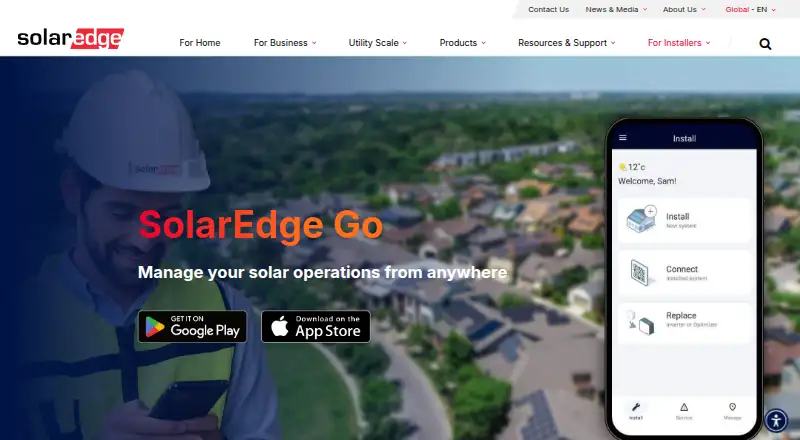
What SolarEdge Go is
SolarEdge Go is a free mobile app for installers managing photovoltaic sites and fleets and providing remote services. It brings together work from SetApp, Mapper, and Monitoring, although full Mapper integration is described as future support. Installers can sync data with SolarEdge Cloud, import designs, view site details and alerts, manage users, create and edit sites, apply SolarEdge Designer plans, and register or replace devices. A map-based fleet view helps users manage fleets or individual sites and respond to critical issues. The app supports on-site device configuration and registration. Remote access supports inverter and system diagnostics and configuration, but is beta, requires administrator permissions, and works only with supported SetApp-enabled leader inverters with CPU version 4.13 or higher. Sessions are limited to 15 minutes. Full functionality requires internet access and SolarEdge Cloud; without internet, use is limited to local commissioning through a direct inverter connection. The app requires Android 11 or later or iOS 14 or later. It supports residential and commercial sites, but is strictly for installers; homeowners are directed to mySolarEdge.
Who it suits
SolarEdge Go is for installers working with residential and commercial sites who need mobile site, fleet, and remote-service tools. Homeowners are directed to mySolarEdge instead.
What it does well
- Free mobile app for installers.
- Provides a map-based fleet view and site details.
- Supports on-site device configuration and registration.
- Can import designs and manage site users.
What to know first
- Full Mapper integration is future support.
- Remote sessions are limited to 15 minutes.
- Remote access requires a supported inverter and admin permissions.
- Without internet, use is limited to local commissioning.
Limits
Remote access is beta for account administrators, requires supported SetApp-enabled leader inverters with CPU version 4.13 or higher, and is limited to 15 minutes per connection. Without internet, use is limited to local commissioning through a direct inverter connection.
Plans
| Plan | Billed and limits | Price |
|---|---|---|
| SolarEdge Go | No price listed on the product page; SolarEdge account credentials required | Free |
As solaredge.com lists them, read 8 Oct 2026. The maker's own page has the final word.
Getting started
- Open the SolarEdge Go product page.
- Install the app on Android 11 or later, or iOS 14 or later.
- Sign in with SolarEdge account credentials.
- Connect to the internet and SolarEdge Cloud for full functionality.
- For local commissioning without internet, connect directly to the inverter.
Overview
SolarEdge Go is a free mobile app for installers handling SolarEdge photovoltaic sites and fleets. It suits crews already working with compatible SolarEdge equipment, especially those who need to move between installation and service tasks. Its advantage is a shared mobile workspace; its reach is narrowed by cloud dependence and remote-access restrictions.
Key features
Site and fleet management
The app brings together tasks from SetApp, Mapper, and Monitoring. Installers can create and edit sites, apply SolarEdge Designer plans, register or replace devices, and manage site users and permissions. A map-based fleet view, site details, alerts, and critical-issue response help teams prioritize service across multiple sites. Full Mapper integration remains a future capability, so the combined workflow is not yet complete.
Installation and remote service
On site, installers can configure and register devices. Cloud-based commissioning and support-ticket management are coming soon, which leaves those workflows outside the app's current capabilities. Remote inverter and system access supports diagnostics and configuration, potentially reducing the need for a site visit. But it is beta, restricted to account administrators, and works only with supported SetApp-enabled leader inverters running CPU version 4.13 or higher. Sessions last up to 15 minutes, and remote actions require admin permissions.
Cloud access and connectivity
SolarEdge Cloud tools sync data, import designs, show site information and alerts, and support user registration and management. Full functionality requires internet access; without it, use is limited to local commissioning through a direct inverter connection. This makes the app a weaker fit for crews who need a broad offline workflow.
Pricing
SolarEdge Go: free. SolarEdge account credentials are required. There are no paid tiers to trade features against, making the app a straightforward option for installers who can use its SolarEdge-specific workflows. Its limitations are compatibility, connectivity, and scope rather than a paid upgrade threshold.
Platforms
SolarEdge Go is available for Android and iOS. The guide requires Android 11 or higher or iOS 14 or higher, and says internet connectivity is required for full functionality.
Who it's for
This is an installer tool for residential and commercial sites, not a homeowner monitoring app; homeowners are directed to mySolarEdge. It is most useful for SolarEdge installers who manage several sites and can work within the supported inverter and account requirements. SolarEdge says it follows ISO 27001 information security practices and has adopted ISO 27017 cloud security guidance.
Pros and cons
- Pros: Site, fleet, installation, and service tasks share one mobile app, with map-based fleet oversight and site-level alerts.
- Pros: The free plan supports cloud tools and on-site device configuration without a paid tier.
- Cons: Full Mapper integration, cloud-based commissioning, and support-ticket management are still future capabilities.
- Cons: Remote access depends on compatible SetApp-enabled leader inverters, admin permissions, internet access, and 15-minute sessions.
Alternatives
For a broader choice of tools, browse Solar Installation Software.
- FieldExecutives is worth considering if a field-executive workflow across Android, iOS, and web matters; its free plan covers up to two users.
- OpenSolar is the better fit for solar design, sales, and project management, with a free-of-charge OpenSolar Pro plan and Android, iOS, macOS, and web support.
- InstalTrack offers a free plan with up to 10 projects and 50 stages, all features included, and an Android app; consider it for project-stage tracking rather than SolarEdge-specific field service.
- Solar ERP may suit teams seeking web-based monitoring with a free plan covering unlimited users, projects, and monitored systems.
- MightyFields Solar is an alternative with a per-user subscription and a 15-user minimum.
- SenseHawk is another paid option for Android, iOS, and web.
- SunrAI Project Management has a Starter plan priced at $29 a month, described as $29 per user monthly, and supports Android, iOS, and web.
- LuminaSims is a paid alternative for Android and web.
Verdict
SolarEdge Go is a sensible free choice for installers who need mobile site and fleet management around compatible SolarEdge equipment. Its strongest reason to choose it is the combination of field configuration, cloud tools, and remote diagnostics in one app. Look elsewhere if you need complete Mapper integration, cloud commissioning, reliable offline breadth, or remote access beyond its narrow device, permission, and session limits.
Verdict
SolarEdge Go brings site and fleet work into a mobile app for installers. Remote access has specific inverter, permission, connectivity, and session limits; full Mapper integration and cloud-based commissioning are still described as future capabilities.
Questions
How much does SolarEdge Go cost?
The plan is free. SolarEdge account credentials are required.
Who is the app for?
It is strictly for installers working with residential and commercial sites. Homeowners are directed to mySolarEdge.
Which mobile platforms are supported?
Android 11 or later and iOS 14 or later are supported.
What does remote access support?
It supports inverter and system diagnostics and configuration. Access depends on connectivity, administrator permissions and compatible SetApp-enabled leader inverters with CPU version 4.13 or higher; sessions last up to 15 minutes.
Can I use it without internet?
Without internet, use is limited to local commissioning through a direct connection to the inverter.
Does the app include SetApp, Mapper and Monitoring?
It brings together work from SetApp, Mapper and Monitoring. Full Mapper integration is described as future support.
Facts from SolarEdge Go's own pages
- Cloud access
- Its cloud capabilities let users sync data, import designs, view site information and alerts, and manage and register users. · solaredge.com, 8 Oct 2026
- Combined tools
- The app brings together work from SetApp, Mapper, and Monitoring, while full Mapper integration is stated as a future capability. · solaredge.com, 8 Oct 2026
- Company
- SolarEdge says it has operated since 2006 and lists its headquarters in Herzliya, Israel. · solaredge.com, 8 Oct 2026
- Compatibility limit
- The guide says remote inverter access depends on connectivity and supports SetApp-enabled leader inverters with CPU version 4.13 or higher. · knowledge-center.solaredge.com, 8 Oct 2026
- Connectivity requirement
- The user guide says full functionality requires a connection to SolarEdge Cloud; without internet, use is limited to local commissioning through a direct inverter connection. · knowledge-center.solaredge.com, 8 Oct 2026
- Fleet management
- Users can manage a fleet or individual site through a map-based fleet view, site details, and critical issue response. · solaredge.com, 8 Oct 2026
- Installation
- Users can configure and register devices on site, and the product page describes cloud-based commissioning as coming soon. · solaredge.com, 8 Oct 2026
- Installations
- The product page describes on-site device configuration and registration and says cloud-based commissioning is coming soon. · solaredge.com, 8 Oct 2026
- Internet requirement
- Without internet access, use is limited to local commissioning over a direct connection to the inverter. · knowledge-center.solaredge.com, 8 Oct 2026
- Mobile OS requirements
- The guide lists Android 11 or higher and iOS 14 or higher as requirements. · knowledge-center.solaredge.com, 8 Oct 2026
- Mobile requirements
- The user guide lists Android 11 or higher and iOS 14 or higher, and says internet connectivity is required. · knowledge-center.solaredge.com, 8 Oct 2026
- Purpose
- SolarEdge Go is a mobile app for installers to manage PV sites and fleets and provide remote services. · solaredge.com, 8 Oct 2026
- Remote-access limits
- The user guide describes remote access as beta for account administrators, limited to supported SetApp-enabled leader inverters with CPU version 4.13 or higher, and limited to 15 minutes per connection. · knowledge-center.solaredge.com, 8 Oct 2026
- Remote service
- Remote access supports inverter and system diagnostics and configuration; the product page marks support-ticket management as coming soon. · solaredge.com, 8 Oct 2026
- Remote services
- The app supports remote inverter and system access for diagnostics and configuration, and the product page lists support ticket management as coming soon. · solaredge.com, 8 Oct 2026
- Remote session limit
- Remote access sessions are limited to 15 minutes, and remote actions require admin permissions. · knowledge-center.solaredge.com, 8 Oct 2026
- Security
- SolarEdge says it adheres to ISO 27001 information security practices and has adopted ISO 27017 cloud security guidance. · corporate.solaredge.com, 8 Oct 2026
- Site and equipment tools
- The user guide says users can create and edit sites, apply SolarEdge Designer plans, register or replace devices, and manage site users and access permissions. · knowledge-center.solaredge.com, 8 Oct 2026
- Support
- The app listing gives [email protected] as its support email, and the user guide says feedback and issue reports can be submitted from within the app. · play.google.com, 8 Oct 2026
- Supported customers
- The app supports residential and commercial sites and is strictly for installers; homeowners are directed to mySolarEdge. · knowledge-center.solaredge.com, 8 Oct 2026
- Supported users
- The user guide says SolarEdge Go supports residential and commercial sites and is strictly for installers; homeowners should use mySolarEdge. · knowledge-center.solaredge.com, 8 Oct 2026
- Unified app
- The app brings together work from SetApp, Mapper, and Monitoring; full Mapper integration is described as future support. · solaredge.com, 8 Oct 2026
Where SolarEdge Go stands on Freedom251
- Solar Software#1 of 17
- Solar Installation Software#5 of 26