Freedom251 › Solar Installation Software
Solar ERP
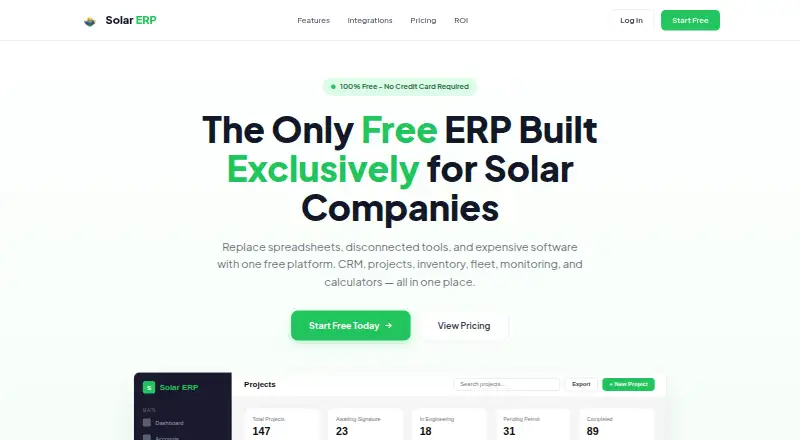
What Solar ERP is
Solar ERP is a web-based ERP built for solar installation companies. Its sales CRM organizes work in a 21-stage project pipeline, while operations tools cover work orders, inventory across multiple locations, fleet management, GPS-enabled timesheets, permitting, and engineering queue tracking. For system monitoring, the platform connects with Enphase, SolarEdge, and Tesla, syncing automatically every 15 minutes.
Solar and detach-and-reset calculators can account for labor, materials, overhead, and margin, then produce PDF proposals. Listed connections also include QuickBooks, OpenSolar, Podio, Nearmap, and e-signatures. The Free plan costs $0 forever and includes unlimited users, projects, and monitored systems. Pro is listed from $495/month with an annual subscription ($5,940/year), supports up to 100 users, and adds AI tools, premium calculators, a customer project portal, advanced reporting, data migration support, and priority email support. Companies with 100 or more users require a Custom plan. Enterprise adds custom API integrations, SSO/SAML, audit logs, advanced permissions, multi-branch support, and phone and video support with a priority SLA. The privacy policy describes TLS 1.2 or higher encryption in transit, AES-256 encryption at rest, database row-level security, and role-based access controls.
Who it suits
Solar ERP suits solar installation businesses that want project tracking alongside operational tools, proposal calculators, and system monitoring in a web platform. Its free plan accommodates unlimited users, projects, and monitored systems; larger organizations can consider Enterprise features, with custom pricing for companies with 100 or more users.
What it does well
- Free plan includes unlimited users, projects, and monitored systems.
- Tracks solar sales through a 21-stage project pipeline.
- Connects to Enphase, SolarEdge, and Tesla for monitoring.
- Calculators generate PDF proposals from specified cost factors.
- Pro adds a customer project portal and advanced reporting.
- Enterprise includes SSO/SAML and multi-branch support.
What to know first
- Pro starts at $495/month with an annual subscription.
- Companies with 100 or more users require a Custom plan.
- Enterprise pricing is custom and not stated as a fixed amount.
Limits
The Free plan lists unlimited users, projects, and monitored systems. Pro is limited to up to 100 users; companies with 100 or more users require a Custom plan. The Free plan’s listed facts do not include the Pro features such as AI tools, premium calculators, the customer project portal, advanced reporting, migration support, and priority email support.
Plans
| Plan | Billed and limits | Price |
|---|---|---|
| Free | $0/forever · Unlimited users · Unlimited projects · Unlimited monitored systems | Free |
| Pro | From $495/month with annual subscription ($5,940/year) · Up to 100 users · Unlimited projects · Unlimited monitored systems | $725 a month |
| Enterprise | Custom pricing based on the size and needs of your organization · For companies with 100+ users · Unlimited projects · Unlimited monitored systems | On request |
As erpsolar.com lists them, read 8 Oct 2026. The maker's own page has the final word.
Getting started
- Visit the Solar ERP website.
- Open the general contact form for support or contact with the team.
- Choose the Free plan or review the Pro and Enterprise plan options.
- Use the web platform for CRM, project operations, and monitoring connections.
Solar ERP is a web-based ERP for solar installation companies, combining sales, project operations, monitoring, and quoting. Its broad workflow coverage and high-volume free plan make it worth considering for installers consolidating work across office and field teams. The main trade-off is that Pro requires an annual commitment, while companies with 100 or more users need custom pricing.
Overview
Solar ERP’s case rests on range: a 21-stage sales pipeline sits alongside work orders, inventory, fleet management, permitting, monitoring, and proposal generation. For a company that wants those workflows under one roof, that breadth is more compelling than a single-purpose solar tool. The free plan also has no stated caps on users, projects, or monitored systems, making it a practical starting point for teams assessing the platform.
That breadth may be more than a small installer needs, and the paid step is substantial: Pro is advertised from $495/month with an annual subscription. Scale is another dividing line, since organizations with 100 or more users must move to custom pricing.
Key features
From sales pipeline to field operations
The solar CRM and 21-stage project pipeline give teams a structured route from sales into delivery. Work orders, multi-location inventory, fleet management, GPS-enabled timesheets, permitting, engineering queue tracking, crew scheduling, and design handoff extend that coverage into day-to-day operations. This is a useful combination for installers coordinating office staff, crews, and equipment; companies with simpler workflows may not benefit from managing all of them in an ERP.
Monitoring and proposals
Connections to Enphase, SolarEdge, and Tesla sync monitoring data automatically every 15 minutes. That cadence gives teams regular system updates without manual syncing, though it is not a live-refresh promise. Solar and detach-and-reset calculators account for labor, materials, overhead, and margin, then produce PDF proposals. QuickBooks, OpenSolar, Podio, Nearmap, and e-signatures round out the named integrations and connections.
Security and support
Solar ERP’s privacy policy describes TLS 1.2 or higher encryption in transit, AES-256 encryption at rest, database row-level security, and role-based access controls. After an account ends, data is retained for 30 days for export and may remain in encrypted backups for up to 90 days after deletion from primary systems. General support is handled through a contact form, with a team member reviewing submissions and responding promptly.
Pricing
| Plan | Price and terms | What it includes |
|---|---|---|
| Free | free; billed $0/forever | Unlimited users, projects, and monitored systems |
| Pro | $725 a month; billed from $495/month with annual subscription ($5,940/year) | Up to 100 users, unlimited projects and monitored systems; AI tools, premium calculators, customer project portal, advanced reporting, data migration support, and priority email support |
| Enterprise | Custom pricing based on the size and needs of your organization | For companies with 100+ users; unlimited projects and monitored systems; custom API integrations, SSO/SAML, audit logs, advanced permissions, multi-branch support, and phone and video support with a priority SLA |
Free is unusually generous on volume: the published plan has unlimited users, projects, and monitored systems. It is the sensible place to start if those limits matter more than Pro’s added tools and support. There is no free trial, but the free plan provides an ongoing alternative to a time-limited evaluation.
Pro is for teams that need the customer portal, AI tools, premium calculators, or advanced reporting. The price is presented both as $725 a month and as billed from $495/month with an annual subscription ($5,940/year); the annual commitment is the key term for buyers to weigh. Pro supports up to 100 users, while companies with 100 or more require Enterprise. Enterprise adds security, integration, multi-branch, and higher-touch support features, but its price is custom rather than fixed.
Platforms
Solar ERP is web-based. That suits teams coordinating work through a browser, but the platform list does not include a dedicated mobile app.
Who it's for
Solar ERP fits solar installation companies that want sales pipeline management, field operations, monitoring, and quoting in one system. Its unlimited Free plan is especially relevant to teams that need room for users, projects, and monitored systems without a stated volume cap. Pro is a better fit when its added customer-facing, reporting, calculator, or support tools justify the annual bill. Larger organizations with at least 100 users need to evaluate Enterprise and its custom pricing.
Pros and cons
- Broad coverage for installers: sales, project stages, field operations, monitoring, and proposals sit in one platform, which suits companies trying to coordinate those workflows together.
- Generous Free limits: unlimited users, projects, and monitored systems make it usable beyond a small trial group.
- Monitoring connections and proposal tools: automatic syncing every 15 minutes and calculators that include costs and margin support ongoing system oversight and quoting.
- Meaningful annual price step: Pro is billed annually from $495/month, so the paid tier is a larger commitment than the free plan.
- Scale requires custom pricing: companies with 100 or more users cannot use Pro and must consider Enterprise.
- Web-only platform listing: teams seeking a dedicated mobile app should compare alternatives.
Alternatives
For a broader comparison, browse Solar Installation Software.
- FieldExecutives is worth considering for teams that want a mobile option across Android and iOS, or a free plan capped at two users; it also offers a free trial.
- OpenSolar is a fit for teams focused on solar design, sales, and project management on a free plan, with a free trial and broader platform support including mobile, desktop, and API.
- InstalTrack may suit teams looking for a free project-stage tool capped at 10 projects and 50 stages, with an Android app and free trial.
- SolarEdge Go is a free Android and iOS option for users with SolarEdge account credentials.
- MightyFields Solar is a paid, per-user SaaS option with a 15-user minimum for teams comfortable with that starting scale.
- SenseHawk is another paid option with Android, iOS, and web platforms.
- SunrAI Project Management may fit teams seeking lifecycle, dispatch, and permit tracking, with a free-during-beta plan and planned launch pricing of $29/user/month.
- LuminaSims is another paid option, available on Android and web.
Verdict
Solar ERP is a strong choice for solar installers that want sales, field operations, monitoring, and quoting coordinated in one web platform, especially if the Free plan’s unlimited users, projects, and monitored systems meet their needs. Choose Pro when its added tools justify an annual commitment; look elsewhere if you need a dedicated mobile app, a fixed Enterprise price, or a Pro plan for 100 or more users.
Verdict
Choose Solar ERP if your solar installation company needs sales pipeline management alongside field operations and system monitoring. The Free plan includes unlimited users, projects, and monitored systems. Look elsewhere if you need a fixed Enterprise price or a Pro plan for 100 or more users.
Questions
Is there a free plan?
Yes. The Free plan is billed at $0 forever and includes unlimited users, unlimited projects, and unlimited monitored systems.
How much does Pro cost?
Pro is listed from $495/month with an annual subscription ($5,940/year), and supports up to 100 users.
What happens for companies with 100 or more users?
They require a Custom plan because of AI API usage. Enterprise pricing is based on the organization’s size and needs.
Which platforms and monitoring connections are listed?
Solar ERP is available on the web. Monitoring connections include Enphase, SolarEdge, and Tesla, with automatic syncing every 15 minutes.
What does Pro add?
Pro adds AI tools, premium calculators, a customer project portal, advanced reporting, data migration support, and priority email support.
What integrations are listed?
Connections include QuickBooks, OpenSolar, Podio, Nearmap, e-signatures, Enphase, SolarEdge, and Tesla.
Facts from Solar ERP's own pages
- CRM and project pipeline
- The platform includes solar sales CRM and a 21-stage project pipeline. · erpsolar.com, 8 Oct 2026
- Data retention
- After account termination, the policy says data is retained for 30 days for export and may remain in encrypted backups for up to 90 days after deletion from primary systems. · erpsolar.com, 8 Oct 2026
- Enterprise features
- Enterprise adds custom API integrations, SSO/SAML, audit logs, advanced permissions, multi-branch support, and phone and video support with a priority SLA. · erpsolar.com, 8 Oct 2026
- Free plan limits
- The Free plan lists unlimited users, unlimited projects, and unlimited monitored systems. · erpsolar.com, 8 Oct 2026
- Integrations
- The maker lists integrations or connections including QuickBooks, OpenSolar, Podio, Nearmap, and e-signatures, in addition to Enphase, SolarEdge, and Tesla monitoring. · erpsolar.com, 8 Oct 2026
- Operations
- It includes work orders, multi-location inventory, fleet management, GPS-enabled timesheets, permitting, and engineering queue tracking. · erpsolar.com, 8 Oct 2026
- Pro features
- Pro adds AI tools, premium calculators, a customer project portal, advanced reporting, data migration support, and priority email support. · erpsolar.com, 8 Oct 2026
- Pro user limit
- Companies with 100 or more users require a Custom plan because of AI API usage. · erpsolar.com, 8 Oct 2026
- Purpose
- Solar ERP describes itself as an all-in-one ERP built for solar installation companies. · erpsolar.com, 8 Oct 2026
- Quoting
- Solar and detach-and-reset calculators can account for labor, materials, overhead, and margin and generate PDF proposals. · erpsolar.com, 8 Oct 2026
- Security
- The privacy policy says data is encrypted in transit with TLS 1.2 or higher and at rest with AES-256, with database row-level security and role-based access controls. · erpsolar.com, 8 Oct 2026
- Support
- The contact page provides a form for general support and says a team member will review submissions and respond promptly. · erpsolar.com, 8 Oct 2026
- System monitoring
- The platform connects to Enphase, SolarEdge, and Tesla for system monitoring, with automatic syncing every 15 minutes. · erpsolar.com, 8 Oct 2026
Where Solar ERP stands on Freedom251
- Solar Installation Software#7 of 26