Snowflake CoCo
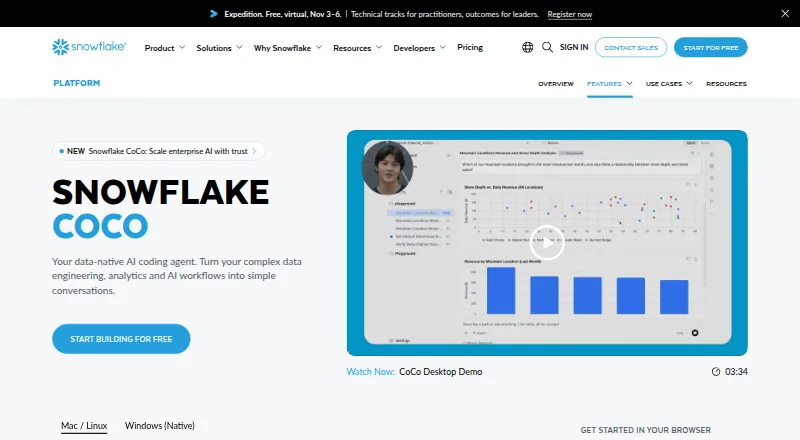
What Snowflake CoCo is
Snowflake CoCo is an AI coding agent for work in Snowflake across data engineering, analytics, machine learning, and agent building. You can use it in Snowsight, through a desktop IDE, or from a command line. In Snowsight, it generates SQL and Python notebook code from natural-language instructions, explains and optimizes queries, and answers account administration questions. The desktop app has agent and editor modes, can access local repositories, and supports plugins, skills, hooks, MCP connections, web pages, and Snowflake notebooks. The CLI connects to Snowflake, runs SQL, accesses local files, and performs bash and git operations. It can also follow project-specific agent instructions and skills. CoCo offers code completion, chat assistance, codebase indexing, and terminal access. Its Agent Client Protocol preview supports use as a local agent backend in Zed, JetBrains, VS Code, and Neovim. MCP connections can link it with tools and data sources such as GitHub, Jira, internal APIs, and databases; named workflows include dbt, Apache Airflow, Postgres, Spark, and AWS Glue. CoCo supports several Claude and OpenAI models. Snowflake bills existing customers by token consumption, with compute and storage charged separately. The introductory trial includes $40 USD in inference credits for the first 30 days, followed by a $20 USD monthly subscription fee.
Who it suits
CoCo suits Snowflake users who want AI help writing or improving SQL and Python, working with code repositories, or handling account administration. Its Snowsight, desktop, CLI, and IDE options serve teams with different coding workflows, while its integrations connect with tools and data sources such as GitHub, Jira, and databases.
What it does well
- Generates SQL and Python notebook code from natural-language requests.
- Explains and optimizes queries in Snowsight.
- Desktop supports local repositories, plugins, skills, and hooks.
- CLI can run SQL, bash, and git operations.
- Offers code completion, chat, indexing, and terminal access.
- Supports MCP connections and an IDE backend preview.
What to know first
- Requires cross-region inference to be enabled.
- Desktop and CLI exclude government, VPS, and sovereign accounts.
- Snowflake compute and storage charges apply separately.
- CLI/Desktop subscription usage can be unavailable until the next billing period after included usage is exceeded.
Limits
The introductory trial provides $40 USD in inference credits for the first 30 days, then a $20 USD monthly subscription fee. CoCo usage is billed by token consumption for existing Snowflake customers, and separate compute or storage charges may apply. CoCo Desktop and CLI are unavailable to government accounts, VPS, and sovereign accounts.
Plans
| Plan | Billed and limits | Price |
|---|---|---|
| CoCo CLI/Desktop subscription | Monthly subscription after a 30-day free trial; the amount is not stated on the pages opened. · Fixed monthly usage; unavailable until the next billing period if included usage is exceeded | On request |
| CoCo pay-as-you-go | Token consumption for companies with an existing Snowflake account; price depends on consumption. · Snowflake compute and storage are billed separately at standard rates | On request |
As snowflake.com lists them, read 29 Sept 2026. The maker's own page has the final word.
Getting started
- Open the Snowflake CoCo product page.
- Choose Snowsight, the desktop IDE, or the command-line interface.
- Enable cross-region inference for access.
- For the introductory trial, start with Snowflake's offer of $40 USD in inference credits for the first 30 days.
- Connect supported tools or data sources through MCP where needed.
Verdict
Choose CoCo if your work centers on Snowflake and you want coding assistance across Snowsight, a desktop environment, or the CLI. Its trial offers $40 USD in inference credits for 30 days, then a $20 USD monthly subscription fee; token-based usage and separate Snowflake consumption charges are also relevant when weighing the cost.
Questions
Is there a free plan or trial?
There is no free plan. The introductory Snowflake trial includes $40 USD in inference credits for the first 30 days.
What does it cost after the trial?
The offer states a $20 USD monthly subscription fee after the first 30 days. Existing Snowflake customers are billed for CoCo usage by token consumption, and separate platform compute or storage charges may apply.
Which platforms and interfaces does CoCo support?
It is available through Snowsight, a desktop IDE, and a command-line interface. Listed platforms are API, Linux, macOS, web, and Windows.
Which editors can use CoCo?
Its Agent Client Protocol preview supports embedding CoCo as a local agent backend in Zed, JetBrains, VS Code, and Neovim.
What tools can it connect to?
CoCo supports MCP connections to tools and data sources such as GitHub, Jira, internal APIs, and databases. Named workflows include dbt, Apache Airflow, Postgres, Spark, and AWS Glue.
Who makes Snowflake CoCo?
Snowflake Inc. makes CoCo.
Facts from Snowflake CoCo's own pages
- Coding agent
- Yes · snowflake.com, 22 Sept 2026
- Availability
- The documentation marks Snowsight, Desktop, and CLI as generally available and states that access requires cross-region inference to be enabled. · docs.snowflake.com, 29 Sept 2026
- Chat assistance
- Yes · snowflake.com, 22 Sept 2026
- CLI capabilities
- The CLI can connect to Snowflake, execute SQL, access local files, run bash and git operations, and use project-specific agent instructions and skills. · docs.snowflake.com, 29 Sept 2026
- Codebase indexing
- Yes · snowflake.com, 22 Sept 2026
- Code completion
- Yes · snowflake.com, 22 Sept 2026
- Desktop features
- CoCo Desktop supports agent and editor modes, local repository access, plugins, skills, hooks, MCP connections, and interaction with web pages and Snowflake notebooks. · docs.snowflake.com, 29 Sept 2026
- Founded
- 2012 · snowflake.com, 28 Sept 2026
- Free plan
- No · snowflake.com, 22 Sept 2026
- Headquarters
- Menlo Park, California, United States · snowflake.com, 28 Sept 2026
- IDE support
- CoCo’s Agent Client Protocol preview supports embedding it as a local agent backend in editors including Zed, JetBrains, VS Code, and Neovim. · docs.snowflake.com, 29 Sept 2026
- Integrations
- CoCo supports MCP connections to tools and data sources such as GitHub, Jira, internal APIs, and databases; the product page also names dbt, Apache Airflow, Postgres, Spark, and AWS Glue workflows. · snowflake.com, 29 Sept 2026
- Interfaces
- CoCo is available in Snowsight, as a desktop IDE, and through a command-line interface. · docs.snowflake.com, 29 Sept 2026
- Maker
- The maker is Snowflake Inc.; its opened About page describes it as a data platform company but does not state a founding date or headquarters address. · snowflake.com, 29 Sept 2026
- Model choices
- The product page lists Claude Opus 4.8, Claude Opus 4.7, Claude Opus 4.6, Claude Opus 4.5, Claude Sonnet 5, Claude Sonnet 4.6, Claude Sonnet 4.5, OpenAI GPT 5.4, and OpenAI GPT 5.2. · snowflake.com, 29 Sept 2026
- Notable limits
- CoCo Desktop and CLI availability excludes government accounts, VPS, and sovereign accounts, while Snowsight lists commercial, FedRAMP Moderate and High, DoD, and KSA sovereign accounts. · docs.snowflake.com, 29 Sept 2026
- Pricing basis
- CoCo usage is billed by token consumption for existing Snowflake customers, and separate Snowflake compute or storage charges may apply. · docs.snowflake.com, 29 Sept 2026
- Purpose
- CoCo is an AI coding agent for data engineering, analytics, machine learning, and agent-building work in Snowflake. · docs.snowflake.com, 29 Sept 2026
- Security
- The CLI supports Snowflake role-based access control, OS-level sandboxing, a three-tier approval system, and automatic risk assessment. · docs.snowflake.com, 29 Sept 2026
- Snowsight features
- In Snowsight, CoCo can generate SQL and Python notebook code from natural language, explain and optimize queries, and answer account administration questions. · docs.snowflake.com, 29 Sept 2026
- Supported IDEs
- Zed,JetBrains,VS Code,Neovim · snowflake.com, 22 Sept 2026
- Terminal access
- Yes · snowflake.com, 22 Sept 2026
- Trial offer
- The product page advertises an introductory Snowflake trial with $40 USD in inference credits for the first 30 days, followed by a $20 USD monthly subscription fee; separate Snowflake platform consumption charges apply. · snowflake.com, 29 Sept 2026
Where Snowflake CoCo stands on Freedom251
- Model registries#19 of 38
- AI Coding Assistants#80 of 102