Freedom251 › Code Snippet Management Software
SnipperApp 3
What SnipperApp 3 is
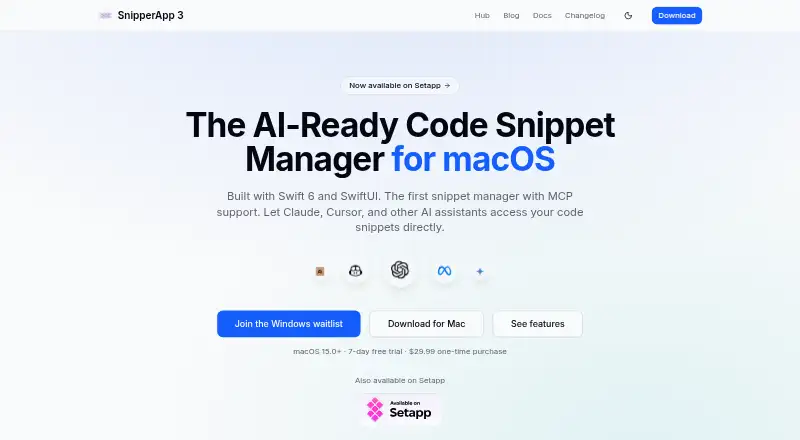
SnipperApp 3 is a code snippet manager for developers who reuse code across web applications, backend services, scripts, and infrastructure. Its workspaces keep snippets in separate collections, each with its own folders, tags, and settings. The editor supports syntax highlighting for more than 50 programming languages and a side-by-side GitHub Flavored Markdown preview. Snippets can sync between Macs through iCloud or synchronize both ways with GitHub Gists, including multi-file gists. A built-in MCP server lets compatible AI assistants search, read, create, and update snippets; listed tools include Claude Code, Claude Desktop, Cursor, and Windsurf. The free Raycast extension has nine commands for searching, pasting, and capturing snippets, while its Ask SnipperApp AI feature requires Raycast Pro. Automatic backups and one-click import from SnipperApp 2 are included. The app requires macOS 15.0 (Sequoia) or later. Its lifetime license costs $29.99 as a one-time purchase, with a 7-day trial, all features, lifetime updates, and unlimited devices.
Who it suits
It suits developers who want to organize reusable code across projects and sync snippets across Macs or with GitHub Gists. AI assistant users can also use its MCP server with the listed compatible tools.
What it does well
- Workspaces have separate folders, tags, and settings.
- Syntax highlighting covers more than 50 programming languages.
- Syncs with iCloud and GitHub Gists.
- MCP server supports search and snippet updates.
- Lifetime license includes unlimited devices and updates.
What to know first
- Requires macOS 15.0 (Sequoia) or later.
- No free plan; the license is a paid purchase.
- Ask SnipperApp AI in Raycast requires Raycast Pro.
Limits
The app requires macOS 15.0 (Sequoia) or later. Ask SnipperApp AI is limited to users with Raycast Pro; the lifetime license itself is a one-time purchase rather than a subscription.
Plans
| Plan | Billed and limits | Price |
|---|---|---|
| Lifetime license | One-time purchase; no subscription. · All features included · Free lifetime updates · Unlimited devices · Requires macOS 15.0 (Sequoia) or later | $29.99, paid once |
As snipperapp.com lists them, read 9 Oct 2026. The maker's own page has the final word.
Getting started
- Open the SnipperApp website
- Install the macOS app on macOS 15.0 or later
- Purchase the lifetime license
- Create workspaces with folders, tags, and settings
- Enable iCloud or GitHub Gist synchronization
- Import an existing SnipperApp 2 library if needed
- Add the free Raycast extension for its nine commands
Verdict
SnipperApp 3 brings code organization, editing, and cross-device syncing into a native macOS app. Its stated macOS requirement and one-time license are important considerations before choosing it.
Questions
How much does SnipperApp 3 cost?
The lifetime license costs 29.99 USD as a one-time purchase, billed once. It includes all features, lifetime updates, and unlimited devices.
Is there a free plan?
There is no free plan. A free Raycast extension is available, but its Ask SnipperApp AI feature requires Raycast Pro.
Which platform does SnipperApp 3 support?
It is a native macOS app and requires macOS 15.0 (Sequoia) or later. A Raycast extension is also provided.
Can it synchronize snippets between devices?
Yes. iCloud sync works across Macs, and two-way synchronization with GitHub Gists includes multi-file gists.
Which AI tools work with its MCP server?
The listed compatible tools are Claude Code, Claude Desktop, Cursor, and Windsurf.
Who owns SnipperApp 3?
The privacy policy identifies Andrii Teologov as the owner and data controller.
Facts from SnipperApp 3's own pages
- AI integration
- Its built-in MCP server lets AI assistants search, read, create, and update snippets, and the site lists Claude Code, Claude Desktop, Cursor, and Windsurf as compatible tools. · snipperapp.com, 9 Oct 2026
- Analytics
- The privacy policy says production builds use Amplitude for device-based anonymous product analytics and Sentry for error tracking, with personally identifiable information excluded from error reports. · snipperapp.com, 9 Oct 2026
- Audience
- The documentation describes it as designed for developers managing reusable code for web applications, backend services, scripts, and infrastructure. · snipperapp.com, 9 Oct 2026
- Backup and import
- The app makes automatic backups and supports one-click import from SnipperApp 2. · snipperapp.com, 9 Oct 2026
- Editing
- The app offers syntax highlighting for more than 50 programming languages and side-by-side GitHub Flavored Markdown preview. · snipperapp.com, 9 Oct 2026
- Maker
- The privacy policy identifies Andrii Teologov as the owner and data controller. · snipperapp.com, 9 Oct 2026
- Organization
- Workspaces separate snippets into collections with their own folders, tags, and settings. · snipperapp.com, 9 Oct 2026
- Platform requirement
- The app requires macOS 15.0 (Sequoia) or later. · snipperapp.com, 9 Oct 2026
- Privacy
- The maker says snippets, folders, tags, and attachments sync to the user's private iCloud database via CloudKit, and the developer does not have access to that iCloud data. · snipperapp.com, 9 Oct 2026
- Product
- SnipperApp 3 is a native macOS code snippet manager built with Swift 6 and SwiftUI. · snipperapp.com, 9 Oct 2026
- Raycast extension
- The free Raycast extension provides nine commands for searching, pasting, and capturing snippets; its Ask SnipperApp AI feature requires Raycast Pro. · snipperapp.com, 9 Oct 2026
- Support
- The privacy policy provides an owner contact email for questions and data-rights requests. · snipperapp.com, 9 Oct 2026
- Sync
- SnipperApp 3 supports iCloud sync across Macs and two-way synchronization with GitHub Gists, including multi-file gists. · snipperapp.com, 9 Oct 2026
Where SnipperApp 3 stands on Freedom251
- Code Snippet Management Software#20 of 22
- Code Snippet Managers#31 of 33