SnapCode
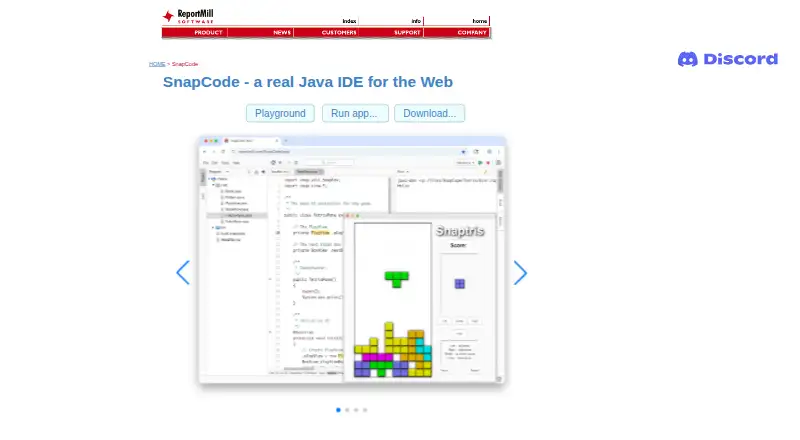
What SnapCode is
SnapCode is a free Java IDE designed for education, available in a browser and as a desktop app or executable JAR. It supports Java 11 and later on Windows, macOS, and Linux, and projects can be worked on in the cloud. SnapCloud saves local changes automatically by default, with manual synchronization available if autosave is disabled. The editor provides syntax highlighting, type-aware completion, inline warnings and errors, project search, and navigation to declarations, JavaDocs, and source.
An optional Java REPL evaluates snippets as they are typed and can avoid class and main declarations. SnapCode also offers drag-and-drop block coding and an integrated UI builder that stores interfaces in .snp XML files. SnapKit adds controls, vector graphics, image effects, animation, and 3D support; SnapCharts provides several chart types with pan, zoom, and mouse-over labels. Users can share running apps and code or embed runnable, editable code in HTML pages. Java Markdown can run code blocks and display outputs, but this feature is still in development.
Who it suits
SnapCode suits learners and educators looking for a Java IDE with browser access, visual block coding, and an integrated UI builder. It also fits Java work that benefits from cloud projects, charts, graphics, or shareable code.
What it does well
- Free Java IDE for education
- Runs in browser and on desktop systems
- Optional REPL reduces Java boilerplate
- Visual drag-and-drop block coding
- Can embed runnable, editable code in HTML
What to know first
- Java Markdown is still in development
- In-browser visual debugger is listed as coming soon
- Java 25 support is listed as coming soon
- GitHub support is listed as coming soon
Getting started
- Open the SnapCode website in a modern browser, or use the download page for the desktop app or executable JAR.
- Use a system with Java 11 or later.
- Start a project in SnapCode; cloud project work is supported.
- Keep SnapCloud's default autosave enabled, or disable it and synchronize manually.
Verdict
SnapCode brings Java editing, visual coding, and graphics tools into a free IDE for education. Note that Java Markdown remains in development and several listed roadmap items are not yet available.
Questions
Is SnapCode free?
Yes. SnapCode has a free plan.
Which platforms does SnapCode support?
It is available in a browser and has desktop downloads for Windows, macOS, and Linux.
Which Java versions does it support?
SnapCode supports Java 11 and later.
Can I share or embed work?
Yes. SnapCode supports sharing running apps and code, and embedding runnable, editable code in HTML pages.
Does it include a visual debugger or GitHub support?
An in-browser visual debugger and GitHub support are listed as coming soon.
Facts from SnapCode's own pages
- Block coding
- SnapCode provides visual drag-and-drop block coding. · reportmill.com, 4 Oct 2026
- Browser implementation
- The download page lists SnapCode Web as using CheerpJ 3 and Swing, and labels it as running in the browser. · reportmill.com, 4 Oct 2026
- Browser use
- The maker says SnapCode runs in any modern browser and can be embedded in an HTML page. · reportmill.com, 4 Oct 2026
- Charts
- SnapCharts support includes bar, pie, scatter, area, line, and contour charts, with pan, zoom, and mouse-over labels. · reportmill.com, 4 Oct 2026
- Cloud projects
- SnapCloud lets users save projects online, open them on other devices, and share a browser-accessible project link. · github.com, 4 Oct 2026
- Cloud sync
- SnapCloud automatically commits local project changes in the background by default, and users can disable autosave and synchronize manually. · github.com, 4 Oct 2026
- Desktop downloads
- The download page lists a desktop app and executable JAR for all platforms, and says SnapCode supports Java 11 and later. · reportmill.com, 4 Oct 2026
- Editing features
- The IDE lists syntax highlighting, class and type aware code completion, inline warnings and errors, project search, and navigation to declarations, JavaDocs, and source. · reportmill.com, 4 Oct 2026
- Editor features
- The IDE includes syntax highlighting, type-aware code completion, inline warnings and errors, project search, and navigation to declarations, JavaDocs, and source. · reportmill.com, 4 Oct 2026
- Help
- SnapCode has an integrated help system with templates for many kinds of code. · reportmill.com, 4 Oct 2026
- Java Markdown
- Java Markdown lets users run Java code in marked blocks in Markdown documents and display outputs such as text, images, views, UI components, and charts; the page says this feature is still in development. · reportmill.com, 4 Oct 2026
- Java REPL
- Its optional Java REPL evaluates snippets as the user types, with implicit class and main declarations and optional semicolons. · reportmill.com, 4 Oct 2026
- Java support
- SnapCode supports Java version 11 and up. · reportmill.com, 4 Oct 2026
- Libraries
- SnapCode uses SnapKit and SnapCharts for UI, graphics, 3D, animation, and charting capabilities. · reportmill.com, 4 Oct 2026
- Maker
- ReportMill Software, Inc. says it makes Java developer tools and was founded in 1997. · reportmill.com, 4 Oct 2026
- Product
- SnapCode is a free, full-featured Java IDE that runs in the browser and is tailored for education. · reportmill.com, 4 Oct 2026
- Purpose
- SnapCode is a free, full-featured Java IDE that runs in a browser and is tailored for education. · reportmill.com, 4 Oct 2026
- REPL
- Its optional Java REPL evaluates snippets as the user types and supports code without class or main method boilerplate. · reportmill.com, 4 Oct 2026
- Roadmap limits
- The page lists an in-browser visual debugger, Java 25 support, and GitHub support as coming soon. · reportmill.com, 4 Oct 2026
- Sharing and embedding
- SnapCode supports sharing running apps and code, and embedding runnable, editable code in HTML pages. · reportmill.com, 4 Oct 2026
- UI and graphics
- SnapKit support includes UI controls, vector graphics, image effects, animation, and 3D support using OpenGL/WebGL. · reportmill.com, 4 Oct 2026
- UI builder
- SnapCode includes an integrated UI builder that stores interfaces in .snp XML files. · reportmill.com, 4 Oct 2026
Where SnapCode stands on Freedom251
- Java IDEs#19 of 23