SnapCAD
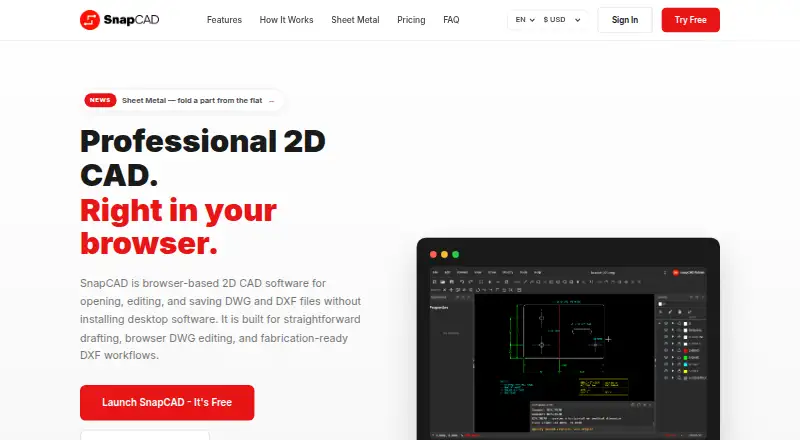
What SnapCAD is
SnapCAD is browser-based 2D CAD software for opening and editing DWG and DXF drawings. Its drafting tools include command-driven work, toolbars, keyboard shortcuts, layer controls, entity snaps, and modify tools. It reads files from the early 1990s through DWG 2018 and lists eight DWG save versions. The service runs in Chrome, Edge, Firefox, and Safari without a desktop download or installation. The Free plan allows users to open DWG and DXF files and use drawing tools, but it does not permit saving or exporting. Standard adds file saving and trade toolsets and costs A$19 a month (billed A$19/mo). Standard DXF exports are described as suitable for CNC routers, laser cutters, and vinyl plotters. Drawings are processed locally in the browser and are not uploaded to a server by default, though an internet connection is required. SnapCAD focuses on practical 2D drafting, not BIM software or full 3D parametric CAD. Its headquarters are in Australia.
Who it suits
SnapCAD names fabricators, CNC users, drafting contractors, cabinetmakers, joinery shops, and small architecture and building services teams as common users. It is aimed at practical 2D drafting rather than BIM or full 3D parametric CAD.
What it does well
- Opens DWG and DXF files in a browser.
- Includes layer controls, entity snaps, and modify tools.
- Works in four listed browsers without installation.
- Processes drawings locally by default.
- Standard DXF exports suit listed fabrication workflows.
What to know first
- Free plan does not allow saving or exporting.
- An internet connection is required.
- Not positioned as BIM or full 3D parametric CAD.
Limits
The Free plan can open DWG and DXF files, but saving and exporting require Standard at A$19 a month. SnapCAD requires an internet connection and is focused on 2D drafting rather than BIM or full 3D parametric CAD.
Plans
| Plan | Billed and limits | Price |
|---|---|---|
| Standard | A$19/mo · Everything in Free · Save DWG and DXF · Add trade toolsets | A$19 a month |
| Free | A$0/mo · Open DWG/DXF · Drawing tools and toolbars · Entity snap · Keyboard shortcuts · No file save/export | On request |
As snapcad.io lists them, read 7 Oct 2026. The maker's own page has the final word.
Getting started
- Open the SnapCAD website in Chrome, Edge, Firefox or Safari.
- Use the Free plan to open a DWG or DXF file and access drawing tools.
- Choose Standard at A$19 a month to save DWG and DXF files and add trade toolsets.
- Keep an internet connection while using SnapCAD.
Verdict
SnapCAD offers browser-based 2D drafting with DWG and DXF support and a free option for opening files. Saving and exporting require Standard, and the service requires an internet connection.
Questions
Is SnapCAD free?
Yes. The Free plan is A$0/mo and includes opening DWG/DXF files, drawing tools and toolbars, entity snaps and keyboard shortcuts. It does not allow file saving or export.
How much does Standard cost?
Standard costs A$19 a month, billed A$19/mo. It adds DWG and DXF saving and trade toolsets.
Which file types does it support?
SnapCAD opens and edits DWG and DXF files. It reads files from the early 1990s through DWG 2018 and lists eight DWG save versions.
Which browsers can run SnapCAD?
The site says SnapCAD works in Chrome, Edge, Firefox and Safari without a desktop download or installation.
Can I use it offline?
No. SnapCAD requires an internet connection.
Who makes SnapCAD and where is it based?
SnapCAD is headquartered in Australia.
Facts from SnapCAD's own pages
- Browser support
- The site says it works in Chrome, Edge, Firefox, and Safari without a desktop download or installation. · snapcad.io, 7 Oct 2026
- Core features
- It includes command-driven drafting, toolbars, keyboard shortcuts, layer controls, entity snaps, and modify tools. · snapcad.io, 7 Oct 2026
- Fabrication workflows
- The site describes Standard DXF exports as suitable for CNC routers, laser cutters, and vinyl plotters. · snapcad.io, 7 Oct 2026
- File compatibility
- It reads DWG and DXF from the early 1990s through DWG 2018 and lists eight DWG save versions. · snapcad.io, 7 Oct 2026
- File handling
- The site says drawings are processed locally in the browser and are not uploaded to a server by default. · snapcad.io, 7 Oct 2026
- Free plan limit
- The Free plan can open DWG/DXF files but does not allow file save or export. · snapcad.io, 7 Oct 2026
- Headquarters
- Australia · snapcad.io, 28 Sept 2026
- Offline use
- SnapCAD currently requires an internet connection, according to its FAQ. · snapcad.io, 7 Oct 2026
- Privacy and compliance
- Its privacy policy says it is prepared to comply with GDPR, UK GDPR, Australian privacy law, and CCPA/CPRA. · snapcad.io, 7 Oct 2026
- Scope limit
- SnapCAD says it is focused on practical 2D drafting and is not positioned as BIM software or full 3D parametric CAD. · snapcad.io, 7 Oct 2026
- Security
- The privacy policy states that data in transit uses TLS 1.2+, data at rest uses Azure-managed encryption keys, and production access is restricted and audited. · snapcad.io, 7 Oct 2026
- Service providers
- The privacy policy names Clerk for authentication, Microsoft Azure for hosting, and Stripe for payment processing. · snapcad.io, 7 Oct 2026
- What it does
- SnapCAD is browser-based 2D CAD for opening, editing, and saving DWG and DXF files. · snapcad.io, 7 Oct 2026
- Who it serves
- The site names fabricators, CNC users, drafting contractors, cabinetmakers, joinery shops, and small architecture and building services teams as common users. · snapcad.io, 7 Oct 2026
Where SnapCAD stands on Freedom251
- 2D CAD Software#20 of 41