Freedom251 › SEO Log File Analysis Tools
SmartDev Tools SEO Log File Analyzer
Visit SmartDev Tools SEO Log File Analyzer Alternatives Pricing
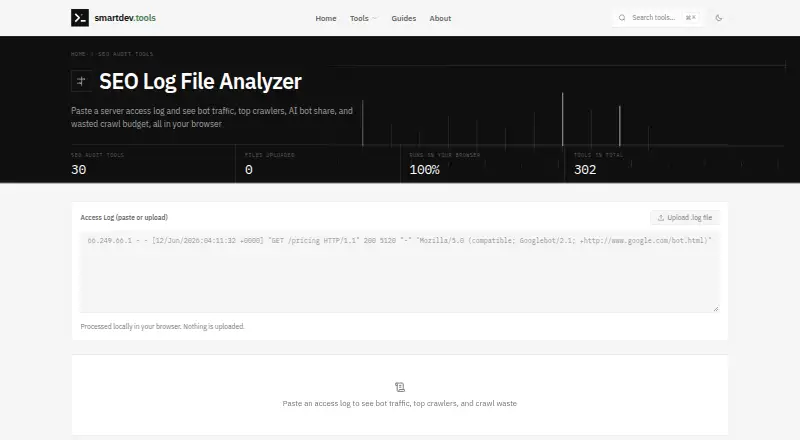
What SmartDev Tools SEO Log File Analyzer is
SmartDev Tools SEO Log File Analyzer is a free web tool for reviewing server access logs and understanding crawler activity. It shows which crawlers visit most, what Googlebot fetches, the share of activity from AI bots, and bot hits that lead to 404s, redirects, or server errors. These reports can help identify wasted crawl budget. You can upload Apache or Nginx access logs in combined format. The analyzer recognizes search engine crawlers, AI bots including GPTBot and ClaudeBot, and SEO tool crawlers such as AhrefsBot and SemrushBot. It reads and parses files in the browser with JavaScript; the page says log lines, IP addresses, and URLs are not uploaded. Lines outside the expected combined format are counted as skipped, so files with mixed formats can still be analyzed. Files up to about 20 MB are handled comfortably, and the FAQ suggests using a recent slice for larger logs. The tool is intended for manual, in-browser use, and SmartDev Tools says its tools do not currently offer an API. The maker describes its broader toolkit as independently operated and funded by non-intrusive display advertising, with no subscription tiers.
Who it suits
It suits site owners, developers, and SEO practitioners who want to inspect crawler activity in Apache or Nginx access logs. It is also relevant to people checking AI bot visits or crawl errors in a browser-based workflow.
What it does well
- Reports top crawlers and Googlebot fetches.
- Shows AI bot share, including GPTBot and ClaudeBot.
- Identifies bot hits resulting in 404s, redirects, and server errors.
- Parses logs in the browser; log lines, IP addresses, and URLs are not uploaded.
- Free to use for Apache or Nginx combined-format logs.
What to know first
- Only Apache and Nginx combined format is expected.
- Lines in other formats are skipped.
- The tool does not currently offer an API.
Limits
The free tool expects Apache or Nginx logs in combined format, and lines in other formats are skipped. Files up to about 20 MB are handled comfortably; larger logs can be narrowed to a recent slice.
Plans
| Plan | Billed and limits | Price |
|---|---|---|
| Free | Apache/Nginx combined log format · files up to about 20 MB handled comfortably | Free |
As smartdev.tools lists them, read 7 Oct 2026. The maker's own page has the final word.
Getting started
- Open https://smartdev.tools/seo-log-file-analyzer in a web browser.
- Prepare an Apache or Nginx access log in combined format.
- Upload the log file to the analyzer.
- Review crawler activity, Googlebot fetches, and bot hits that result in errors or redirects.
Verdict
Choose SmartDev Tools SEO Log File Analyzer for free, browser-based reviews of supported access logs, including crawler mix and bot-related errors. Look elsewhere if you need API access or analysis beyond the expected Apache or Nginx combined format.
Questions
How much does the analyzer cost?
It is free, with a listed price of $0 plan.
Is there a free trial?
No. The listed pricing facts say there is no free trial; the tool has a free plan.
Which platforms can I use it on?
It is web-based and designed for manual, in-browser use.
Which log formats does it accept?
It accepts Apache or Nginx access logs in combined format. Lines in other formats are counted as skipped.
Does it offer an API or integrations?
SmartDev Tools says its tools do not currently offer an API. The analyzer names Apache and Nginx log formats and does not describe integrations with other services.
Are log details uploaded?
The page says parsing happens in the browser with JavaScript and that log lines, IP addresses, and URLs are not uploaded.
Facts from SmartDev Tools SEO Log File Analyzer's own pages
- API
- SmartDev Tools says its tools do not currently offer an API and are designed for manual, in-browser use. · smartdev.tools, 7 Oct 2026
- Audience
- The maker describes SmartDev Tools as a browser-based toolkit for developers, designers, and people working with digital files. · smartdev.tools, 7 Oct 2026
- Business model
- SmartDev Tools says it is independently operated and funded by non-intrusive display advertising, with no subscription tiers. · smartdev.tools, 7 Oct 2026
- Crawl analysis
- It reports which crawlers visit most, what Googlebot fetches, and bot hits resulting in 404s, redirects, and server errors. · smartdev.tools, 7 Oct 2026
- Crawler coverage
- It recognizes search engine crawlers, AI bots including GPTBot and ClaudeBot, and SEO tool crawlers such as AhrefsBot and SemrushBot. · smartdev.tools, 7 Oct 2026
- File size
- The FAQ says files up to about 20 MB are handled comfortably and suggests analyzing a recent slice for larger logs. · smartdev.tools, 7 Oct 2026
- Input
- Users can paste or upload Apache or Nginx access logs in combined format. · smartdev.tools, 7 Oct 2026
- Integrations
- The analyzer page names Apache and Nginx log formats and does not describe integrations with other services. · smartdev.tools, 7 Oct 2026
- Local processing
- The file is read and parsed in the browser with JavaScript; the page says log lines, IP addresses, and URLs are not uploaded. · smartdev.tools, 7 Oct 2026
- Log format behavior
- Lines in formats other than the expected combined format are counted as skipped, so mixed files can still be analyzed. · smartdev.tools, 7 Oct 2026
- Purpose
- Analyzes server access logs to show bot traffic, top crawlers, AI bot share, and wasted crawl budget. · smartdev.tools, 7 Oct 2026
- Support
- The contact page says it typically responds to messages within 1–2 business days and prioritizes bug reports and security issues, typically addressing them within 24 hours. · smartdev.tools, 7 Oct 2026
Where SmartDev Tools SEO Log File Analyzer stands on Freedom251
- SEO Log File Analysis Tools#19 of 27