Freedom251 › Screen Time Management Apps
SmartBreak
What SmartBreak is
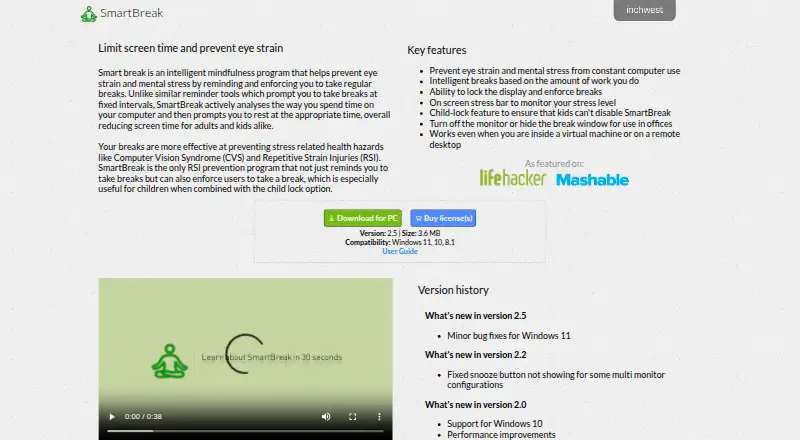
SmartBreak is break-reminder software for Windows and macOS that monitors computer use and prompts pauses intended to help prevent eye strain and mental stress. Break timing adapts to the amount of work performed instead of using fixed intervals. The app can lock the display during breaks, show an on-screen stress bar, and use a child lock to discourage children from disabling it. Office settings can hide the break window or turn off the monitor. SmartBreak says it works inside virtual machines and on remote desktops. The download page lists Windows 11, 10, and 8.1 compatibility, while the store describes a universal Windows and Mac license. A 15-day demo is available, after which purchase is required. SmartBreak 2 costs $14.99, paid once for one user’s computers; upgrading an existing 1.x license costs $4.99, paid once. Registration is checked against InchWest servers.
Who it suits
SmartBreak suits people who want work-based break timing on Windows or macOS. It also fits offices, remote desktop users, and households needing a child lock.
What it does well
- Adaptive breaks respond to work amount
- Display locking can enforce pauses
- Stress bar shows stress level
- Works in virtual machines and remote desktops
- Office mode can hide breaks or turn off monitor
What to know first
- No free plan
- 15-day demo requires purchase afterward
- Privacy policy allows marketing-partner information sharing
Plans
| Plan | Billed and limits | Price |
|---|---|---|
| SmartBreak 2 (Single user license) | The page does not state a billing interval. · For use on all computers operated exclusively by one user · Site license available by contacting InchWest | $14.99, paid once |
| SmartBreak 1.x license upgrade | The page does not state a billing interval. · Upgrade for an existing SmartBreak 1.x license | $4.99, paid once |
As inchwest.com lists them, read 5 Oct 2026. The maker's own page has the final word.
Verdict
SmartBreak combines adaptive reminders with enforced breaks, stress indication, and office controls. Check the 15-day limit, paid licensing, and privacy terms before choosing it.
Facts from SmartBreak's own pages
- Adaptive breaks
- Break timing is based on the amount of work the user does rather than fixed intervals. · inchwest.com, 5 Oct 2026
- Child lock
- A child-lock feature is intended to prevent children from disabling SmartBreak. · inchwest.com, 5 Oct 2026
- Enforced breaks
- SmartBreak can lock the display to enforce breaks. · inchwest.com, 5 Oct 2026
- Office use
- The app can turn off the monitor or hide the break window for office use. · inchwest.com, 5 Oct 2026
- Payment
- The user guide lists Visa, MasterCard, PayPal, cash, and money order among accepted payment methods. · inchwest.com, 5 Oct 2026
- Privacy
- InchWest's privacy policy says it may share information with third-party partners for marketing or promotional purposes and will not sell it. · inchwest.com, 5 Oct 2026
- Purpose
- SmartBreak monitors computer use and prompts users to take breaks to help prevent eye strain and mental stress. · inchwest.com, 5 Oct 2026
- Registration
- The guide says the serial number is emailed after purchase and registration is checked against InchWest servers. · inchwest.com, 5 Oct 2026
- Remote environments
- SmartBreak says it works inside virtual machines and on remote desktops. · inchwest.com, 5 Oct 2026
- Stress indicator
- The app includes an on-screen stress bar to monitor stress level. · inchwest.com, 5 Oct 2026
- Support
- The user guide directs customers with registration problems to [email protected]. · inchwest.com, 5 Oct 2026
- Supported systems
- The download page lists Windows 11, 10, and 8.1 compatibility; the store describes the license as universal for Windows and Mac. · inchwest.com, 5 Oct 2026
- Trial
- The user guide says the demo works for 15 days and users must purchase the program to continue using it. · inchwest.com, 5 Oct 2026
Where SmartBreak stands on Freedom251
- Screen Time Management Apps#33 of 36