Freedom251 › Presentation Template Libraries

SlideUpLift
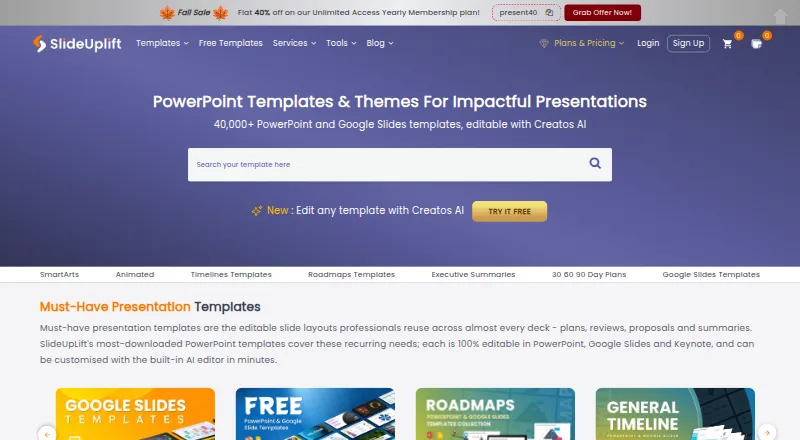
What SlideUpLift is
SlideUpLift offers editable presentation templates and Creatos AI, an editor that can rewrite, refine, and restructure slide content. Its library contains more than 40,000 templates for business, marketing, project work, pitch decks, roadmaps, timelines, SWOT analyses, and 30-60-90 day plans. Creatos AI can apply uploaded brand assets, colors, fonts, and themes. The maker says templates work in PowerPoint, Google Slides, and Keynote; AI presentations can be exported to PowerPoint or Google Slides. More than 10,000 free PowerPoint templates can be downloaded without membership, and a new free template is published every Friday. Browser tools include a Gantt chart maker, PowerPoint merge and split utilities, and image tools. A PowerPoint add-in provides library browsing and requires PowerPoint version 16. Free accounts include two AI credits, and Access Lite allows five downloads per month. Access Lite costs $18.99 a month; other listed plans include unlimited monthly and yearly options.
Who it suits
SlideUpLift may suit people creating presentations for business, marketing, project work, or educational and event settings. Its tools are aimed at corporate teams, students and educators, and event organizers.
What it does well
- More than 40,000 editable presentation templates
- More than 10,000 templates are free without membership
- Templates work in PowerPoint, Google Slides, and Keynote
- Includes browser-based Gantt and image tools
What to know first
- Free accounts include only 2 AI credits
- Access Lite allows 5 downloads per month
- Free merge and split tools limit files to 2 MB
Limits
Free accounts include 2 AI credits, and Access Lite allows 5 downloads per month. On the free tier, Merge PPT and Split PPT have a 2 MB per-file limit.
Plans
| Plan | Billed and limits | Price |
|---|---|---|
| Free Access Plan | 2 free AI credits · inline editing · free template downloads | Free |
| Unlimited Yearly | $12.50/mo · billed yearly · Unlimited downloads · 120 AI credits | $149.99 a year |
| Team Pro + | Billed yearly · 2 seats · Unlimited downloads · 120 AI credits per person · add seats at $1.99/mo | $173.87 a year |
| Access Lite | Billed monthly · 5 downloads / month · 2 free AI credits | $18.99 a month |
| Unlimited Monthly | Billed monthly · Unlimited downloads · 10 AI credits | $24.99 a month |
As slideuplift.com lists them, read 29 Sept 2026. The maker's own page has the final word.
Getting started
- Visit https://slideuplift.com/.
- Download free PowerPoint templates without membership, or choose a plan.
- Use Creatos AI or another browser-based tool, or browse the library through the PowerPoint add-in.
- Edit compatible templates in PowerPoint, Google Slides, or Keynote.
- Export Creatos AI presentations to PowerPoint or Google Slides.
Overview
SlideUpLift is a presentation resource for people who need editable slide designs as well as tools to revise or assemble decks. It suits professionals, educators, and event organizers who work in PowerPoint, Google Slides, or Keynote and want templates alongside browser-based utilities. Its breadth is useful, though the free AI allowance is small and regular downloads beyond the free library require a paid plan.
The library spans business, marketing, project work, pitch decks, roadmaps, timelines, SWOT analyses, and 30-60-90 day plans. More than 10,000 PowerPoint templates can be downloaded without a membership, with a new free template published each Friday. For a broader comparison of this category, see Presentation Template Libraries.
Key features
- Editable presentation templates: The collection has more than 40,000 templates, supplied in PPTX format. Compatibility with PowerPoint, Google Slides, and Keynote makes the library relevant across common presentation workflows; commercial use and team sharing are supported.
- Creatos AI: The editor can rewrite, refine, and restructure slide content, and apply uploaded brand assets, colors, fonts, and themes. That makes it more than a template catalog for users who want to adapt copy and branding, although free accounts receive only 2 AI credits.
- Browser-based tools: Creatos AI sits alongside a Gantt chart maker, PowerPoint merge and split tools, and image utilities. On the free tier, Merge PPT and Split PPT accept files up to 2 MB each, a meaningful constraint for larger presentations.
- PowerPoint add-in: Users can search and browse the template library from within PowerPoint. It requires PowerPoint version 16, so older versions are not covered.
Creatos AI exports to PowerPoint or Google Slides. SlideUpLift says uploads to its online tools are transferred over SSL and automatically deleted within 24 hours, or immediately if the user removes them. Its privacy policy also acknowledges that security measures cannot guarantee against unauthorized access, data loss, or breaches, so teams handling sensitive material should weigh that risk.
Pricing
SlideUpLift uses a freemium model. The no-cost Free Access Plan includes inline editing, free template downloads, and 2 AI credits; the library's free downloads do not require membership. This is a practical way to browse and use free designs, but it is not a generous ongoing AI allowance.
- Access Lite — $18.99 a month, billed monthly: 5 downloads per month and 2 AI credits. This is the entry paid option for occasional users, but the five-download ceiling makes it a poor fit for frequent deck production.
- Unlimited Monthly — $24.99 a month, billed monthly: Unlimited downloads and 10 AI credits. The modest price increase over Access Lite removes the download cap, making it the clearer monthly choice for people who expect to use several templates.
- Unlimited Yearly — $149.99 a year, billed yearly at $12.50/mo: Unlimited downloads and 120 AI credits. It reduces the monthly equivalent for committed users, in exchange for a yearly billing term.
- Team Pro + — $173.87 a year, billed yearly: Includes 2 seats, unlimited downloads, and 120 AI credits per person; additional seats cost $1.99/mo. It suits a small team sharing a plan, while larger groups need to account for the added-seat charge.
Plans include 24/7 customer support. The paid plans distinguish themselves chiefly by download allowances, AI credits, billing term, and seats, so occasional users may be better served by free downloads than by subscribing.
Platforms
SlideUpLift is available on Android, iOS, Linux, macOS, the web, and Windows. Templates work with PowerPoint, Google Slides, and Keynote, while Creatos AI exports to PowerPoint or Google Slides. The PowerPoint add-in brings library browsing into the desktop app, subject to its version 16 requirement.
Who it's for
SlideUpLift is a strong fit for people who regularly prepare business, marketing, or project presentations and value a large range of editable starting points. The mix of templates, Gantt chart and file utilities, plus brand-aware AI editing can also serve corporate teams, students and educators, and event organizers. The free library is especially useful for someone who wants occasional templates without opening an account.
It is less compelling for users who need substantial AI editing on a free plan or only make decks sporadically beyond the free collection: 2 free credits and 5 monthly downloads on Access Lite can run out quickly. Teams with confidential uploads should also consider the stated limits of the security assurances.
Pros and cons
- Pro — Broad template coverage: More than 40,000 editable designs span common business and planning needs, with over 10,000 free PowerPoint downloads requiring no membership.
- Pro — AI plus practical utilities: Creatos AI handles content revision and brand styling, while browser tools cover Gantt charts, file merging and splitting, and image work.
- Pro — Multiple presentation workflows: Templates support PowerPoint, Google Slides, and Keynote, and commercial use and team sharing are supported.
- Con — Tight entry-level quotas: Free users get 2 AI credits, and Access Lite allows only 5 downloads each month; the free merge and split tools also cap files at 2 MB.
- Con — Security is not a guarantee: Uploads are protected in transit and are deleted on a stated schedule, but the policy does not promise that breaches or data loss can never occur.
Alternatives
Choose SketchBubble if its free allowance of 10 template downloads per month and 75 signup AI credits better matches a user who wants to explore before paying; its free plan also charges 5 credits per slide, so those credits are not unlimited editing.
PPT Design is worth considering for someone who wants add-ins for both PowerPoint and Google Slides, with a no-expiry free plan that includes 5 template downloads, 64 themes, and one user.
HiSlide is an alternative for users drawn to a free library of 300+ slides with unlimited downloads and a PowerPoint add-in, plus a Google Slides add-on.
PoweredTemplate may suit users who prioritize a higher free daily download allowance: its free plan provides 10 downloads per day and 400 AI credits at signup, but requires attribution and excludes premium assets.
PitchDeck.net is a web-based alternative focused on decks, with its free plan capped at 10 decks per month and a Pro plan offering unlimited decks for $29 a month.
SlideEgg is another web option; its free plan includes 3 downloads per day, 200 AI credits, and 2 AI tools, which may appeal to users seeking a different mix of daily downloads and AI access.
Slidesgo AI Presentation Maker may fit users who want a web-based AI presentation maker with 3 AI presentations and 3 template downloads per month on its free plan.
SlideGeeks is another alternative for presentation resources.
Verdict
SlideUpLift is a sensible choice for frequent presentation makers who want a large editable library, AI-assisted slide revisions, and utilities in one service. Its no-membership free template collection makes it easy to start, and Unlimited Yearly is the more economical paid route for steady use. Look elsewhere if you need substantial free AI capacity, have only occasional needs beyond the free downloads, or cannot accept the stated uncertainty around upload security.
Verdict
SlideUpLift brings templates, AI editing, and browser-based presentation utilities together. The free library offers downloads without membership, while account limits and plan download allowances vary.
Questions
Is there a free plan?
Yes. The Free Access Plan costs nothing and includes 2 free AI credits, inline editing, and free template downloads. More than 10,000 PowerPoint templates can be downloaded without membership.
How much do paid plans cost?
Access Lite is $18.99 a month, Unlimited Monthly is $24.99 a month, Unlimited Yearly is $149.99 a year, and Team Pro + is $173.87 a year.
Which presentation editors are supported?
The maker says templates work in PowerPoint, Google Slides, and Keynote. Creatos AI can export to PowerPoint or Google Slides.
What platforms are listed?
SlideUpLift lists Android, iOS, Linux, macOS, web, and Windows.
Can templates be used commercially?
Yes. Commercial use is supported, and the license scope is commercial.
What does the PowerPoint add-in require?
The add-in lets users search and browse SlideUpLift’s template library from within PowerPoint. It requires PowerPoint version 16.
Facts from SlideUpLift's own pages
- AI editing
- Creatos AI can rewrite, refine, and restructure slide content and apply uploaded brand assets, colors, fonts, and themes. · slideuplift.com, 29 Sept 2026
- Audience
- The maker describes its online tools for corporate teams, students and educators, and event organizers. · slideuplift.com, 29 Sept 2026
- Exports and compatibility
- The maker says templates work in PowerPoint, Google Slides, and Keynote, and Creatos AI can export to PowerPoint or Google Slides. · slideuplift.com, 29 Sept 2026
- Free library
- More than 10,000 free PowerPoint templates are available to download without a membership, with a new free template published every Friday. · slideuplift.com, 29 Sept 2026
- Integrations
- A PowerPoint add-in lets users search and browse SlideUpLift’s template library from within PowerPoint; the maker says it requires PowerPoint version 16. · slideuplift.com, 29 Sept 2026
- Online tools
- Browser-based tools include Creatos AI, a Gantt chart maker, PowerPoint merge and split tools, and image utilities. · slideuplift.com, 29 Sept 2026
- Privacy and security
- The privacy policy says SlideUpLift uses security measures to protect personal data but does not guarantee that unauthorized access, data loss, or breaches will never occur. · slideuplift.com, 29 Sept 2026
- Product
- SlideUpLift offers a library of more than 40,000 editable presentation templates and an AI presentation editor called Creatos AI. · slideuplift.com, 29 Sept 2026
- Support
- The membership page lists 24/7 customer support as included with its plans. · slideuplift.com, 29 Sept 2026
- Upload handling
- SlideUpLift says online-tool uploads are transferred over SSL and deleted automatically within 24 hours or immediately when users remove them. · slideuplift.com, 29 Sept 2026
- Usage limits
- Free accounts include 2 AI credits, Access Lite allows 5 downloads per month, and Merge PPT and Split PPT have a 2 MB per-file limit on the free tier. · slideuplift.com, 29 Sept 2026
- Use cases
- Its templates cover business, marketing, project work, pitch decks, roadmaps, timelines, SWOT analyses, and 30-60-90 day plans. · slideuplift.com, 29 Sept 2026
Where SlideUpLift stands on Freedom251
- Presentation Template Libraries#20 of 34