Freedom251 › Presentation Template Libraries
SketchBubble
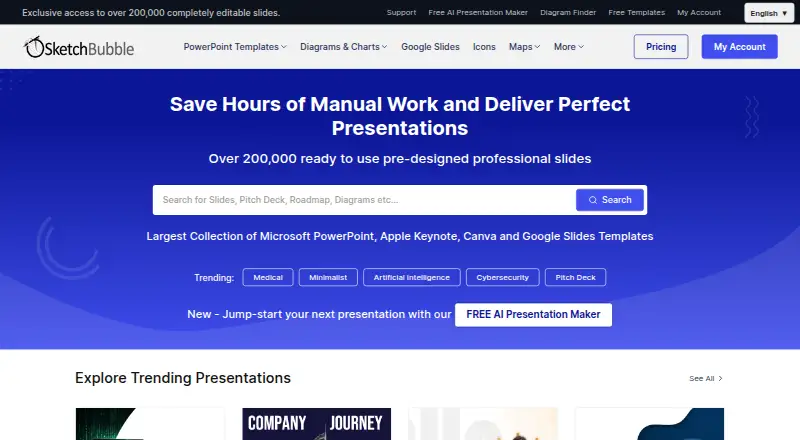
What SketchBubble is
SketchBubble combines presentation templates with an AI tool for making decks from a topic or prompt. Its library covers editable templates, diagrams, infographics, and graphics, with vector-based elements such as icons, maps, and charts. The AI can organize content, draft headlines and bullet points, suggest visuals, and create tables, charts, graphs, and diagrams. Users can add logos, custom colors, and fonts, and prepare presentations in multiple languages. AI-generated decks can be exported as PowerPoint or PDF and opened in Google Slides; template versions are also available for Apple Keynote. Editing is supported in PowerPoint, Keynote, Google Slides, and Canva, and commercial use is allowed. The Free plan costs nothing and permits 10 monthly downloads of free templates, with 75 AI credits at signup. Five credits generate one slide. AI Only costs $15 a month and provides AI credits but no premium templates. Pro costs $50 a month and adds access to all templates, with 20 downloads monthly.
Who it suits
SketchBubble suits people who want editable presentation materials or help turning a prompt into a deck. Its stated audience ranges from small businesses to professionals across industries and Fortune 500 companies.
What it does well
- AI drafts slide text and suggests visuals.
- Templates include editable vector graphics, icons, maps, and charts.
- Presentations support multiple languages and custom branding.
- Commercial use is allowed.
- Works with PowerPoint, Keynote, Google Slides, and Canva.
What to know first
- Free plan limits users to 10 template downloads monthly.
- Free plan gives access only to free templates.
- Five AI credits are required for each slide.
- AI Only excludes premium templates.
Limits
The Free plan allows 10 monthly downloads of free templates and provides 75 AI credits at signup. Each slide generated with AI uses five credits. AI Only provides free templates only; Pro includes all templates and 20 monthly downloads.
Plans
| Plan | Billed and limits | Price |
|---|---|---|
| Free | 10 template downloads per month · free templates only · 75 AI credits on signup · 5 credits per slide | Free |
| AI Only | Billed monthly · 3,000 AI credits on signup, refilled monthly · 5 credits per slide · no premium templates; free templates only | $15 a month |
| Pro | Billed monthly · 20 template downloads per month · access to all templates · 3,000 AI credits on signup, refilled monthly · 5 credits per slide | $50 a month |
As sketchbubble.com lists them, read 3 Oct 2026. The maker's own page has the final word.
Getting started
- Visit https://www.sketchbubble.com/.
- Choose the Free, AI Only, or Pro plan.
- Use the AI presentation maker to start from a topic or prompt, or select a template.
- Edit the deck in PowerPoint, Keynote, Google Slides, or Canva.
- Export AI presentations as PowerPoint or PDF, or use the available template formats.
SketchBubble combines a library of editable presentation assets with an AI maker for drafting slides from a topic or prompt. It is best suited to people who want to build and refine decks in familiar presentation apps, with both template downloads and AI credits in one service. Its appeal depends on choosing a plan whose monthly allowances match how often you make presentations.
Overview
The service brings together templates, diagrams, infographics and graphics, plus an AI tool that can structure presentation content and draft slide text. That can help when you need both a visual starting point and a first pass at the narrative. The trade-off is that template access and AI use have separate limits, so frequent users should consider both before subscribing.
Key features
Editable templates and exports
SketchBubble says its templates are customizable and use vector-based graphics, icons, maps and charts. Downloads and editing are supported in PowerPoint, Keynote, Google Slides and Canva; the template library includes Apple Keynote versions. AI presentations can be exported as PowerPoint or PDF and opened in Google Slides. Commercial use is permitted under a commercial license.
AI presentation creation
The AI maker can organize content, draft slide headlines and bullet points, suggest visuals, and create tables, charts, graphs and diagrams. Logos, custom colors and fonts provide ways to adapt generated decks to a brand, and presentations can be created in multiple languages. Five credits generate one slide, making the monthly credit allowance a practical constraint for longer or more frequent decks.
Pricing
SketchBubble is freemium, with no free trial. The Free plan costs nothing and includes 10 template downloads per month from the free collection, plus 75 AI credits at signup. At five credits per slide, that is enough for 15 slides in total before credits run out; it is a useful way to try both sides of the service, but the template selection is restricted.
AI Only costs $15 a month, billed monthly. It supplies 3,000 AI credits at signup and refills them monthly, equivalent to 600 slides at the stated rate, but includes no premium templates. Choose it if AI-generated content is the priority and free templates are sufficient; it does not expand template access.
Pro costs $50 a month, billed monthly. It raises the template allowance to 20 downloads per month and opens access to all templates, while also providing 3,000 AI credits with monthly refills. This is the more complete option for users who need premium designs as well as AI drafting, though its download cap still matters to high-volume users.
Customers may request a refund within 10 days of purchase and can cancel subscriptions. Template access continues through the end of the subscription period after cancellation. Support is available by ticket or email for account, template, AI and billing questions.
Platforms
SketchBubble supports Android, iOS, macOS, web and Windows. Presentations can be edited in PowerPoint, Keynote, Google Slides and Canva, offering flexibility for users working across common presentation tools.
Who it's for
The template library is positioned for professionals across industries, from small businesses to Fortune 500 companies. SketchBubble is a good fit for people who want editable visual assets and AI-generated slide drafts, especially when they can work within the monthly download and credit limits. It is less suited to someone who needs unrestricted premium-template downloads or relies on AI for very high slide volumes.
Pros and cons
- Pros: Templates and AI slide creation are combined, with editing across PowerPoint, Keynote, Google Slides and Canva.
- Pros: Pro includes all templates, and both paid plans refill 3,000 AI credits monthly.
- Pros: Branding controls and multiple-language generation support tailored presentations.
- Cons: Free users are limited to 10 monthly downloads from free templates, and receive only 75 AI credits at signup.
- Cons: AI Only excludes premium templates, while Pro caps downloads at 20 per month.
Alternatives
For a broader set of presentation-template options, browse Presentation Template Libraries. Consider SlideUpLift if its free access plan's inline editing, template downloads and two AI credits better suit a small trial. PPT Design may suit users seeking a free plan with five template downloads, 64 themes, presentation-app add-ins and one user. HiSlide is an alternative for users who value a free collection of 300+ slides and unlimited downloads. PoweredTemplate may fit users who prefer a free allowance of 10 downloads per day and 400 AI credits at signup, with attribution required. PitchDeck.net is another option for users focused on deck counts, with 10 decks per month on Free and unlimited decks on Pro at $29 a month. SlideEgg offers a free plan with daily downloads and AI credits. Slidesgo AI Presentation Maker may suit users whose needs fit three AI presentations and three template downloads per month on its free plan. SlideGeeks is another presentation-product option.
Verdict
SketchBubble is a strong fit for professionals who want editable templates and AI-generated slide drafts in the same workflow, with options to carry the work into familiar presentation apps. The main reason to choose it is that combination, reinforced by Pro's full template access and substantial monthly AI allowance. Look elsewhere if 20 monthly template downloads are too few, premium templates are essential on a lower-cost plan, or your slide volume exceeds the AI credit budget.
Verdict
SketchBubble offers both a template library and AI-assisted deck creation, with several editing and export options. Check the monthly download and credit limits against your expected use before choosing a plan.
Questions
Is SketchBubble free?
Yes. Its Free plan costs nothing and includes 10 monthly downloads of free templates and 75 AI credits at signup.
What do the paid plans cost?
AI Only costs $15 a month. Pro costs $50 a month.
How many AI credits does a slide use?
Five AI credits generate one slide. Paid plans refill their credits monthly.
Which platforms and editing tools are supported?
SketchBubble lists Android, iOS, macOS, web, and Windows. Templates can be edited in PowerPoint, Keynote, Google Slides, or Canva.
Can I use SketchBubble materials commercially?
Yes. Commercial use is allowed under its commercial license.
Who makes SketchBubble?
The company is InfoShore Technology Solutions LLP, with a registered office in Jaipur, Rajasthan, India.
Facts from SketchBubble's own pages
- AI credit limit
- The pricing page states that five AI credits generate one slide, and paid plans refill credits monthly. · sketchbubble.com, 3 Oct 2026
- AI features
- SketchBubble AI can structure content, write slide headlines and bullet points, suggest visuals, and create tables, charts, graphs, and diagrams. · sketchbubble.com, 3 Oct 2026
- Branding and languages
- SketchBubble AI supports adding logos, custom colors, and fonts, and creating presentations in multiple languages. · sketchbubble.com, 3 Oct 2026
- Company
- The privacy policy identifies the company as InfoShore Technology Solutions LLP and gives its registered office in Jaipur, Rajasthan, India. · sketchbubble.com, 3 Oct 2026
- Editing
- The company says its templates are editable and customizable, with vector-based graphics, icons, maps, and charts. · sketchbubble.com, 3 Oct 2026
- Exports
- AI presentations can be exported as PowerPoint or PDF and opened in Google Slides; its template library also includes Apple Keynote versions. · sketchbubble.com, 3 Oct 2026
- Headquarters
- Jaipur, Rajasthan, India · sketchbubble.com, 28 Sept 2026
- Intended users
- The company describes its templates as serving professionals across industries, from small businesses to Fortune 500 companies. · sketchbubble.com, 3 Oct 2026
- Product
- SketchBubble offers editable presentation templates, diagrams, infographics, and graphics, as well as an AI presentation maker that creates decks from a topic or prompt. · sketchbubble.com, 3 Oct 2026
- Refunds and cancellation
- The pricing page says customers may request a refund within 10 days of purchase and can cancel subscriptions; template access continues until the subscription period ends. · sketchbubble.com, 3 Oct 2026
- Security
- The privacy policy describes SSL for transfers to external parties, access restrictions, and PCI DSS compliance, and says it cannot guarantee that unauthorized access or data breaches will never occur. · sketchbubble.com, 3 Oct 2026
- Support
- Customers can submit a support ticket or contact the company by email for account, template, AI, and billing questions. · support.sketchbubble.com, 3 Oct 2026
- Template limit
- The free plan allows 10 template downloads per month and access only to free templates; Pro allows 20 downloads per month and access to all templates. · sketchbubble.com, 3 Oct 2026
Where SketchBubble stands on Freedom251
- Presentation Template Libraries#7 of 34