Freedom251 › Album Cover Maker Software

siutil Album Cover Maker
What siutil Album Cover Maker is
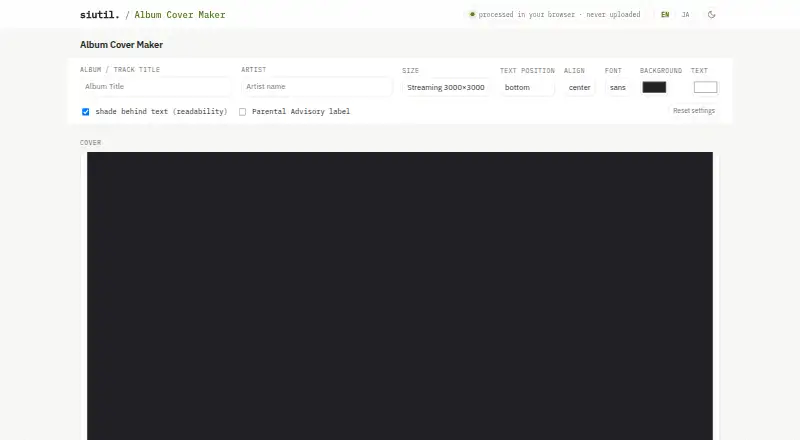
siutil Album Cover Maker is a free browser tool for creating album and CD cover art. Add an image by selecting, dropping, or pasting it; the tool fits the image to a square cover. You can add an album or track title and artist name, position the text at the top, center, or bottom, and align it left, center, or right. Choose a sans or serif font, and, when artwork is present, add a soft shaded band behind the text. Without an image, you can create a solid-color cover using text. Export options include square 3000×3000px and 1400×1400px sizes for streaming, plus CD jacket and 12-inch vinyl presets at 121×121mm and 314×314mm. The print presets export at about 300 DPI, and finished covers save as full-size PNG files. Artwork and text are processed in the browser and are not sent to a server; settings are stored on your device and can be cleared with Reset. An optional Parental Advisory label is available; follow your distributor’s or label’s policies on its use.
Who it suits
It suits musicians and other creators preparing cover art for streaming uploads or as a starting point for CD and vinyl print submissions. It works in a web browser and is free to use.
What it does well
- Free plan with no stated usage limits
- Exports square streaming sizes and print presets
- Saves finished covers as full-size PNGs
- Artwork and text stay in the browser
- Supports image-based and text-only covers
What to know first
- Available on web only
- Parental Advisory rules vary by service and label
Plans
| Plan | Billed and limits | Price |
|---|---|---|
| Album Cover Maker | No pricing or usage limits stated on the product page | Free |
As siutil.com lists them, read 5 Oct 2026. The maker's own page has the final word.
Getting started
- Open https://siutil.com/album-cover/.
- Add an image by selecting, dropping, or pasting it, or create a solid-color cover.
- Set the title and artist text, then choose its placement, alignment, and font.
- Choose a streaming, CD jacket, or vinyl preset and adjust the design.
- Save the finished cover as a full-size PNG.
Verdict
The tool covers basic image, text, and export needs for square streaming covers and common print formats. Check the relevant distributor or record-label policy before using its optional advisory label.
Questions
Is siutil Album Cover Maker free?
Yes. Its listed plan is free, and the product has a free plan.
What export sizes are available?
Square exports are 3000×3000px and 1400×1400px. Print presets are 121×121mm for a CD jacket and 314×314mm for 12-inch vinyl, at about 300 DPI.
What platforms does it support?
The listed platform is web.
Can I use it without uploading artwork?
Yes. You can make a solid-color cover with title and artist text without adding an image.
Where is my artwork processed?
Artwork and text are processed in the browser, and the exported PNG is saved to your device.
Can I add a Parental Advisory label?
Yes, an optional black-and-white label can be placed in the lower-left. Follow your distributor's or record label's policies because rules vary.
Facts from siutil Album Cover Maker's own pages
- Add artwork
- Users can add a cover image or photo, which is fitted to fill the square. · siutil.com, 5 Oct 2026
- Export
- The finished cover can be saved as a full-size PNG. · siutil.com, 5 Oct 2026
- Fonts and readability
- The maker offers sans and serif fonts and a soft shaded band behind text when artwork is present. · siutil.com, 5 Oct 2026
- Integrations
- The page names Spotify, Apple Music, and YouTube Music as examples of streaming services that use square cover art. · siutil.com, 4 Oct 2026
- Intended users
- The page describes using exported covers for streaming service uploads or as a base for CD or vinyl print submissions. · siutil.com, 4 Oct 2026
- Label use caveat
- The page advises following distributor or record-label policies because rules for using the Parental Advisory label differ by service and label. · siutil.com, 5 Oct 2026
- Local settings
- Settings such as size, position, and colors are stored on the user's device and can be cleared with Reset. · siutil.com, 5 Oct 2026
- Maker
- The product page identifies the maker as siutil. · siutil.com, 5 Oct 2026
- Output sizes
- It offers square outputs at 3000×3000px and 1400×1400px for streaming, plus CD jacket at 121×121mm and 12-inch vinyl at 314×314mm. · siutil.com, 5 Oct 2026
- Parental Advisory
- Users can add a classic black-and-white PARENTAL ADVISORY EXPLICIT CONTENT label in the lower-left. · siutil.com, 5 Oct 2026
- Print guidance
- The FAQ says CD and vinyl presets export at about 300 DPI for print submission. · siutil.com, 5 Oct 2026
- Print sizes
- It offers CD jacket 121×121mm and 12-inch vinyl 314×314mm presets, which export at about 300 DPI. · siutil.com, 4 Oct 2026
- Privacy
- The page states that artwork, title, and artist name are never sent to a server and that processing happens in the browser. · siutil.com, 5 Oct 2026
- Purpose
- The tool makes album and CD cover art in a browser. · siutil.com, 5 Oct 2026
- Streaming guidance
- The FAQ calls 3000×3000px widely recommended for streaming cover art and says at least 1400×1400px is used. · siutil.com, 5 Oct 2026
- Streaming sizes
- It offers square 3000×3000px and 1400×1400px output sizes for streaming cover art. · siutil.com, 4 Oct 2026
- Text controls
- Users can add the album or track title and artist name, choose top, center, or bottom placement, left, center, or right alignment, and select a sans or serif font. · siutil.com, 4 Oct 2026
- Text layout
- Users can position album or track title and artist text at the top, center, or bottom, with left, center, or right alignment. · siutil.com, 5 Oct 2026
- Text-only covers
- Without added art, the maker creates a solid-color cover with the title and artist text. · siutil.com, 5 Oct 2026
- Text readability
- When artwork is present, users can place a soft shaded band behind the text for readability. · siutil.com, 4 Oct 2026
- Usage caveat
- The page says rules for using the Parental Advisory label vary by service and label, and directs users to follow their distributor's or record label's policies. · siutil.com, 4 Oct 2026
Where siutil Album Cover Maker stands on Freedom251
- Album Cover Maker Software#16 of 26