Freedom251 › Album Cover Maker Software
MagicShot Album Cover Maker
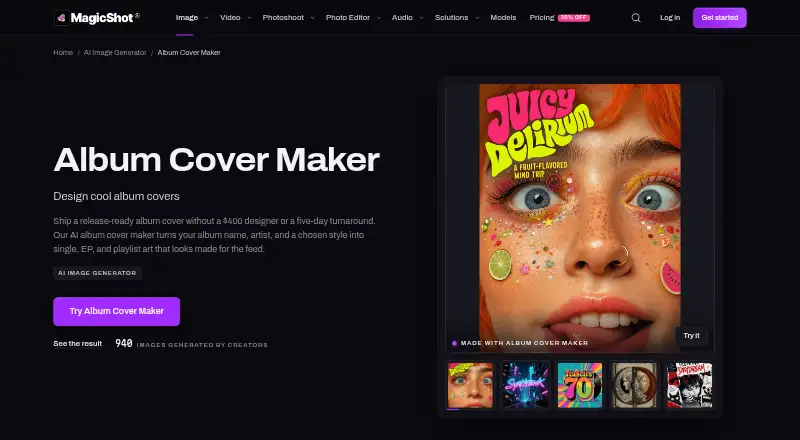
What MagicShot Album Cover Maker is
MagicShot Album Cover Maker creates cover art for singles, EPs, and playlists from an album name, artist name, and chosen style. You can upload a photo or describe the desired image, then guide the result with prompts or settings. Styles include Neon / Futuristic, Retro / Vintage, Classical / Orchestral, Emo / Pop-Punk, Metal / Hardcore, Stencil / Industrial, Country / Americana, Wet Ink / Drip, and Jazz / Blue Note. Covers are square for streaming and social feeds, and export as PNG or WebP at up to 4K. Generated images can be opened in other MagicShot tools for retouching, upscaling, or another treatment. Album Cover Maker is included in every MagicShot plan, with tools sharing a credit balance. Paid plans include commercial-use rights for generated work. The free plan requires no card, and paid plans start at $9/mo. Monthly credits reset each cycle; unused credits do not roll over. MagicShot says uploads, prompts, and results are not used to train AI models and can be deleted from active storage.
Who it suits
It suits creators, marketers, small business owners, and social media users looking for cover visuals without complex software. It can also serve people who want to start from a photo or description and refine the result with prompts or settings.
What it does well
- Exports PNG and WebP files up to 4K.
- Offers a range of named cover styles.
- Paid plans include commercial-use rights.
- Included in every MagicShot plan.
What to know first
- Unused monthly credits do not roll over.
- Commercial-use rights are listed for paid plans.
- The tool shares a credit balance with other MagicShot tools.
Limits
The free plan is listed as free and includes selected tools; its listed tools are Text to Video, Image to Video, Text to Speech, and AI Photo Generator. Paid plans start at $9/mo, and monthly credits reset each cycle without rollover.
Plans
| Plan | Billed and limits | Price |
|---|---|---|
| Free | No plan needed · Selected free tools: Text to Video, Image to Video, Text to Speech, AI Photo Generator · no card needed | Free |
| Premium | $138 billed once a year, 39% off · 19,000 credits/month · 85+ tools · up to 6,000 images/month · up to 70 videos/month | $19 a month |
| Premium+ | $270 billed once a year, 36% off · 40,000 credits/month · 85+ tools · up to 10,000 images/month · up to 120 videos/month | $35 a month |
| Essential | $63 billed once a year, 42% off · 8,000 credits/month · 85+ tools · up to 2,000 images/month · up to 25 videos/month | $9 a month |
As magicshot.ai lists them, read 8 Oct 2026. The maker's own page has the final word.
Getting started
- Open the Album Cover Maker website in a web browser.
- Enter an album name and artist name.
- Choose a listed cover style.
- Upload a photo or describe the desired cover.
- Guide the generation with prompts or settings.
- Export as PNG or WebP, or open the result in another MagicShot tool.
MagicShot Album Cover Maker generates square artwork for singles, EPs, playlists, and other releases from an album name, artist name, and a chosen visual direction. It is best suited to musicians, marketers, small businesses, and social creators who need streaming-ready graphics without a complex design suite. Its strongest case is the combination of extensive style choices, 4K exports, and a path into MagicShot’s other editing tools.
Overview
You can start with an uploaded photo or a written description, then steer the result with prompts or settings. That supports both an image-led workflow and concept creation from scratch. Covers are built square for streaming services and social feeds, and exports are available as PNG or WebP at up to 4K.
Paid plans include commercial-use rights for generated work, which makes the service more practical for released music, promotional campaigns, and client projects. Album Cover Maker is included in every MagicShot plan rather than sold as a separate subscription. All MagicShot tools consume one shared credit balance, so work in other generators directly competes with cover production. Credits reset monthly and unused amounts do not roll over.
Key features
Style direction
The style menu covers Neon / Futuristic, Retro / Vintage, Classical / Orchestral, Emo / Pop-Punk, Metal / Hardcore, Stencil / Industrial, Country / Americana, Wet Ink / Drip, and Jazz / Blue Note. This range gives genre-focused projects a useful starting vocabulary, while prompts and settings let you push beyond a preset look.
Image guidance and editing
Uploading a photo is useful when the cover needs to retain a person, object, or existing visual reference. A text description is better for an original scene or abstract concept. Once generated, artwork can be opened in other MagicShot tools for retouching, upscaling, or another treatment, reducing the need to move files between separate services.
Output, privacy, and support
PNG and WebP exports up to 4K suit both digital distribution and promotional use. MagicShot says uploads, prompts, and results are not used to train its AI models and can be deleted from active storage. Data is encrypted in transit and at rest, with access limited to essential operations and support. PCI DSS-compliant payment providers process transactions, and full card numbers do not reach MagicShot’s servers. Support is available at [email protected] or through a contact form, with messages read by a real person.
Pricing
Free
The Free plan costs nothing, requires no plan or card, and includes selected free tools: Text to Video, Image to Video, Text to Speech, and AI Photo Generator. It is a way to explore MagicShot’s free-tool offering, but it does not provide the paid credit allowances or paid-plan commercial-use rights.
Essential
Essential costs $9 a month, or $63 billed once a year (42% off). It provides 8,000 credits each month, 85+ tools, up to 2,000 images per month, and up to 25 videos per month. This is the sensible entry point for occasional cover work and moderate experimentation, provided your other MagicShot usage leaves enough of the shared balance for artwork.
Premium
Premium is $19 a month, or $138 billed once a year (39% off), with 19,000 monthly credits, 85+ tools, up to 6,000 images, and up to 70 videos. It suits creators producing covers regularly or using several MagicShot generators, because the larger shared allowance provides more headroom than Essential.
Premium+
Premium+ costs $35 a month, or $270 billed once a year (36% off). Its 40,000 credits, 85+ tools, up to 10,000 images, and up to 120 videos target high-volume production teams and prolific creators. The extra capacity matters only if you can use it before the monthly reset; unused credits expire each cycle.
Platforms
MagicShot Album Cover Maker runs on the web, so it is accessed through a browser rather than a native desktop or mobile application.
Who it's for
Choose it if you need square, high-resolution cover art, genre-oriented starting styles, and optional commercial rights in one web service. It also fits users who want to continue refining generated images in related MagicShot tools. Look elsewhere if you need a standalone cover subscription, carryover credits, or a native mobile app.
Pros and cons
- Pros: Square streaming and social output with PNG and WebP export up to 4K.
- Pros: Nine named style directions plus prompts, settings, photo uploads, and text descriptions.
- Pros: Paid plans include commercial-use rights and connect to MagicShot retouching and upscaling tools.
- Pros: Encryption, deletion from active storage, and stated non-training use address common privacy concerns.
- Cons: One shared credit pool means video or other image work can reduce cover-making capacity.
- Cons: Monthly credits do not roll over, so unused allowance is lost at reset.
- Cons: The free tier is limited to selected tools, making paid plans necessary for the full credit-based workflow.
Alternatives
Phot.AI is the better fit when Android, iOS, API, and web access, plus a Starter plan with 500 credits, one seat, one marketplace account, and 2 GB of storage, matter more than MagicShot’s style list.
AI Album Cover Maker suits buyers who want a dedicated web cover tool with a perpetual free tier of 50 credits or a 19.99 USD monthly Pro plan offering 2,000 credits and about 200 images per month.
ArtificialStudio Album Cover Generator is worth considering for API or web access and a free allowance of 20 credits daily.
Cover Art Studio is an iOS option with a free app and separate one-time paid options.
CoverArt AI is a web alternative with a free tier limited to 2 credits per month and private covers.
Mew Design AI Product Mockup Maker is a broader web design choice with a free signup allowance of 50 credits and 5–7 designs.
siutil Album Cover Maker is a free web alternative with no stated pricing or usage limits.
TuneArt is a web freemium option where every template is available on a free account and generation uses credits.
For a wider comparison, see Album Cover Maker Software.
Verdict
MagicShot Album Cover Maker is a strong choice for creators who want genre-led generation, square 4K-ready exports, and commercial rights alongside a broader creative toolkit. Choose Essential for moderate use or scale to Premium and Premium+ when shared credits must support sustained production. The main reason to look elsewhere is the shared, non-rolling credit system, especially if you need predictable cover-only capacity or a native mobile workflow.
Verdict
MagicShot Album Cover Maker offers style-led cover generation with square exports and options for further editing in other MagicShot tools. Consider the shared credit balance and monthly reset when choosing a plan.
Questions
How much does MagicShot Album Cover Maker cost?
Album Cover Maker is included in every MagicShot plan. The free plan costs nothing; paid plans start at $9/mo. The Essential plan is listed at $9 a month, billed as $63 once a year.
Is there a free plan?
Yes. The Free plan costs nothing, requires no plan or card, and lists selected tools: Text to Video, Image to Video, Text to Speech, and AI Photo Generator.
What platforms does it support?
It is a web tool.
Can I use generated covers commercially?
MagicShot says commercial-use rights for generated work are included on paid plans.
What file formats and sizes can I export?
The maker offers PNG and WebP export up to 4K. Its FAQ says the artwork is square for streaming and social feeds.
How does MagicShot handle uploaded content?
MagicShot says uploads, prompts, and generated results are not used to train AI models and can be deleted from active storage.
Facts from MagicShot Album Cover Maker's own pages
- Commercial use
- MagicShot says commercial-use rights for generated work are included on paid plans. · magicshot.ai, 8 Oct 2026
- Credit limits
- Unused monthly credits do not roll over and reset each cycle. · magicshot.ai, 8 Oct 2026
- Editing
- Generated covers can be opened in other MagicShot tools for retouching, upscaling, or another treatment. · magicshot.ai, 8 Oct 2026
- Headquarters
- Brooklyn, New York, United States · magicshot.ai, 28 Sept 2026
- Inputs
- Users can upload a photo or describe the desired cover, then steer results with prompts or settings. · magicshot.ai, 8 Oct 2026
- Intended users
- MagicShot describes its audience as creators, marketers, small business owners, social media users, and people who want visuals without complex software. · magicshot.ai, 8 Oct 2026
- Output
- The maker offers PNG and WebP export up to 4K, and its FAQ says the art is built square for streaming and social feeds. · magicshot.ai, 8 Oct 2026
- Payments
- Payments are processed by PCI DSS compliant providers, and full card numbers do not touch MagicShot servers. · magicshot.ai, 8 Oct 2026
- Privacy
- MagicShot says uploads, prompts, and generated results are not used to train AI models and can be deleted from active storage. · magicshot.ai, 8 Oct 2026
- Security
- MagicShot says user data is encrypted in transit and at rest, with access limited to essential operations and support. · magicshot.ai, 8 Oct 2026
- Shared subscription
- Album Cover Maker is included in every MagicShot plan, with tools drawing from one shared credit balance. · magicshot.ai, 8 Oct 2026
- Styles
- Listed cover styles include Neon / Futuristic, Retro / Vintage, Classical / Orchestral, Emo / Pop-Punk, Metal / Hardcore, Stencil / Industrial, Country / Americana, Wet Ink / Drip, and Jazz / Blue Note. · magicshot.ai, 8 Oct 2026
- Support
- Users can contact [email protected] or use the contact form, and MagicShot says messages are read by a real person. · magicshot.ai, 8 Oct 2026
- What it makes
- Album Cover Maker turns an album name, artist name, and chosen style into cover art for singles, EPs, and playlists. · magicshot.ai, 8 Oct 2026
Where MagicShot Album Cover Maker stands on Freedom251
- Album Cover Maker Software#13 of 26