Freedom251 › RCS Messaging Platforms
Sinch RCS for Business
What Sinch RCS for Business is
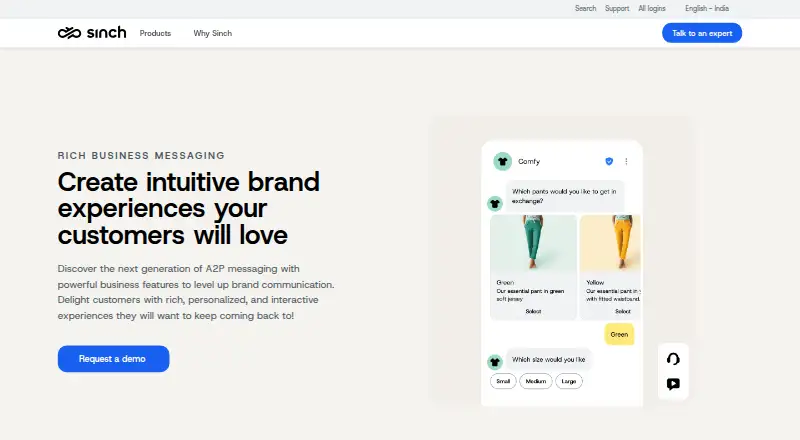
Sinch RCS for Business lets verified brands send personalized, interactive messages into customers’ native messaging inboxes. Messages can contain images, audio, video, carousels, reactions, and interactive buttons, without requiring customers to install an app. Sinch reports whether messages reached the RCS Agent, were delivered, read, or clicked. Messages can include up to 11 suggested actions or replies, while rich cards and carousels support up to four each. Actions include dialing a number, sharing or viewing a location, opening a URL, and creating a calendar event. Phones or networks without RCS support can receive web experiences over SMS. Availability and RCS Agent approval timelines vary by country and operator. Pricing varies by region, with carrier fees and setup costs potentially applying, and registration is required. Sinch Engage lists HubSpot, Salesforce, Zoho CRM, Shopify, and NetSuite integrations. API access, webhooks, two-way messaging, and verified senders are supported.
Who it suits
Sinch RCS for Business suits brands that want rich, measurable customer messaging in native inboxes. It is relevant to businesses able to complete sender verification and RCS Agent registration.
What it does well
- Rich media and interactive buttons are supported
- Customers need no app download
- Delivery, read, and click analytics are available
- SMS fallback covers unsupported phones or networks
- CRM integrations are listed
What to know first
- RCS availability differs by country and operator
- Registration and approval timelines vary
- Pricing requires a regional sales quote
- Carrier fees and setup costs may apply
Limits
Messages support up to 11 suggested actions or replies. Rich cards and carousels support up to four items each, and RCS availability depends on country, operator, phone, and network support.
Plans
| Plan | Billed and limits | Price |
|---|---|---|
| Sinch RCS for Business | Contact sales for a detailed quote; RCS pricing varies by region and carrier. · Carrier fees and setup costs may apply · RCS Agent registration required | On request |
As sinch.com lists them, read 3 Oct 2026. The maker's own page has the final word.
Getting started
- Open the Sinch RCS for Business website
- Contact Sinch sales for a regional quote
- Register and obtain approval for an RCS Agent
- Connect through the API or a listed Sinch Engage integration
- Configure verified sender messaging and SMS fallback
Verdict
Sinch RCS for Business combines verified identity, rich messaging, analytics, and fallback delivery. Regional availability, registration requirements, and variable pricing should be confirmed before deployment.
Questions
How is Sinch RCS for Business priced?
Pricing varies by region and carrier. Sinch asks businesses to contact sales for a detailed quote; carrier fees and setup costs may apply.
Is there a free plan?
No. Sinch RCS for Business is a paid service.
Which platforms does it support?
The listed platforms are Android, API, and web.
Do customers need to install an app?
No. Messages from verified brands arrive in the native messaging inbox. Unsupported phones or networks can receive web experiences through SMS fallback.
What integrations are listed?
Sinch Engage lists direct integrations with HubSpot, Salesforce, Zoho CRM, Shopify, and NetSuite, with feature availability varying by ecosystem.
What registration is required?
RCS Agent registration and approval are required, and timelines vary by country.
Facts from Sinch RCS for Business's own pages
- Action limits
- A message can have up to 11 suggested actions or replies, while rich cards and carousels can each accommodate up to 4. · sinch.com, 3 Oct 2026
- Analytics
- Sinch reports whether messages were submitted to the RCS Agent, delivered, read, and clicked. · sinch.com, 3 Oct 2026
- Company
- Sinch says it was founded in 2008 and has headquarters in Stockholm. · group.sinch.com, 3 Oct 2026
- Founded
- 2008 · sinch.com, 28 Sept 2026
- Headquarters
- Stockholm, Sweden · sinch.com, 28 Sept 2026
- Integrations
- Sinch Engage lists direct integrations with HubSpot, Salesforce, Zoho CRM, Shopify, and NetSuite; feature availability may differ by ecosystem. · sinch.com, 3 Oct 2026
- No app download
- Messages from verified brands land in the native messaging inbox, with no customer download required. · sinch.com, 3 Oct 2026
- Personalization
- Sinch says its Conversation API can use relevant details from stored chats and analytics to personalize conversations. · sinch.com, 3 Oct 2026
- Pricing
- RCS pricing varies by region; Sinch says to contact its sales team for a detailed quote tailored to business needs. · sinch.com, 3 Oct 2026
- Purpose
- Sinch RCS for Business lets brands send rich, personalized, interactive messages to customers in their native messaging inbox. · sinch.com, 3 Oct 2026
- Registration and availability
- RCS Agent registration and approval timelines vary by country, and RCS support differs across countries and operators. · sinch.com, 3 Oct 2026
- Rich media
- Messages can include images, audio, video, carousels, and interactive buttons. · sinch.com, 3 Oct 2026
- Security
- Sinch's Trust Center lists ISO 27001:2022, SOC 2 Type I and II, PCI, GDPR, CSA, HECVAT, and HIPAA badges. · trust.sinch.com, 3 Oct 2026
- SMS fallback
- For phones and networks that do not support RCS, messages can fall back to web experiences over SMS. · sinch.com, 3 Oct 2026
- Suggested actions
- Supported suggested actions include dialing a number, viewing or sharing a location, opening a URL, and creating a calendar event. · sinch.com, 3 Oct 2026
- Supported media
- The page lists real-time receipts, high-resolution images, video, audio, carousels, and message reactions as supported by RCS. · sinch.com, 3 Oct 2026
- Verified identity
- The page says only verified companies can use RCS and describes verified messaging with a brand logo as a way to build trust. · sinch.com, 3 Oct 2026
Where Sinch RCS for Business stands on Freedom251
- RCS Messaging Platforms#19 of 34
- RCS Business Messaging Software#19 of 29