Freedom251 › Text-to-speech tools
Simple TTS Reader
What Simple TTS Reader is
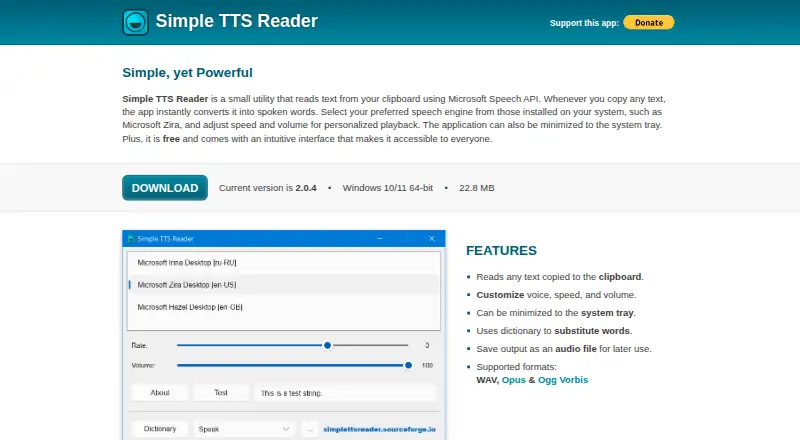
Simple TTS Reader is a free Windows application that speaks text copied to the clipboard. It uses Microsoft Speech API and lets you select a speech engine installed on the computer. Voice, speed and volume controls can be adjusted, and the app can stay minimized in the system tray. A dictionary can substitute words before they are spoken. You can save generated audio as WAV, Opus or Ogg Vorbis files. For long material, command-line chunked mode processes sections and combines them into one file, addressing the limits often imposed by online voices. The maker describes use with text from websites, Word documents, PDFs and AI chatbot responses. The current download is listed for Windows 10/11 64-bit, and commercial use is allowed. The SourceForge project lists Apache License V2.0 and points to its bug tracker for help. There is no stop button; copying one word cancels playback. The Free plan costs nothing for Windows 10/11 64-bit.
Who it suits
It suits Windows users who want clipboard text read aloud or saved as audio. It can also help with long documents and commercial use is permitted.
What it does well
- Free Windows application
- Adjustable voice, speed and volume
- Exports WAV, Opus and Ogg Vorbis
- Chunked mode combines long-text audio
- Commercial use allowed
What to know first
- Windows 10/11 64-bit download
- No stop button
- Copying one word cancels playback
Plans
| Plan | Billed and limits | Price |
|---|---|---|
| Free | Windows 10/11 64-bit | Free |
As simplettsreader.sourceforge.io lists them, read 12 Oct 2026. The maker's own page has the final word.
Verdict
Simple TTS Reader focuses on clipboard-based speech with adjustable playback and several export formats. Its missing stop button and Windows-only download are important considerations.
Facts from Simple TTS Reader's own pages
- Audio export
- Users can save audio as WAV, Opus, or Ogg Vorbis files. · simplettsreader.sourceforge.io, 12 Oct 2026
- Chunked mode
- The app offers a command-line chunked mode that processes large texts in parts and combines them into one audio file. · simplettsreader.sourceforge.io, 12 Oct 2026
- Commercial use
- Yes · simplettsreader.sourceforge.io, 21 Sept 2026
- Dictionary
- The app can use a dictionary to substitute words. · simplettsreader.sourceforge.io, 12 Oct 2026
- Export formats
- WAV,Opus,Ogg Vorbis · simplettsreader.sourceforge.io, 21 Sept 2026
- Free plan
- Yes · simplettsreader.sourceforge.io, 21 Sept 2026
- License
- The SourceForge project page lists Apache License V2.0. · sourceforge.net, 12 Oct 2026
- Notable limitation
- The maker says the app has no stop button; copying a single word cancels speech playback. · simplettsreader.sourceforge.io, 12 Oct 2026
- Online voice limit
- The site says online voices usually limit how much text they can process at once, giving five minutes as an example. · simplettsreader.sourceforge.io, 12 Oct 2026
- Platforms
- Windows · simplettsreader.sourceforge.io, 21 Sept 2026
- Playback controls
- Users can customize voice, speed, and volume, and minimize the app to the system tray. · simplettsreader.sourceforge.io, 12 Oct 2026
- Purpose
- Simple TTS Reader reads copied clipboard text aloud. · simplettsreader.sourceforge.io, 12 Oct 2026
- Speech engine
- The app uses Microsoft Speech API and lets users choose a speech engine installed on their system. · simplettsreader.sourceforge.io, 12 Oct 2026
- Support
- The project page identifies its bug ticket tracker as the best way to get help. · sourceforge.net, 12 Oct 2026
- System requirements
- The current download is listed for Windows 10/11 64-bit. · simplettsreader.sourceforge.io, 12 Oct 2026
- Use cases
- The maker says the app works with text from websites, Word documents, PDFs, and AI chatbot responses. · simplettsreader.sourceforge.io, 12 Oct 2026
Where Simple TTS Reader stands on Freedom251
- Text-to-speech tools#135 of 232
- Text-to-Speech Software#139 of 223