Freedom251 › Document Comparison Software
SIDETRACK
What SIDETRACK is
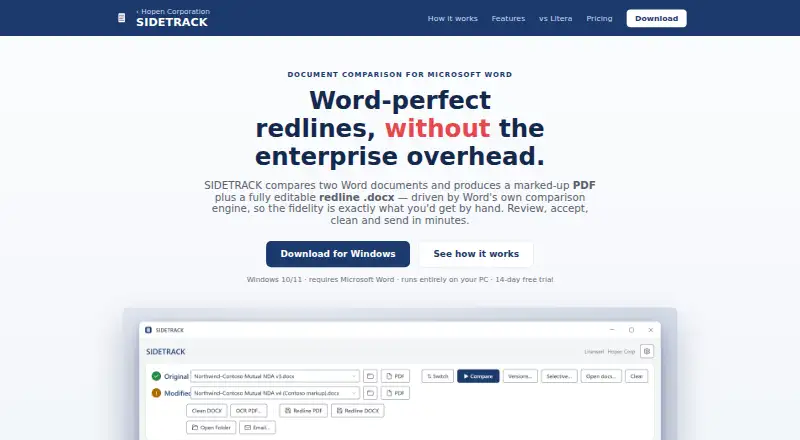
SIDETRACK is a Windows desktop tool for comparing Word documents with Microsoft Word’s comparison engine. It creates a marked-up PDF and an editable redline DOCX. The Change List identifies change types and page numbers, supports navigation, and lets you accept or reject individual edits. For multi-reviewer work, it compares one original with up to five returned versions and can combine changes into a redline or clean copy. Word reflows text PDFs, while built-in local OCR makes scanned, image-only PDFs searchable. A metadata scan checks for personal data, prior authors, custom XML, watermarks, and AI signatures, then can clean a copy. Processing runs on your PC and documents are not uploaded. Outputs can be bundled into a prefilled Outlook draft or copied to the clipboard. The 14-day trial includes full features without a card or watermark. Monthly costs $19.95 a month; Yearly costs $199.95 a year.
Who it suits
SIDETRACK suits lawyers and other reviewers working on Windows 10/11 with Microsoft Word. It is intended for document comparison, redlining, multi-version review, and local processing.
What it does well
- Creates marked-up PDF and redline DOCX
- Compares up to five returned versions
- Supports individual change acceptance or rejection
- Local OCR searches scanned PDFs
- Documents stay on the user's PC
What to know first
- Requires Windows 10/11
- Requires Microsoft Word
- One subscription covers one installation
- No free plan
Limits
The trial lasts 14 days and includes full features, no card requirement, and no watermark. Monthly and Yearly subscriptions each cover one installation; Monthly includes unlimited comparisons.
Plans
| Plan | Billed and limits | Price |
|---|---|---|
| 14-day free trial | 14 days · Full features · no card · no watermark for 14 days | Free |
| Monthly | per month · cancel anytime · Unlimited comparisons · no watermark · free updates · one installation | $19.95 a month |
| Yearly | per year · ~2 months free · cancel anytime · Everything in Monthly · one installation | $199.95 a year |
As hopencorp.com lists them, read 8 Oct 2026. The maker's own page has the final word.
Getting started
- Download SIDETRACK from the maker’s website
- Install it on Windows 10 or Windows 11 with Microsoft Word
- Start the 14-day trial without an account or payment card
- Compare a Word, PDF, or Office document
- Choose Monthly or Yearly subscription inside SIDETRACK after the trial
Verdict
SIDETRACK focuses on Word-based comparison, redline production, and review controls for Windows users. Its local processing and metadata cleanup add workflow options, while Microsoft Word remains required.
Questions
Is there a free plan?
No. SIDETRACK offers a 14-day free trial with full features, no card, and no watermark.
What does the Monthly plan cost?
Monthly costs $19.95 a month, can be canceled anytime, and includes unlimited comparisons, no watermark, free updates, and one installation.
What does the Yearly plan cost?
Yearly costs $199.95 a year, can be canceled anytime, includes everything in Monthly, and covers one installation.
Which operating systems are supported?
The maker specifies Windows 10/11. SIDETRACK also requires Microsoft Word.
Can it compare PDFs and Office files?
Yes. Listed capabilities include PDF comparison, Office file comparison, formatting changes, and redline output.
Are documents uploaded?
No. The maker says SIDETRACK runs on your PC and documents are not uploaded.
Facts from SIDETRACK's own pages
- Account requirement
- The maker says no account is required to download and start using the trial. · hopencorp.com, 8 Oct 2026
- Change review
- Its Change List shows change types and page numbers, supports navigation, and lets users accept or reject individual changes. · hopencorp.com, 8 Oct 2026
- Checkout
- Subscriptions are activated inside SIDETRACK and checkout is handled by PayPal. · hopencorp.com, 8 Oct 2026
- Email integration
- SIDETRACK can bundle output files into a prefilled Outlook draft or copy them to the clipboard for sharing elsewhere. · hopencorp.com, 8 Oct 2026
- Intended users
- The maker describes SIDETRACK as a lightweight desktop tool for lawyers' everyday document comparison and review workflow. · hopencorp.com, 8 Oct 2026
- License scope
- One subscription covers one installation. · hopencorp.com, 8 Oct 2026
- Local processing
- The maker says SIDETRACK runs on the user's PC and documents are not uploaded. · hopencorp.com, 8 Oct 2026
- Metadata cleanup
- A built-in scan checks for personal data, prior authors, custom XML, watermarks, and AI signatures, and can clean a copy. · hopencorp.com, 8 Oct 2026
- Multi-reviewer comparison
- SIDETRACK compares one original against up to five returned versions and can combine the edits into a redline or clean copy. · hopencorp.com, 8 Oct 2026
- Operating system
- The maker specifies Windows 10/11 and says SIDETRACK requires Microsoft Word. · hopencorp.com, 8 Oct 2026
- PDF and OCR
- The maker says Word reflows text PDFs and built-in local OCR makes scanned, image-only PDFs searchable. · hopencorp.com, 8 Oct 2026
- Purpose
- SIDETRACK compares Word documents and creates a marked-up PDF and an editable redline DOCX using Microsoft Word's comparison engine. · hopencorp.com, 8 Oct 2026
- Updates
- The maker says the app installs in seconds and updates itself, with free updates included in the Monthly plan. · hopencorp.com, 8 Oct 2026
Where SIDETRACK stands on Freedom251
- Document Comparison Software#24 of 25